Your team of five just closed a deal with a company that has 200 employees. Their procurement person asks for your information security policy, your employee handbook, and proof of compliance documentation.
You freeze. Those documents exist somewhere. Probably. One might be in a Google Doc from eight months ago. Another is definitely in Slack. The compliance checklist is in someone’s head.
This happens to small teams constantly. Not because you’re disorganized, but because at five people, everything lives in conversations. Then you land the client, make your first hire, or face your first audit, and suddenly you need structure you don’t have.
Here’s what I’ve learned working with teams at this exact stage: you don’t need enterprise systems. You need five to ten well-documented pages that create leverage. The kind of clarity that makes clients think you’re far more established than you are.
This guide shows you exactly what to document, how to structure it, and why doing this now prevents the chaos that hits every company between 10 and 20 people.
For the complete framework, see Building a Startup Knowledge Base: The Complete Guide.
Why small teams lose leverage without realizing it
At five people, you share context naturally. Someone asks a question, you answer it. A decision gets made, everyone was in the room. The client has a question, whoever talked to them last remembers the details.
This works until it doesn’t.
At five people, you don’t have knowledge silos yet. You have knowledge scattered. Why you need a knowledge base becomes obvious the moment you hire your first new person.
The invisible cost of repeated conversations
Picture this: Your developer asks how you structured the pricing for the last three clients. You explain it. Two weeks later, your designer asks the same question because they’re creating a proposal. You explain it again. A month later, a new person joins and asks why pricing works this way.
You’ve now spent 30 minutes across three conversations explaining something that should take 90 seconds to read.
When “just ask me” stops scaling
The moment you can’t be in every conversation is the moment undocumented decisions create problems.
Your co-founder tells a client you’ll deliver feature X. You already decided internally that feature X is out of scope. But that decision lives in a Slack thread from two months ago that nobody searches.
Or your contractor pings you: ‘Should I use the old approach or the new one?’ You think: Didn’t we decide this last month? You check Slack. Nothing. Email? Maybe. You end up explaining it from memory – slightly differently than last time. They spend four hours building the wrong thing.
These aren’t coordination failures. They’re documentation gaps that only show up when you’re too busy to be the central node in every information flow.
The 50-person company advantage you can steal
Companies at 50 people have something you don’t: forced structure. Once nobody could keep everything in their head, they documented processes. Conflicting decisions led to approval workflows. New hires got employee handbooks instead of interrupting everyone for basic answers.
You can create that same clarity right now, before you need it. That’s the leverage.
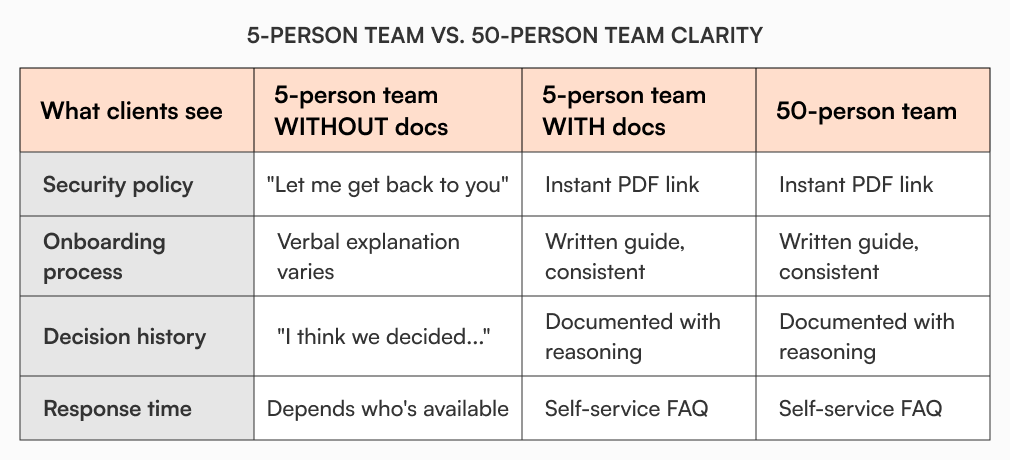
When your 5-person team has documented decisions, clear processes, and organized knowledge, you operate with confidence that 30-person teams without structure don’t have. Clients see it. New hires feel it. Investors notice it.
The five pages that create disproportionate leverage
You don’t need 100 pages of documentation. You need the pages that eliminate repeated conversations and preserve decisions.
Decision log: Your source of truth for “why we did this”
Marcus runs a 6-person product studio. They were constantly re-debating decisions they’d already made. The framework choice. Which client types to avoid. How they structured pricing. Same conversations, different week.
He created a simple decision log. Every significant choice got one entry: the decision, the date, who decided, what alternatives were considered, and why they chose this path.
Three months later, a client asked them to rebuild a feature they’d intentionally simplified. Instead of debating it again, Marcus pulled up the decision log, showed the team the reasoning, and they moved on in five minutes.

What to document:
- Tech stack choices and why
- Pricing structure decisions
- Which client types you’ll pursue or avoid
- Product scope boundaries
- Process changes and their reasoning
Format:
- Decision title
- Date
- Owner
- Context (what prompted this)
- Options considered
- Final choice and reasoning
This single page type prevents more wasted time than anything else you’ll build.
Role clarity pages: what each person owns
At five people, roles blur. Everyone does a bit of everything. That flexibility is valuable, but ambiguity around ownership creates gaps.
Your knowledge base should have one page per core role that answers: What do you own? What do you not own? Who do you escalate to? What tools do you use? What’s expected in your first week?
When you hire, new people aren’t guessing. When your designer is out and someone needs to know where the brand assets live, it’s documented. New hires can onboard themselves instead of interrupting you with questions.
Client-facing FAQ: the questions you answer every week
Every small team gets asked the same questions repeatedly. How does billing work? What’s your turnaround time? Do you work with companies outside the US? What’s your cancellation policy?
If you’re answering these in email three times a week, you’re wasting hours. Document them once in a clean FAQ format, then link to it.
Before: Client: “What’s your revision policy?” You: (opens email, types 150-word explanation, sends)
After: Client: “What’s your revision policy?” You: “Here’s our client FAQ – revision policy is in section 3.”
You’ve saved 10 minutes and provided a faster, more complete answer.
How we work: the unwritten expectations that trip people up
There are assumptions you make that new people don’t share. When you send Slack messages. Whether you expect responses on weekends. How you run client kickoffs. When invoices go out. How you handle scope creep.
These aren’t policies, they’re norms. But when they’re not written down, new team members stumble.
A “How we work” page captures:
- Communication expectations (response times, channels)
- Meeting norms (default length, recording, agendas)
- Client interaction guidelines
- File organization structure
- Tool stack and when to use what
This eliminates 90% of “I didn’t know we did it that way” moments.
Templates and starting points: consistency without thinking
The proposal template. The client onboarding checklist. The meeting agenda format. The project brief structure.
These aren’t documentation in the traditional sense, but they’re leverage. Instead of recreating these from scratch each time, you have starting points that ensure consistency.
When your teammate creates a proposal without you, it looks like your proposal. When someone runs a client kickoff, they cover the same ground you would.
Simple workflows that keep pages accurate
Documentation dies when it gets stale. At five people, you don’t need complex governance. You need two simple guardrails.
Every page has an owner
Pick one person responsible for keeping each page current. Not writing it alone, but ensuring it doesn’t decay.
The decision log? Whoever runs ops. Role clarity pages? Each person owns their own. Client FAQ? Whoever talks to clients most.
When something changes, the owner updates the page or delegates it. That’s it.
Review triggers, not review schedules
Don’t set arbitrary “review every quarter” rules. Small teams move too fast for that.
Instead, tie reviews to business triggers:
- Decision log gets reviewed when someone references an old decision.
- Role pages get updated when responsibilities shift.
- Client FAQ gets updated when you get the same question three times.
- “How we work” page gets reviewed when someone new joins.
Use acknowledgment when it matters
For the few pages that actually matter for compliance or legal reasons (your client contract terms, your IP agreement, your data handling policy), you need proof that people read them.
Acknowledgment tracking lets you see who’s reviewed what without chasing people down. For a 5-person team, this is overkill most of the time. But when you need it (new contractor signs on, client asks for compliance proof, investor does diligence), it’s there.
How to structure access as you grow
Right now, everyone on your team probably sees everything. That’s fine at five people. But the moment you add a contractor, a part-timer, or a client who needs limited access, you need boundaries.
Start with two levels: team and external
Team: Full access to everything internal External: Only sees what you explicitly share
Your client doesn’t need to see your internal decision log. Contractors shouldn’t access financial planning. Advisors don’t need client project files.
With role-based access control, you can create these boundaries without managing complex permissions. Tag pages as “internal only” or “client-facing” and you’re done.
Add granularity only when you need it
Once you hit 10-15 people, you might need more layers. Engineering sees technical docs that Sales doesn’t. Finance sees budget info that contractors don’t. As you scale your knowledge base beyond the initial pages, role-based access becomes essential.
Build those boundaries when the pain of not having them outweighs the friction of managing them. Not before.
Metrics that tell you it’s working
At five people, analytics dashboards are overkill. But three simple signals tell you if your knowledge base is creating leverage.
You’re answering fewer repeat questions
If you’re still explaining the same things three times a week, your documentation isn’t being used. Either people don’t know it exists, don’t trust it, or can’t find it.
Track this informally. When someone asks a question, check: is this documented? If yes, why didn’t they find it? If no, should it be?
New people contribute in their first week
When your newest team member feels comfortable enough to update a page or add to the decision log in their first few days, it means your knowledge base feels safe, clear, and collaborative.
If they’re only reading and never editing, something’s wrong. Either they don’t have access, don’t understand the structure, or don’t trust that their input is wanted.
Decisions stick without re-litigation
The clearest sign your decision log is working: when someone tries to re-open a settled question, you can point to the log, remind everyone why you decided this, and move on.
If you’re still debating the same things monthly, either you’re not logging decisions or people don’t trust what’s logged.
Getting started: your first five pages
If you’re starting from zero, focus on the pages that create immediate leverage.
- Decision log – if you’re re-explaining past choices weekly
- Client FAQ – if you type the same email answers three times a week
- Role clarity pages – if you’re hiring in the next 3 months
- “How we work” – if new people seem confused about expectations
- Templates – if teammates recreate proposals from scratch each time
For step-by-step implementation, see Build Your Startup Knowledge Base.
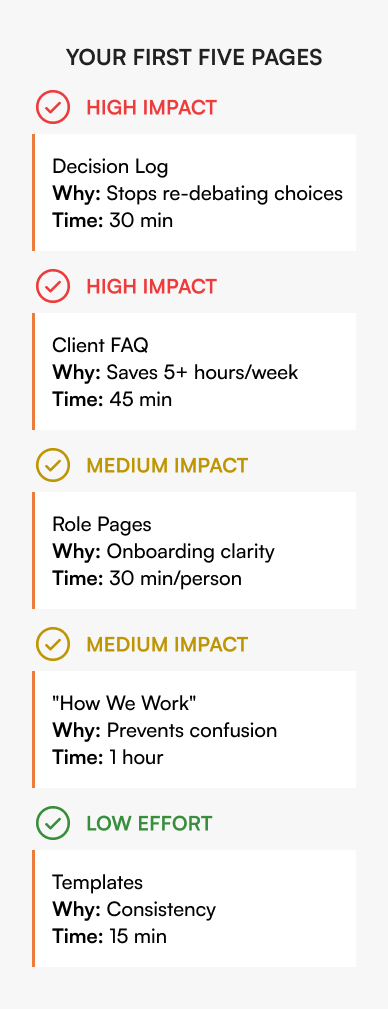
Build these five pages and you’ve eliminated 80% of repeated conversations. For a detailed step-by-step implementation timeline, see our guide on Your First 48 Hours of Startup Documentation.
How AllyMatter helps small teams build structure without overhead
Five-person teams don’t need enterprise platforms. You need structure that doesn’t require a documentation person.
AllyMatter keeps pages accurate without complex workflows. Set simple review steps when you need them. See what changed without audit logs. Share specific pages with contractors or clients without exposing everything.
The system scales with you. What works at five people still works at fifteen or fifty. You’re building the foundation now that prevents chaos later.
What this means for your team
Documentation at five people isn’t about compliance or formality. It’s about creating leverage.
When you document decisions, you stop re-litigating them. Role clarity eliminates gaps and overlaps. Answering questions once in writing frees up hours every week.
The companies that punch above their weight aren’t smarter or better funded. They just wrote down the things that matter before they forgot them.
You can do this in a weekend. And when you’re ready to hire, when you land the client that’s 10x your size, or when scaling from 2 to 20 employees, you’ll have the foundation that prevents chaos.
That’s how small teams operate like big ones.
Don’t wait until chaos forces you to document. Join the AllyMatter waitlist and start building structure now.
Frequently asked questions
What should a 5-person team document first?
Start with decisions that outlive conversations. Why you chose this tech stack. Why you structured pricing this way. Which client requests you’ll say no to. At five people, these decisions live in Slack or someone’s head. Document them now, and person six doesn’t re-litigate what you already decided. Then add role expectations, tool access steps, and the questions clients always ask. You don’t need 100 pages. You need the ten pages that prevent repeated conversations and preserve context when someone’s unavailable.
How do we keep documents from going stale?
Tie updates to triggers, not schedules. Review the decision log when someone questions an old choice. Update role pages when responsibilities shift. Refresh the client FAQ when you get the same question three times. Every page should have one owner who ensures it stays current, but that doesn’t mean writing it alone. When something changes in the business, the owner makes sure the page reflects it. That’s simpler than quarterly reviews that never happen and more effective than hoping someone notices documentation is outdated.
Do we really need a formal knowledge base at five people?
You don’t need formal. You need reliable. Right now, knowledge probably lives in Slack, Google Docs, email, and people’s heads. When someone’s out, others can’t find information. When you hire person six, they don’t know where anything is. A knowledge base isn’t about formality. It’s about having one place where decisions, processes, and answers live so you’re not the bottleneck. The teams that build this early operate with clarity that 30-person teams without it don’t have. That’s leverage.
Should contractors and clients have access to our knowledge base?
Contractors should see what they need to do their work. Client-facing FAQs, relevant processes, templates they’ll use. They shouldn’t see your internal decision log, financial planning, or strategic docs. Clients might need access to specific pages like your security policy, compliance documentation, or product guides. Keep internal and external content separate from the start using role-based visibility. This prevents accidentally sharing something you shouldn’t and makes it easier to give people exactly what they need without manual document hunting.
How long does it take to set up a knowledge base?
The first useful version takes about eight hours. Document your last ten major decisions. Write down role expectations. Create a client FAQ. Capture your “how we work” norms. That’s enough to eliminate most repeated conversations. Then you add to it as needs surface. Got asked the same question twice this week? Add it to the FAQ. Made a decision about scope or pricing? Log it. The system grows with you instead of requiring a big upfront investment you’ll never finish.