Your founding team just closed a seed round. Six months ago, Notion held everything: meeting notes, product specs, customer feedback, and that one really important policy document someone wrote at 2 AM. Now you’re at 18 employees, and people can’t find the PTO policy. Your finance lead spent 30 minutes hunting down the expense reimbursement process. Three new hires received different onboarding instructions because nobody knows which Notion page is current.
This breaking point happens to most startups between 15 and 30 employees. What worked brilliantly as a flexible workspace for five people becomes a liability when accountability, approvals, and compliance start mattering.
Let’s examine what changes when you move from general workspace tools to purpose-built knowledge management.
What you’re actually comparing
Notion is an all-in-one AI workspace that combines docs, wikis, databases, tasks, and AI assistants. It’s designed to be everything for your team: project management, meeting notes, brainstorming, and yes, documentation. The knowledge base is one of many use cases, not the sole focus.
AllyMatter is an internal knowledge base designed specifically for startup policies, SOPs, and compliance documentation. It assumes you’re a growing company (5-50 employees) that needs governance without enterprise complexity.
Both tools work well but for different things. Notion excels at flexible collaboration across many use cases. AllyMatter removes friction from policy lifecycle management.
How to evaluate a startup knowledge base at 2–50 employees
Before comparing features, understand what success looks like for knowledge management at startup scale.
Governance. Can you prove who approved a policy and when? Does the system enforce review workflows, or do you coordinate approvals manually through comments and messages?
Audit readiness. When auditors, insurance carriers, or enterprise customers ask for documentation evidence, can you export it immediately, or do you spend days assembling proof from multiple sources?
Findability under pressure. When someone needs an answer during a customer call or before approving an invoice, do they find the right information in under 30 seconds, or do they wade through meeting notes and project docs?
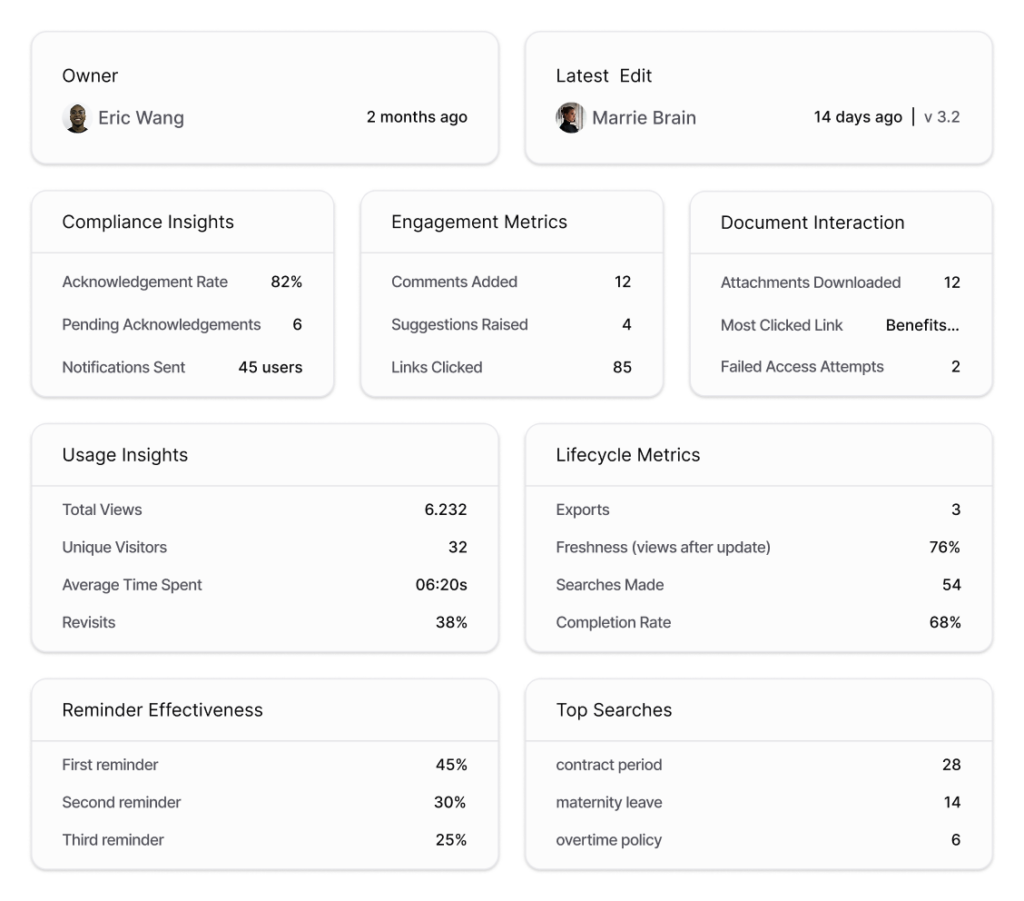
Analytics and visibility. Can you see which policies people access and acknowledge, where documentation gaps exist, and which teams haven’t completed required reads?
Scaling effort. What breaks when you go from 15 to 30 people? How much manual work does each new hire, department, or location create?
How document creation differs
Michael, VP of Operations at a 28-person fintech startup, needed to publish a new remote work policy. In Notion, he created a new page in the company wiki, wrote the policy, mentioned stakeholders in comments to request review, tracked approvals through a separate database he’d built, posted the final version, announced it in Slack, and hoped everyone saw the update. The policy took 30 minutes to write. The governance around it took hours of coordination.
In AllyMatter, he clicked “New Document,” selected “HR Policy,” wrote the content, assigned two approvers (HR director and CEO), and clicked “Submit for Approval.” The system routed it through review, collected approvals with timestamps, published when complete, automatically notified affected employees, and tracked who read it.
Neither approach is wrong. Notion gives you complete freedom to design your own workflows. AllyMatter provides standard workflows that match how most startups handle policy changes. Which one fits depends on whether you value flexibility or pre-built governance.
Feature comparison for growing teams
When evaluating knowledge bases for policy management, the comparison isn’t about feature counts but whether governance capabilities are built-in or require custom configuration. Here’s how AllyMatter and Notion differ on the capabilities that matter most between 15 and 50 employees:
| Capability | AllyMatter | Notion |
| Policy lifecycle | Native draft → review → approval → publish workflow with required change notes | Manual coordination via comments; custom databases needed for tracking |
| Required reads + acknowledgments | Built-in with tracking, reminders, exportable reports | Custom database required with manual setup and maintenance |
| Approvals and signatures | Built-in approvals with signature capture | Not available; requires third-party integration |
| Targeted delivery | Role/department/location-based automatic visibility and notifications | Manual page permissions; notifications are all-or-nothing |
| Audit-ready exports | Exportable audit package with approvals, acknowledgments, version history, access logs | Manual assembly from pages, comments, databases, external tools |
| Onboarding kits | Structured onboarding tracks with acknowledgment tracking | Flexible page creation; tracking requires custom databases |
| FAQ deflection | Category-based FAQ library with usage analytics | Database or pages; mixed with other content types in search |
| Migration from Docs/Sheets | Structured import with category mapping | Flexible import; structure determined by you |
| Search optimization | Metadata-driven search for policies/procedures | Full-text search across all content types (projects, notes, docs) |
| Access control maintenance | Rule-based; auto-updates with org changes | Manual page-level permissions requiring ongoing updates |
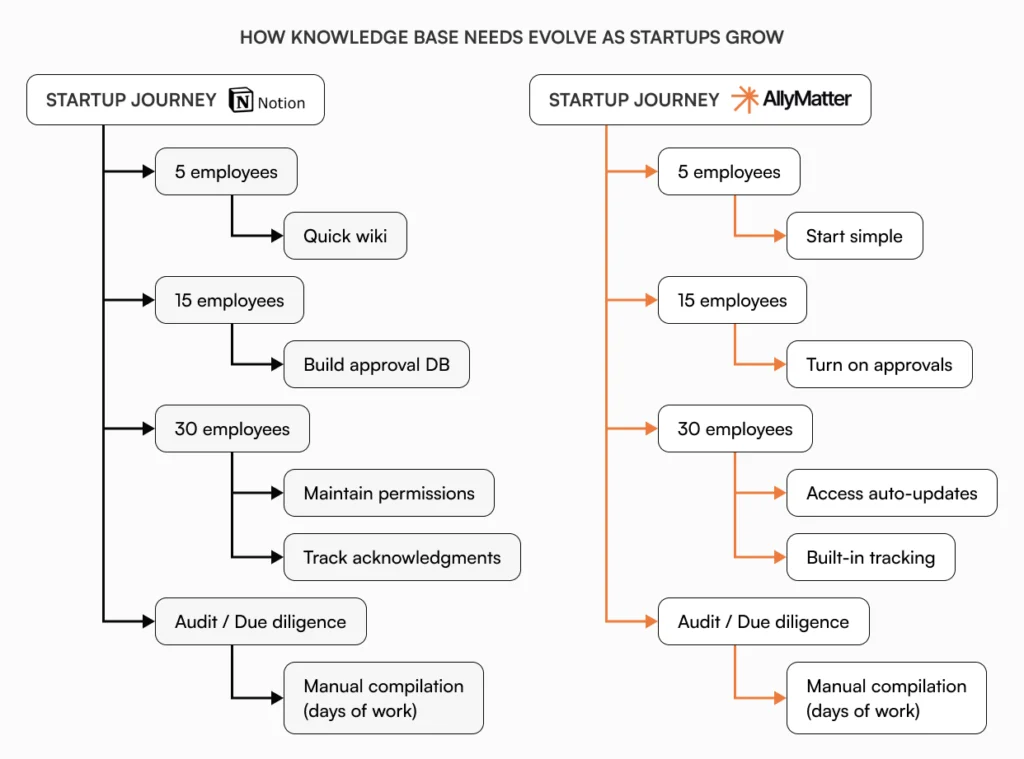
What breaks between 15 and 30 employees in a wiki model
Notion’s flexibility becomes a challenge as teams grow. Here’s what typically breaks:
Multiple sources of truth. Different people create similar pages for slightly different contexts. You end up with three onboarding guides (which is current?), two expense policies (US versus international, but which applies to remote employees?), and confusion about which product roadmap the sales team should reference.
No draft versus published state. Everything is live as soon as you create it. There’s no concept of “this policy is approved and official” versus “this is a work in progress.” Junior team members see unfinished policies alongside approved ones.
Search degrades with volume. Notion’s search works well when you have 50 pages. At 500 pages spanning multiple workspaces, searching for “expense policy” returns meeting notes where expenses were mentioned, brainstorm sessions about budget planning, archived project retrospectives, and yes, the actual policy, all mixed together without priority.
Everyone can edit everything by default. Great for collaboration, challenging for policy control. New team members accidentally modify critical documents without realizing the impact. There’s no “lock this approved policy” option.
Permission management becomes manual labor. When someone switches from Sales to Customer Success, you update their page permissions manually. Hiring five people in marketing means granting access page by page. Opening a UK office requires creating location-specific pages and managing access separately.
Built-in governance vs building your own
Notion’s power comes from flexibility. Teams build elaborate approval systems using databases, relations, and properties. Acknowledgment tracking uses checkboxes and formulas. Notification workflows rely on automations. Every governance feature you need, you build yourself.
The tradeoff is setup time. Every governance feature you need, you build yourself. Some teams love this control. Others find it becomes a part-time job maintaining the systems they’ve created.
AllyMatter includes policy lifecycle management (draft, review, approval, publish, archive), acknowledgment tracking with completion reports, version control with required change notes, targeted delivery by role and department, and audit trail exports as core features. No configuration required.
Notion lets you design exactly the system you want. AllyMatter gives you a system that works immediately. Pick based on whether you have time to build and maintain custom governance.

Version history and change management
Notion’s page history shows every edit with detailed diffs. You can see exactly what changed at the character level. This works beautifully for collaborative editing where multiple people are iterating on project specs or brainstorms.
AllyMatter’s version history requires change notes for significant updates. When you modify a policy, the system prompts you to explain why. Six months later, when someone asks “why did we change the PTO policy,” you have the business context documented alongside the technical change.
Both systems track changes. Notion optimizes for collaborative iteration. AllyMatter optimizes for explainable change history that satisfies auditors.
How access control scales with your team
In Notion, you manage permissions at the page level, database level, and workspace level. This flexibility is powerful but becomes manual work as you grow. When someone switches departments, you update their page permissions manually. When you hire five people in marketing, you grant access page by page.
AllyMatter uses role-based access with department and location tags. You define rules once: “HR policies visible to all employees; compensation guidelines visible to managers and above; UK-specific documents visible to UK team members.” As people join, change roles, or move locations, access updates based on their profile.
Notion’s granular control appeals to teams who want custom permission structures. AllyMatter’s rule-based model appeals to teams who want permissions that maintain themselves. The difference matters most when you’re growing quickly without dedicated IT staff.
Use case comparison: Where each tool excels
Policy lifecycle with approvals
Notion approach: Write policy → mention reviewers in comments → track approvals in separate database → manually notify stakeholders → post final version → announce in multiple channels → hope people see it.
AllyMatter approach: Write policy → assign approvers → system manages review → publish automatically when approved → targeted notifications → track acknowledgments → export audit trail.
The difference is who handles coordination: you or the system.
Required reads with documented acknowledgment
Notion approach: Publish policy → build database to track acknowledgments → manually notify employees → follow up individually → compile evidence across tools → assemble for auditors.
AllyMatter approach: Publish with acknowledgment enabled → automatic notifications → completion tracking → exportable compliance report.
For startups preparing for SOC 2, Series A due diligence, or enterprise sales requiring compliance documentation, this difference becomes significant.
Onboarding kits with progress tracking
Notion approach: Create onboarding pages → manually check in with new hires → track completion in spreadsheet or custom database → follow up individually on incomplete items.
AllyMatter approach: Build onboarding track with required documents → new hire receives structured checklist → system tracks completion → managers see progress dashboard.
FAQ deflection for common questions
Notion approach: Create FAQ page or database → search returns meeting notes and brainstorms alongside policies → manual analysis of what people ask → scattered FAQ across multiple pages.
AllyMatter approach: Build structured FAQ library organized by department → smart search surfaces relevant answers first → analytics help surface which questions get asked most → identify documentation gaps.
A practical 10-day migration plan from Notion
Moving from Notion doesn’t require a big-bang cutover. This plan minimizes disruption while establishing proper governance.
Days 1-2: Inventory and categorize
Export your Notion workspace. Identify what qualifies as policy (requires approval), procedure (step-by-step instructions), or FAQ (common questions). Discard project notes, meeting minutes, and work-in-progress content that don’t belong in a policy knowledge base.
Most startups discover 60-70% of their Notion content is transient work product. That’s fine. Notion remains excellent for projects and collaboration.
Days 3-5: Map to structure and clean up
Organize identified content into AllyMatter’s structure:
- HR: Policies, benefits, onboarding
- Finance: Expense policies, approval processes, vendor management
- Operations: SOPs, customer service procedures
- Engineering: Security policies, access controls (not technical docs)
- Product: Product documentation standards, release procedures
Identify duplicates and conflicting versions. Assign clear owners for each document.
Days 6-7: Set up governance and access rules
Configure approval workflows that match your decision-making: HR policies approved by HR director, financial policies by finance lead and CEO, security policies by security officer.
Define role-based access groups so people see what’s relevant to them. This forces clarity about governance before migrating content.
Days 8-9: Migrate content and collect approvals
Move cleaned-up content into AllyMatter. Route documents requiring formal approval through workflows. This creates your baseline of approved documentation with proper evidence.
Some documents will need revision during this process. That’s good. You’re upgrading from “someone wrote this” to “this was reviewed and approved.”
Day 10: Launch and redirect
Announce AllyMatter as the new home for policies and procedures. Update Notion pages with redirects pointing to AllyMatter equivalents. Make AllyMatter the primary link in Slack bookmarks, onboarding checklists, and team directories.
Keep Notion for what it does well: project planning, brainstorming, meeting notes. Use AllyMatter for what needs governance: approved policies, standardized procedures, authoritative FAQs.
7 tasks to validate during a trial
Before committing, validate AllyMatter solves your specific problems:
- Create and approve a policy. Draft a simple policy, route it through a two-step approval (your role and a colleague), and publish with required acknowledgment. Does the workflow match how your organization makes decisions?
- Test targeted delivery. Set up role-based visibility for a document. Publish it to only one department. Verify people see only what they should based on their role.
- Run a required read. Publish a policy with acknowledgment required. Track who’s completed it. Send reminders to stragglers. Export the completion report.
- Simulate document updates. Modify a published policy, add change notes explaining why, and see how the system notifies relevant stakeholders. Is this clearer than your current process?
- Export an audit report. Generate reports showing who viewed, acknowledged, or edited specific documents. Does this satisfy your compliance needs?
- Test search with a new hire. Have someone unfamiliar with your knowledge base search for common questions. Do they find answers faster than in your current system?
- Check mobile access. Policies get referenced during travel, in warehouses, and on sales calls. Does mobile access work for your team’s real workflow?
Why AllyMatter exists alongside tools like Notion
Notion solved a real problem: teams needed one flexible workspace for everything. It succeeded brilliantly. Millions of teams use it daily.
AllyMatter exists because growing companies hit a different problem around 15-30 employees. They need governance without enterprise complexity. Audit trails matter, but they don’t have compliance specialists. Structure becomes essential, but speed can’t suffer.
An opinionated design typically means faster implementation and easier maintenance than building governance systems yourself. Role-based access reduces admin overhead. Built-in approval workflows eliminate coordination tax. Exportable audit trails satisfy auditors without manual compilation.
Many companies keep Notion for collaborative work while using AllyMatter for governed documentation.
When Notion is the right choice
Choose Notion when you want one workspace for everything. It makes sense when you need project management alongside documentation, your team values design flexibility and customization, you want AI assistance for general knowledge work, you’re willing to build custom governance workflows, or you have someone who can maintain organizational structure.
Notion’s breadth is a genuine advantage. If consolidating tools matters more than specialized features, Notion delivers. Many startups use Notion successfully for several years before outgrowing it.
The free tier works well for small teams that need a wiki without formal approval requirements. Some companies use Notion indefinitely and never need more structure.
When AllyMatter is the right choice
Choose AllyMatter when governance matters more than flexibility. It fits teams that need structured knowledge management for policies and procedures, have nobody available to be a full-time knowledge base administrator, are preparing for compliance audits (SOC 2, ISO, HIPAA), need proof of policy acknowledgment for insurance or customers, or want approval workflows without building them.
Startups moving from Notion, Google Drive, or Slack often choose AllyMatter specifically because they need less flexibility and more structure. The opinionated design means faster implementation and lower maintenance.
What governance costs without purpose-built tools
The hidden cost of general tools for knowledge management appears during growth inflection points: your first SOC 2 audit, enterprise sales requiring compliance documentation, insurance renewals after 50 employees, or Series A due diligence.
Companies preparing for SOC 2 often spend weeks gathering evidence. Security officers report spending 40+ hours reconstructing proof that policies had been properly reviewed, approved, and acknowledged. Not writing the policies. Not even implementing them. Just proving the governance existed.
According to research from the Society for Human Resource Management, it takes an average of 44 days to fill a position. The knowledge transfer gap extends even longer. When key people leave during rapid growth, you need systems that preserve institutional knowledge without requiring manual compilation during critical moments.
During due diligence, founders often discover they have good policies but no organized evidence of governance. They spend weeks compiling proof from comments, Slack messages, and tracking databases.
A concrete compliance scenario
Your company needs SOC 2 certification for an enterprise customer. The auditor requests:
- Data handling policies with formal approval records
- Access control procedures showing who can see sensitive systems
- Proof that all employees acknowledged security policies
- Change history for security-related documents over the past year
- Everything exported for their review
In Notion: You compile pages from multiple workspaces, dig through comments for approval evidence, locate your acknowledgment tracking database, manually create a chronological change log, export pages individually to PDF, write a summary document connecting everything, and spend several days assembling the package.
In AllyMatter: You filter to “Security” category documents, generate an audit-ready export with documents, approvals, acknowledgments, version history, and access logs. You send it the same day.
The question is which tool fits the actual work startups do as they mature.
Can you use both?
Many companies use Notion for active project work, brainstorming, and meeting notes while using AllyMatter for approved policies, procedures, and onboarding materials. The tools complement each other. Notion handles dynamic collaboration. AllyMatter handles governance and compliance.
This combination works well when you have distinct needs: engineering teams want flexible documentation for technical specs, operations teams need structured documentation for policies and procedures. Use each tool for what it does best.
For more guidance on building your startup’s knowledge foundation, see our complete guide to building a startup knowledge base. You’ll find frameworks for deciding what to document first and how to structure information as you grow.
If you’re evaluating why fast-growing companies need a standalone internal knowledge base solution, you’ll understand when general tools start creating more problems than they solve.
For teams coming from Google Drive or Slack threads, understanding the documentation pivot from 2 to 20 employees helps you recognize the transition point.
Making the decision
Both Notion and AllyMatter solve real knowledge management problems. Notion excels at flexible collaboration across many use cases. AllyMatter removes friction from policy lifecycle management and compliance tracking. The choice isn’t about which tool is better. It’s about which tool fits your current stage and primary use case.
The pilot plan and trial checklist above give you a structured way to compare both platforms. Join our waitlist to test AllyMatter with your team’s actual documents and workflows.
Frequently asked questions
Can we migrate from Notion to AllyMatter later if we start with Notion?
Yes, though it requires work. You’ll export content from Notion (which is straightforward) and import into AllyMatter. The effort comes in restructuring information to fit AllyMatter’s organizational model and rebuilding governance metadata like approval history. Starting with the right tool for your primary use case saves this work later.
If we’re already using Notion for projects, can we add AllyMatter just for HR policies?
Absolutely. Many companies use both. Notion handles collaborative project work. AllyMatter manages policies and compliance. Clear communication about which tool serves which purpose prevents confusion. Each team uses what fits their workflow.
How long does setup take for each platform?
AllyMatter takes 2-3 hours to configure settings, import initial documents, and train your team. Notion takes longer to decide on organizational structure, create custom approval workflows if needed, build acknowledgment tracking systems, and train team members on the system you’ve designed. The difference matters when you’re running lean.
We already pay for Notion. Does it make sense to pay for another tool?
Consider total cost beyond licensing. If your operations team spends hours weekly managing policy governance manually in Notion, that’s a hidden cost. Calculate the actual time your team spends working around Notion’s limitations for policy management. The right tool might save more in operational efficiency than it costs in licensing.
Do most startups eventually outgrow Notion for policies?
Many startups use Notion successfully for years. The transition point typically hits between 15-30 employees when someone asks “who approved this policy?” or “can you prove employees acknowledged the security policy?” If those questions come up frequently, it signals you need more structure than a general workspace provides.