“We set up Confluence six months ago and nobody uses it.”
That sentence comes up more than you’d think. Usually from an Operations Manager or HR Director at a company somewhere between 30 and 150 people who picked Confluence because it looked like what serious companies use. And they weren’t wrong. Confluence is what serious companies use. Certain kinds of serious companies.
The problem was never the software. The problem is that Confluence was built for a very specific context, and if your company isn’t that context, you end up paying for a level of complexity your team won’t adopt.
Worth saying clearly: this isn’t an argument against Confluence. For the teams it was designed for, it’s genuinely excellent. But fit matters, and a lot of growing companies discover that mismatch the hard way, usually around renewal time.
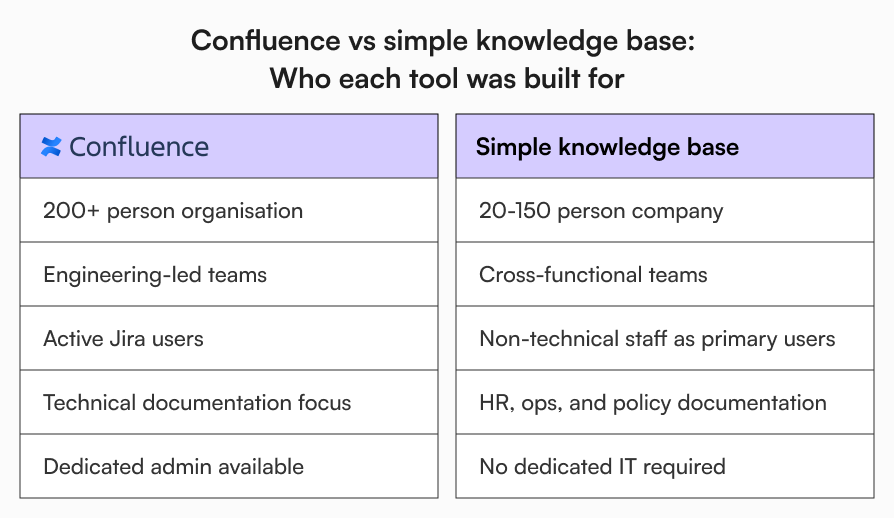
What Confluence was built for
Confluence was designed to live alongside Jira. That’s not a minor detail. The two products are deeply connected, and the integration is the point.
Engineering teams use Jira to manage sprints, track issues, and ship features. Confluence becomes the documentation layer sitting on top of that: technical specs, architecture decisions, runbooks, post-mortems, all of it linked back to active Jira tickets. At a 500-person software company where engineers live in Jira every day, that’s a powerful setup. Confluence’s space architecture, its macro system, its page hierarchies were all built with that environment in mind.
When you’re running a 70-person company where the heaviest software users are your HR coordinator and your ops lead, most of that infrastructure has nothing useful to do. Take Sarah, an HR Manager at a 80-person scale-up. She needs to publish an updated parental leave policy, get it approved by her director, and confirm that the relevant team members have read it. Macros, space hierarchies, page trees, none of that is relevant to her job. She just needs a workflow she can follow without calling IT.
That’s a different problem from what Confluence was built to solve.
Signs Confluence isn’t working for your team
There’s a recognisable pattern to how this plays out. See how many of these land:
- People default to Slack or email to share information even though Confluence exists
- One person “manages” Confluence, and when they’re unavailable, things stall
- New employees are still confused by it months after joining, not just in the first week
- Nobody is confident a document is current, or when it was last updated, or by whom
- HR, finance, and operations staff got a login and nobody showed them how it worked
Three or more of those, and the issue isn’t that your team doesn’t understand the value of documentation. The tool isn’t working for the people who need it most.
The real cost of Confluence for a 20-150 person team
The licensing fee is the part that shows up in your budget. The harder costs are the ones that don’t.
Licensing
Confluence’s per-user pricing scales with headcount. At 50 users it’s manageable. At 150, it becomes a line item someone has to actively justify, and that conversation gets harder when adoption across the company is low. You can find the current pricing breakdown on Atlassian’s Confluence pricing page.
The admin problem
Confluence needs someone to own it. Space structure, permissions, page cleanup, answering questions from people who can’t find things. In a growing company without a dedicated IT team, that usually falls on an already-stretched Operations Manager or IT admin. It’s not a huge job in isolation, but it’s ongoing, it compounds, and it requires specific Confluence knowledge. When the person who owns it moves on, nobody inherits a clean system. They inherit confusion. In my experience, once a company needs a dedicated Confluence owner, adoption is already slipping.
Low adoption across non-technical teams
Confluence’s editor and navigation were built for users comfortable with technical tools. Most of your company isn’t. When employees find a tool friction-heavy, they don’t raise a support ticket about it. They quietly go back to whatever felt easier, usually email, Slack, or a shared drive. A knowledge base that your team doesn’t trust or regularly use isn’t solving your documentation problem. It’s just somewhere your documentation sits.
Content that nobody maintains
Without a clear ownership and update structure that non-technical users can follow, content drifts. Pages get created and never revisited. Your team stops trusting what they find there, and “is this still current?” becomes a question people ask out loud rather than something the system answers automatically.
This is where the real productivity cost accumulates quietly. Not in any single moment, but across every employee who searches for something, finds a page, and still isn’t sure whether to act on it.
What growing teams need from a knowledge base
When you strip away the features a 50 or 100-person company will never use, the actual requirements are pretty focused.
People need to find what they’re looking for without navigating a folder hierarchy they didn’t build. Search should work the way employees expect it to, returning results based on what each person is permitted to see, not the entire contents of the system.
Documents need visible ownership. Who created it, who last approved it, when it was last updated. Without that, content becomes orphaned and accuracy erodes. This matters especially for HR policies and operational SOPs, where acting on an outdated version has real consequences.
Version history needs to be legible to a non-technical person. Not buried in a page history panel, but visible enough that anyone can quickly confirm they’re reading the current version of something.
And for compliance-sensitive content, there needs to be a way to confirm that the right people have read what they’re supposed to read. Publishing a policy and confirming it’s been acknowledged are two different things. That distinction tends to matter more as companies grow.
Consider what this looks like in practice:
Before: Marcus, an Operations Manager at a 90-person company, updates the expense policy in Confluence. There’s no approval step. The old version stays accessible. Six weeks later, two employees submit claims following the old reimbursement limits because nobody told them the page had changed.
After: The same update goes through an approval workflow. Once approved, it’s distributed to the relevant team for acknowledgement. There’s a clear record of who has read it and when.
That’s not an exotic requirement. It’s the kind of thing that comes up constantly at growing companies, and it’s where a lot of Confluence setups quietly fall short.
If you’re thinking about what a well-run internal knowledge base looks like in practice, this piece on internal knowledge base best practices covers the fundamentals well.
Confluence vs AllyMatter: How the features compare for growing teams
The question worth asking isn’t which tool has more features. Confluence’s overall feature set is extensive. The more useful question is which features map to what a growing, non-engineering-led company needs day to day.
The comparison below focuses specifically on that lens: not what each tool can do at its ceiling, but how each performs for the HR Manager, Operations lead, or IT admin trying to manage internal documentation across a 20 to 150-person team.
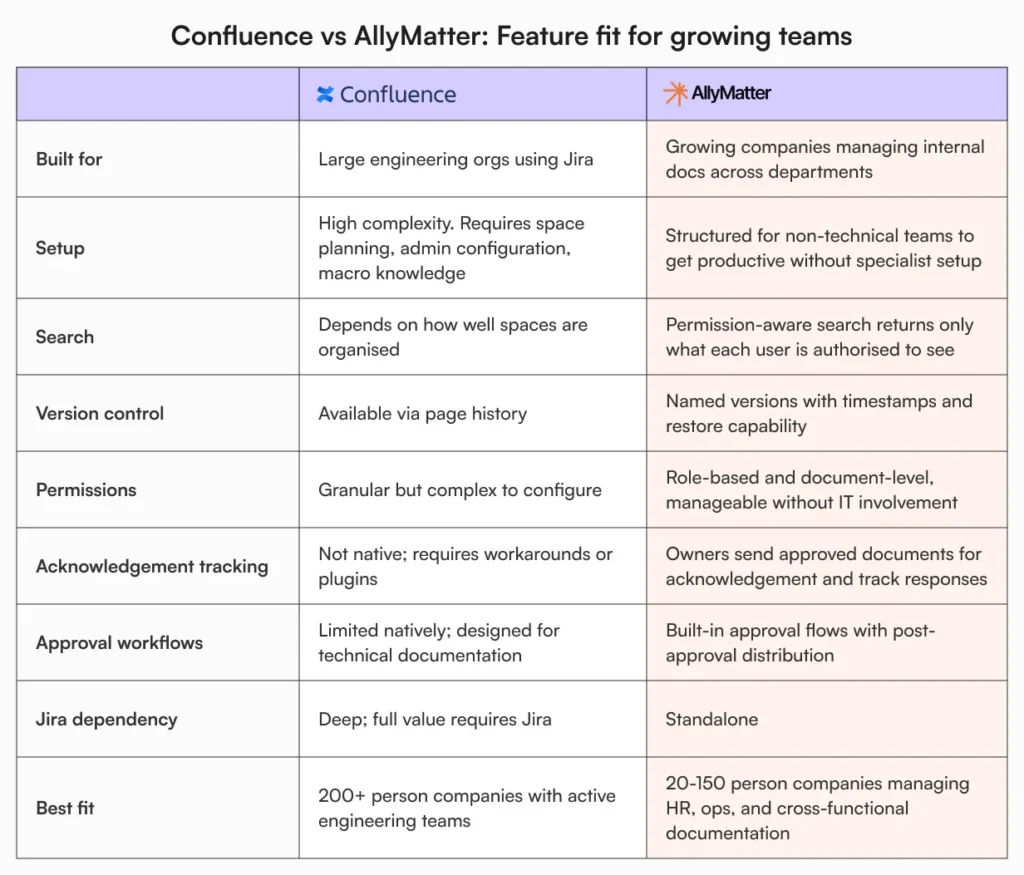
For a broader look at how different tools serve teams at different stages, the knowledge base tools guide for growing teams is a useful reference.
So should you replace Confluence?
Not automatically. If your engineering team genuinely lives in Jira and Confluence serves as the documentation layer for that, leave it alone. It’s doing the job it was designed for.
But if your Confluence instance is primarily used by HR, operations, and cross-functional teams, and the honest answer to “is your team using this?” is somewhere between “not really” and “we have to remind them constantly”, then the renewal conversation is worth having properly.
The goal is documentation your team uses. A tool maintained by one person, avoided by most others, and full of pages nobody’s sure are current isn’t a knowledge base. It’s expensive storage. And at some point, if your team doesn’t trust your documentation, that stops being a tool problem and starts becoming operational risk.
If you want to see what a simpler setup looks like from day one, try the AllyMatter sandbox and see how your team responds.
And if you’re still working through whether your company needs a dedicated knowledge base at all, why every business needs a knowledge base is a good place to start that thinking.
Frequently asked questions
How are Confluence and AllyMatter different from each other?
The core difference is who each tool was built for. Confluence was designed for large engineering organisations running on Jira, and it works well in that context. AllyMatter is built for growing companies where HR, operations, and cross-functional teams are the primary users of the knowledge base. That shapes everything from how search works to how approvals and acknowledgements are handled. If your team doesn’t live in Jira, most of what makes Confluence powerful simply won’t get used.
Is Confluence too complex for small teams?
For engineering teams already using Jira, usually not. For everyone else, the space architecture, permission management, and editor tend to create more friction than they resolve. The clearest signal is adoption. If your team isn’t using it without being nudged, the tool is working against you.
Why isn’t my team using Confluence after we set it up?
Usually a few things compound: the navigation isn’t intuitive for people who didn’t build it, the editor feels unfamiliar compared to tools people use every day, and there’s rarely a clear owner keeping content current. People don’t complain out loud. They quietly go back to email or Slack instead.
What should I look for in Confluence alternatives for small teams?
Start with adoption, not features. Can a new employee find what they need on day one without a training session? Can your HR manager update a policy without involving IT? And when someone pulls up a document, can they tell at a glance whether it’s current and who approved it? Those three things will narrow your options quickly.
Can I migrate from Confluence without losing our documentation?
Yes. Confluence allows space exports and most platforms can import that content. The harder part is content quality, not the technical migration itself. Treat the move as an audit: what’s still accurate, what needs updating, what should be retired. Moving stale documentation from one system to another just relocates the problem.

Founder of AllyMatter I’m Sid Varma, founder of AllyMatter, an operations-first knowledge base for growing companies. Before AllyMatter, I co-founded Syren Cloud and helped scale it into a 300-person organization across two countries, leading marketing, operations, and HR. We moved fast, served demanding customers, and learned the hard way that internal knowledge systems built for help docs or IT don’t solve day-to-day operations. AllyMatter is my answer—tools that turn tribal knowledge into trusted, searchable processes. This blog shares the playbooks, checklists, and lessons I wish I’d had while scaling.