
Comparisons · 7 min read
Confluence vs AllyMatter: Comparison for Growing Teams
Most teams don’t outgrow their knowledge base because they need more features. They outgrow it because the tool stops fitting the way they work.
Picture this: your HR lead has just updated the remote work policy and needs every employee to confirm they’ve read it before the end of the week. In Confluence, that means an email chain, a Slack reminder, and a spreadsheet someone has to maintain manually. None of it lives in the documentation system, and none of it is traceable back to the policy itself.
That’s not a criticism of Confluence as a product. It’s a fit problem. Confluence was built for a different kind of team.
Both tools manage knowledge. They serve very different teams, and the choice between them is less about features and more about how your organisation actually works.
When Confluence is the right tool
Confluence earns its place when a company is already running on Jira. The native integration lets engineering and product teams link tickets directly to documentation, connect specs to backlogs, and keep technical decisions and their context in one ecosystem. For that use case, the integration alone is worth the setup cost.
It also scales. Confluence handles large, nested documentation structures well, has a wide marketplace of add-ons, and is built to support large-scale teams. For engineering-led companies with Atlassian expertise in-house, it’s a defensible default.
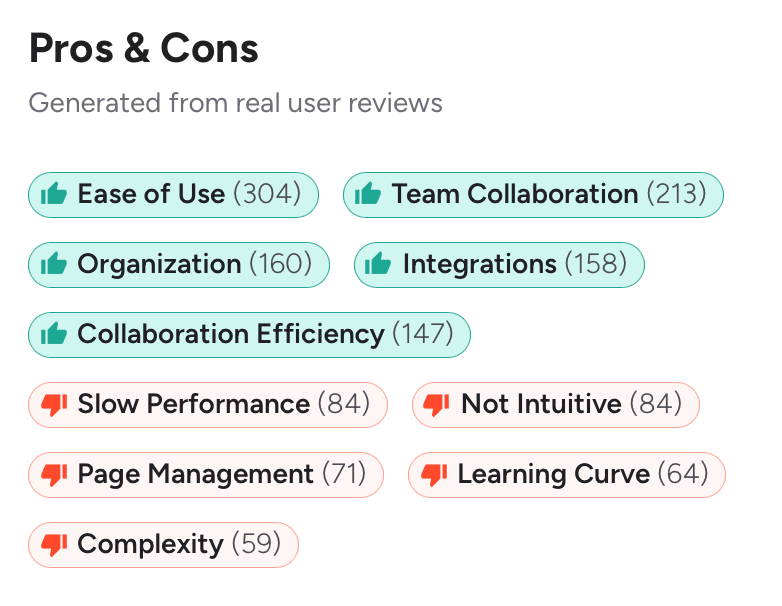
The limitations become visible when non-technical teams start using it. HR managers trying to manage policy documentation, ops leads building SOPs, or IT admins configuring access outside of Jira context often find Confluence requires more configuration than the task warrants, particularly as team size grows and permission structures become more complex. Reviews on G2 frequently cite permission complexity and adoption friction from non-technical users as recurring pain points.
When AllyMatter fits better
AllyMatter is built specifically for policy management, internal knowledge sharing, and document governance in growing companies. The product assumes that not every team is an engineering team, and that the people managing documentation shouldn’t need an Atlassian admin to change who can see what.
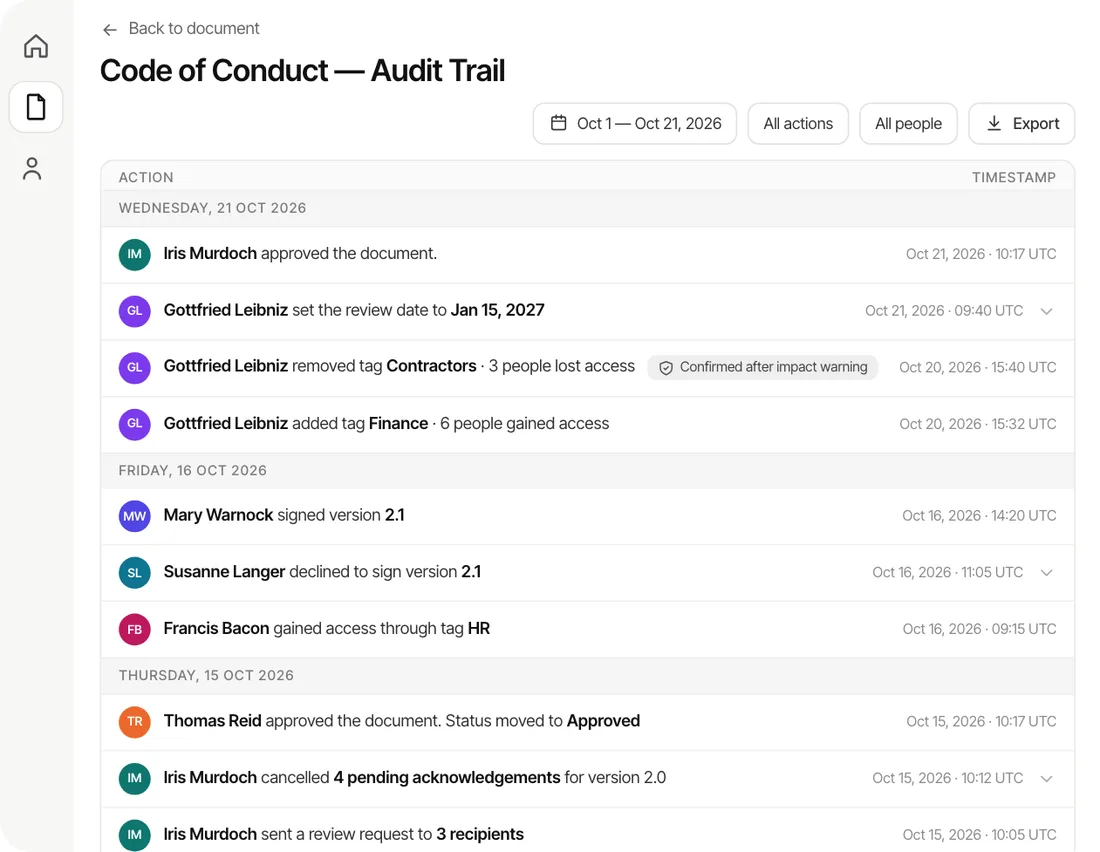
The areas where it’s built differently from Confluence: multi-step approval workflows are native, not an add-on. Document acknowledgment tracking is a core feature. Access control is managed through tags and roles from a single dashboard without permission inheritance complexity. And the audit trail is structured for compliance from the start, not bolted on.
It’s also considerably faster to set up for teams without dedicated IT support.
How the two tools compare across key dimensions
Most knowledge base comparisons list features side by side without explaining which ones actually matter for the buying decision. These are the dimensions that tend to drive the choice between Confluence and AllyMatter. The two areas where the gap is most significant, approval workflows and acknowledgment tracking, are covered in more depth in the sections that follow.
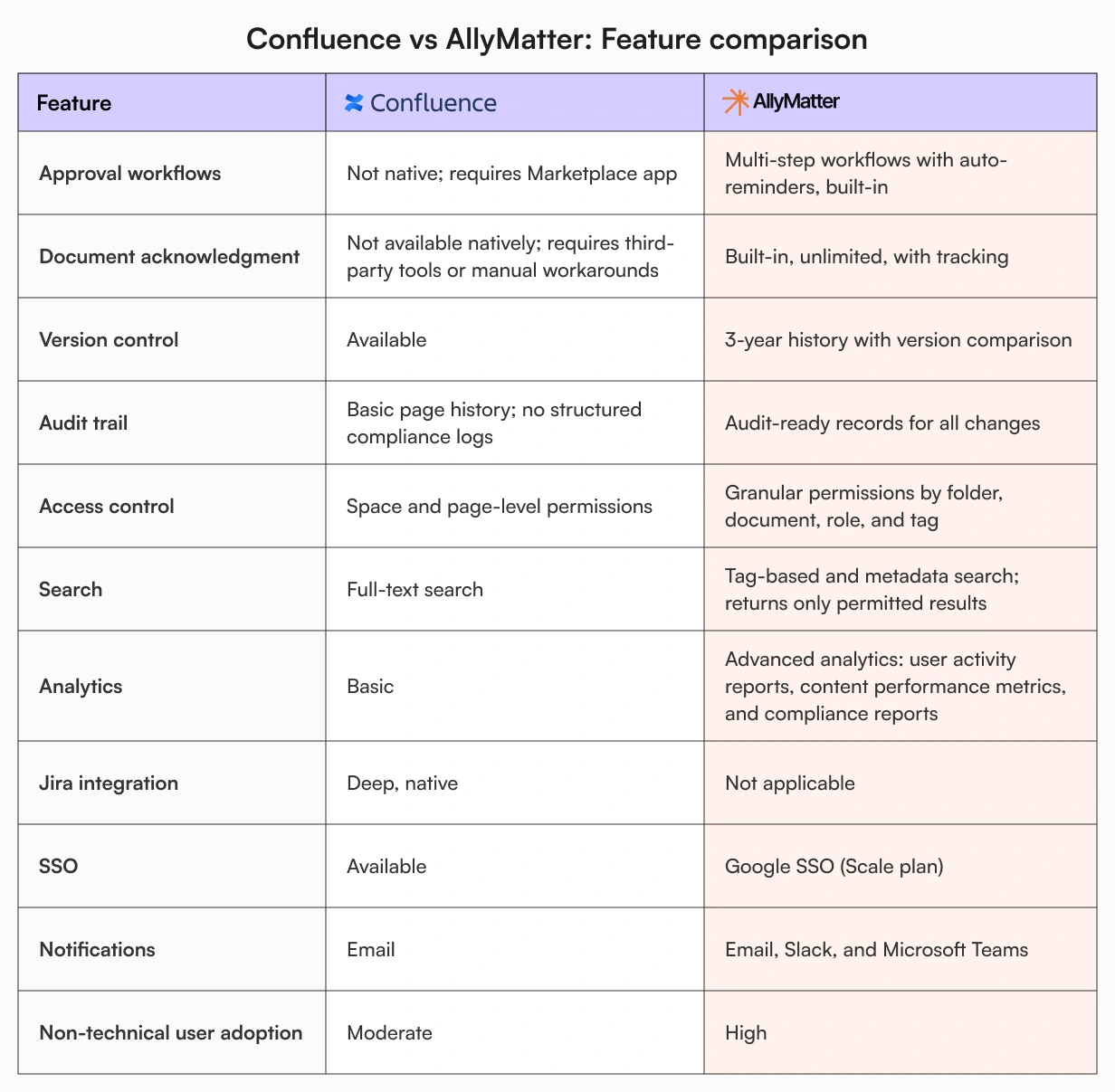
A note on search: AllyMatter’s search is permission-aware. Users only see documents their tag permissions allow. For companies managing sensitive HR documentation or department-specific SOPs alongside general knowledge, this matters more than it might initially seem.
What approval workflows actually look like in each tool
In Confluence, there’s no native approval workflow at the Standard tier. You can use page statuses and inline comments to coordinate reviews informally, but a structured multi-stage sign-off requires a third-party Marketplace app. That adds licensing cost, configuration time, and a dependency outside the core product.
In AllyMatter, approval workflows are created and managed inside the platform. An admin defines a named workflow, sets the stages (HRBP review, then legal, then CHRO), specifies whether all approvers or any approver at each stage must sign off, and configures interval reminders for anything pending. That workflow is reusable across documents. Every action is timestamped and logged: who approved, when, and at which stage the document currently sits.
For teams managing compliance documentation, the difference between an informal review chain and a formal, auditable approval record is not cosmetic.
Policy acknowledgment: a gap worth knowing about
Confluence doesn’t have a native acknowledgment feature. If you update your expense policy and need to confirm that 80 employees have read it, you’re working outside the tool, whether that’s an email, a Slack poll, or a spreadsheet.
“Did everyone get the updated policy?” “I think it went out last week.” “Is there a way to check?” That conversation happens constantly in teams that rely on documentation tools that weren’t built for policy distribution.
In AllyMatter, once a document is approved you can send it to a tag group for acknowledgment. Every employee in that group receives a request, confirms from within the platform, and the response is tracked against their user record. Editors can monitor status, reminders repeat on the cadence the sender chooses until people act, and the entire action log becomes part of the document’s audit history.
For HR managers handling policy rollouts, particularly in regulated industries, this is the kind of accountability trail that Confluence doesn’t provide natively.
Pricing: per user vs flat rate
Confluence’s Standard plan is priced per user per month. Pricing starts at a few dollars per user per month on the Standard tier, with the Premium tier roughly doubling that. You can verify current pricing at atlassian.com/software/confluence/pricing.
AllyMatter’s Scale plan is a flat $49/month (or $490/year), covering unlimited editors and unlimited viewers. The model works differently: read-only users don’t count against a per-seat charge.
The economics of that difference change depending on how your team is structured. A 50-person company where 40 employees primarily read and acknowledge documentation, and 10 are active editors, pays Confluence for all 50 seats. On AllyMatter’s Scale plan, the same team pays a flat monthly rate regardless of how many are viewing versus editing. For growing companies where headcount is increasing but the proportion of active editors stays relatively small, that gap compounds over time.
Getting up and running
Getting Confluence configured for a team without existing Atlassian infrastructure takes time. Spaces need to be set up, permission inheritance understood (it doesn’t always behave intuitively), and add-ons configured for any workflows beyond basic documentation. The setup is well-documented, but it assumes technical familiarity.
AllyMatter is managed from a single admin dashboard. You add users, assign roles, configure tag-based permissions, and the system is ready. Yearly plans include free migration help and chat handholding during setup, which is relevant for teams moving existing documentation across from Confluence, Google Drive, or other tools.
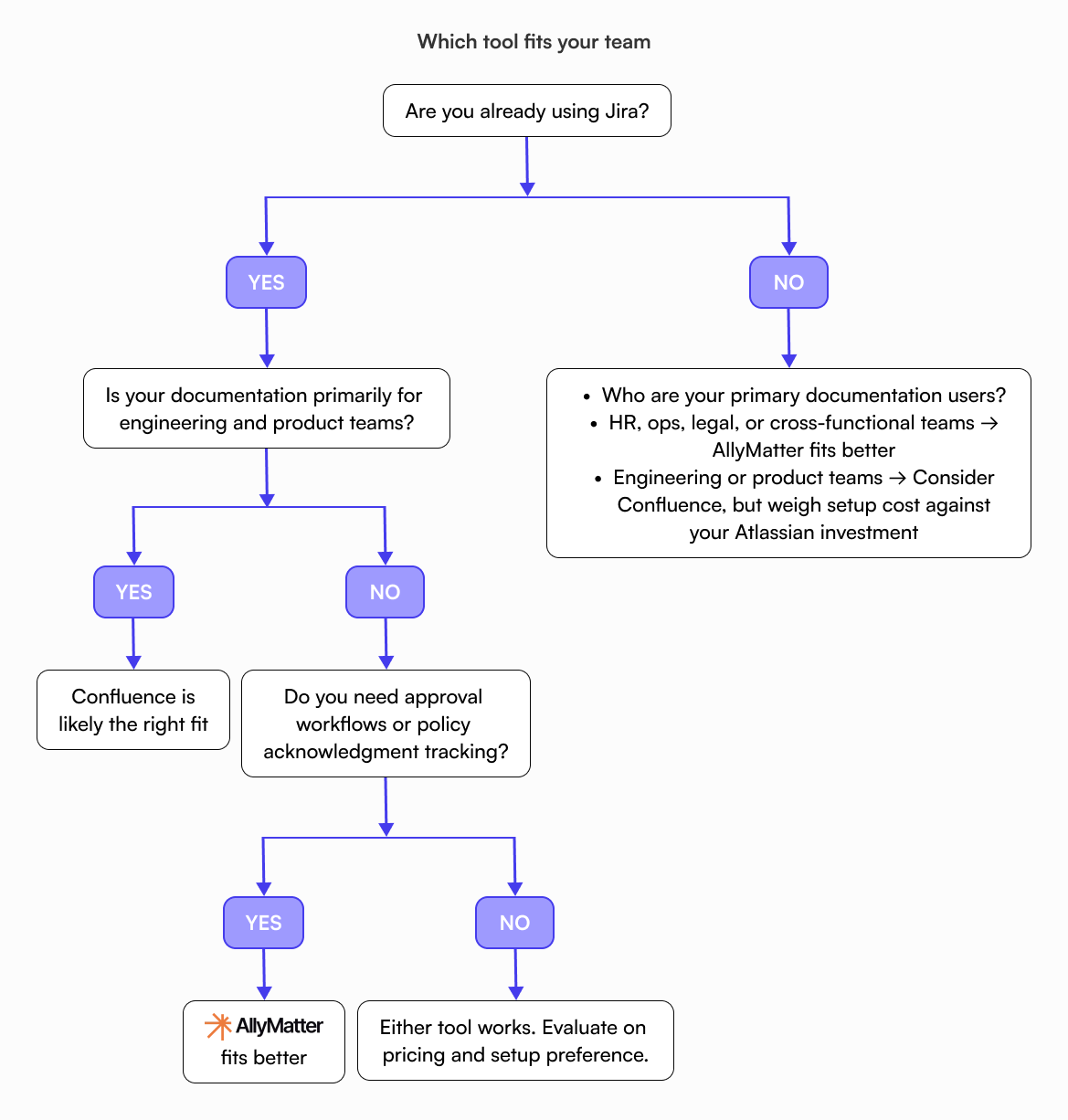
Which tool fits your team
Confluence is the right call if you’re already running Jira and your documentation needs are primarily engineering or product-adjacent. The ecosystem integration is the product’s main strength, and if you’re already inside that ecosystem, the per-user pricing is less of a concern. It’s also worth considering if you need deep automation capabilities or a large-scale intranet setup.
AllyMatter fits better when the primary documentation users are HR, operations, legal, or cross-functional teams, rather than engineers. If structured approval workflows and policy acknowledgment tracking are operational requirements rather than nice-to-haves, Confluence will require workarounds that AllyMatter handles natively. The flat pricing model also matters more as teams grow and the proportion of read-only employees increases.
If you’re specifically evaluating for HR and ops use cases, Confluence vs AllyMatter for HR goes deeper on that comparison. For startups weighing the fit at an earlier stage, AllyMatter vs Confluence for startups covers the considerations specific to that context. And if you’ve already concluded Confluence isn’t the right fit for where your team is now, Why Confluence is overkill for growing teams makes that case in detail.
The right tool is the one your team will use
Both tools are capable. The question is what your team needs them to do.
If you’re an engineering-led company embedded in the Atlassian ecosystem, Confluence is a reasonable fit. If you’re a growing company where knowledge management needs to work across every department, including HR, operations, and compliance, the gaps in Confluence become daily friction.
The fastest way to know if AllyMatter fits is to use it. Try the sandbox demo without creating an Atlassian account.
Frequently asked questions
Can AllyMatter replace Confluence entirely?
For teams that depend on Jira integration for engineering documentation, probably not without tradeoffs. For teams whose primary needs are policy management, HR documentation, SOPs, and cross-functional knowledge sharing, AllyMatter covers the same ground with considerably less overhead.
Does Confluence have document acknowledgment built in?
No. Acknowledgment is not a native Confluence feature at any tier. Teams typically manage this through email or separate tools, which means the record doesn’t live alongside the documentation.
Is AllyMatter more affordable than Confluence for larger teams?
It depends on how your team is structured. AllyMatter’s Scale plan charges a flat monthly rate with unlimited viewers. Confluence charges per user regardless of access level. For teams with a high proportion of read-only employees, the difference can be significant.
Can I use AllyMatter without IT involvement?
Yes. Permissions, workflows, and user management are all handled from a single dashboard. HR managers or ops leads can set up and maintain the knowledge base without ongoing IT support.
What happens to our existing Confluence documentation if we switch?
Yearly plans include free migration help, with chat handholding during setup. The migrations page covers what that process involves.