It’s 10:37 PM on a Wednesday. You’re red-lining the PTO policy, again. Legal approved one sentence in Slack. A manager in San Jose is still using last year’s meal/rest rules. A new hire can’t find the I-9 checklist. Two emails ask, “Where’s the latest harassment training policy?”
Welcome to the HR-as-switchboard reality. You’re doing real HR work (onboarding, policy changes, compliance) while hunting through Drive, Slack, and inboxes for “the latest version.” The fix isn’t more email threads or a prettier PDF. It’s a self-serve HR knowledge base that gives employees and managers clear answers, tracks who read what, and leaves a visible audit trail. You can build this in two weeks.
The real cost of ad-hoc HR documentation
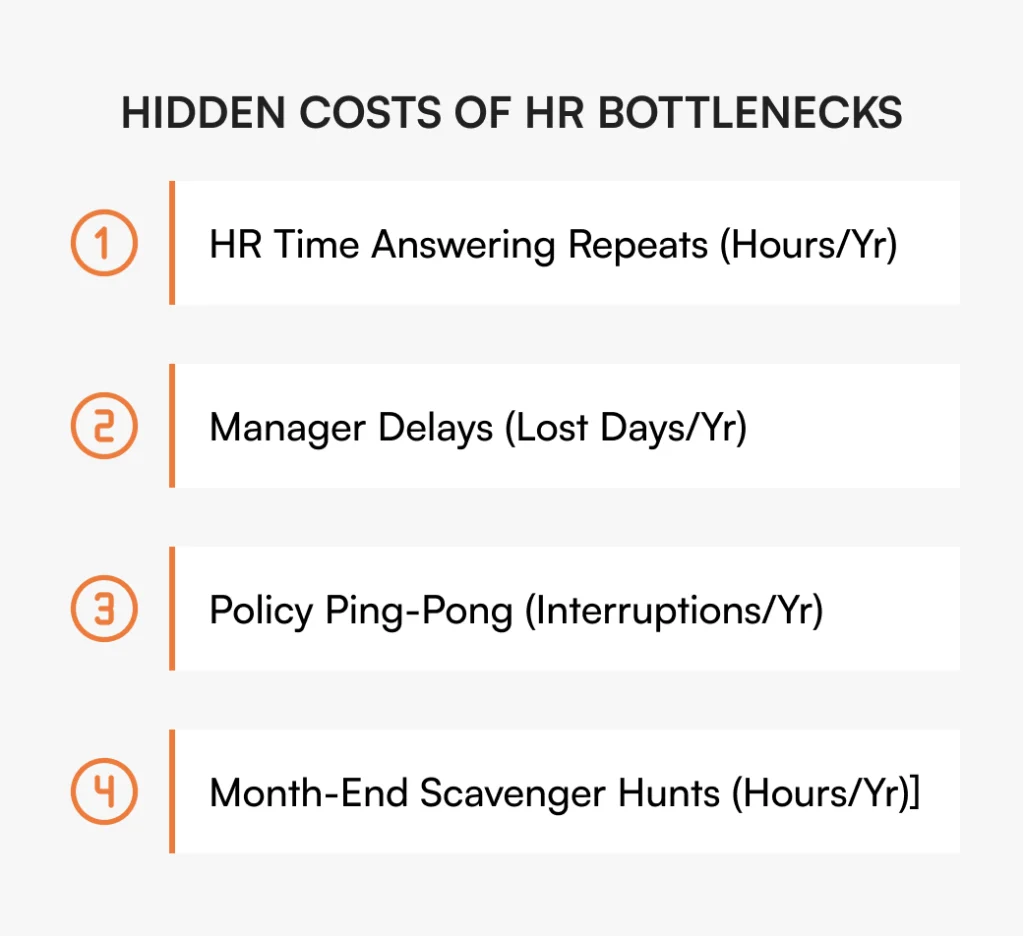
Before building the solution, quantify the problem. Decision friction, compliance anxiety, onboarding drag, and inconsistent answers compound into lost hours and avoidable risk.
Decision friction
Managers want to do the right thing but don’t know which version applies in their state (FLSA overtime vs CA daily OT) or whether a process changed. They DM HR, or worse, guess.
Example: a manager in your Texas office approves overtime for someone who should’ve been on California daily overtime rules. That’s not a training problem. It’s a documentation problem.
Compliance anxiety
A policy “went live” in Slack. Did everyone see it? Who acknowledged it? If Legal or an auditor asks for version history and read receipts, can you show them in minutes?
Onboarding drag
Day-1 questions (“Where’s direct deposit?” “What’s our PTO process?”) ping HR all week. You become the help desk instead of enabling managers.
According to the Society for Human Resource Management, it takes new hires 8-12 months to achieve full productivity in professional roles. Every day-1 question that goes unanswered extends that timeline.
Inconsistent answers
Three flavors of the same policy circulate. New managers lean on tribal knowledge. Employees hear different rules from different people.
What a system you can trust means for HR (U.S.)
A trusted HR knowledge system does more than store files. It supports:
- Authoring with templates for Policies, Procedures, and FAQs
- Approval workflows with visible approvers and timestamps
- Version history with diffs and restore points
- Acknowledgments and reminders to track who read what
- Access controls by role, employment type (exempt/non-exempt), and state (CA, NY, etc.)
- Search and tags that match U.S. HR phrasing: PTO, 401(k), FMLA, mileage
- Ownership and review cadence so content stays current
- Exportable audit evidence when compliance asks for proof
For the strategic framework behind these requirements, see HR Knowledge Base: Complete Guide for Scale-Ups.
Why teams resist “documentation” (and how to beat it)
If documentation feels like bureaucracy, no one will adopt it. Make it lighter than asking HR.
You’re already making policy decisions daily (approving PTO, clarifying overtime, guiding managers). The question is whether those decisions are findable at 11 AM for your East Coast team and provable at 4 PM when Legal asks.
Good HR documentation doesn’t slow people down. It speeds them up. It replaces “ask HR” with search, follow, done, and replaces “trust me” with here’s the audit trail.
When shared drives and wikis aren’t enough
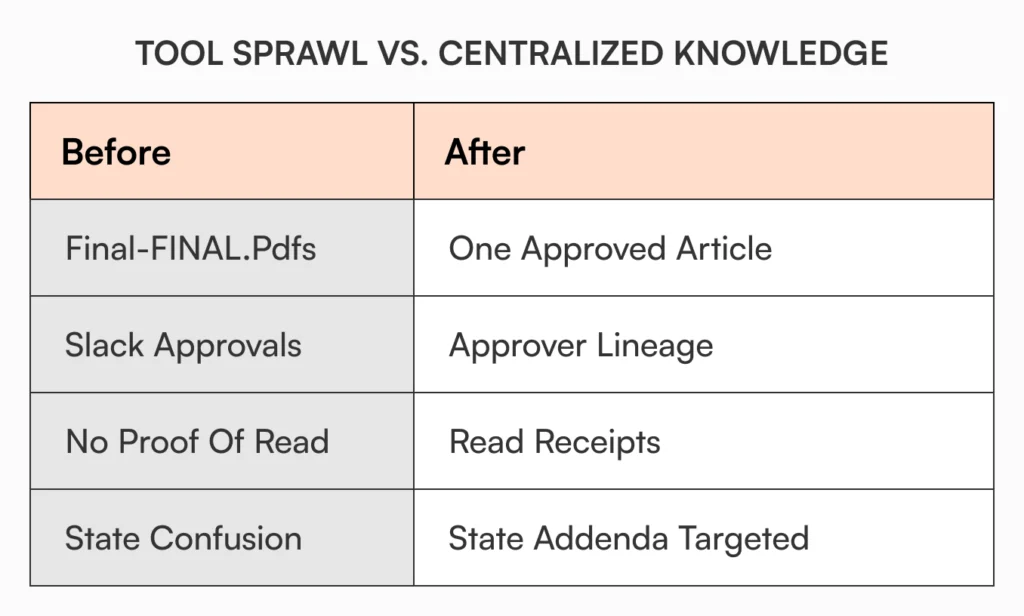
As headcount and policies grow, good intentions turn into risk: multiple “latest” versions, approvals lost in Slack, no proof of read, no clear “who changed what, when, and why.” A purpose-built HR KB fixes this. Approvals and version history live with the content, acknowledgments are tracked, and audits become exports instead of scavenger hunts.
For comparisons with general tools, see Why Google Docs Fails as an Internal Knowledge Base and Why SharePoint Fails as an Internal Knowledge Base.
The five HR docs that create freedom (cover 90% of questions)
You don’t need a 200-page handbook to start. These five unlock most of the value fast.
Policy & acknowledgment playbook
What’s mandatory to read (Code of Conduct, Anti-Harassment, PTO & Sick Leave, Remote Work), how acknowledgments work (who, by when, reminders), and a live index linking to the policy articles (not files).
Real wording: “All U.S. employees must acknowledge Anti-Harassment and Code of Conduct within 7 days. California employees must also acknowledge the CA Meal/Rest Addendum. Auto-reminders continue until complete.”
For deeper context on HR department workflows, see Internal Knowledge Base – HR Department Use Cases.
Manager guide: Performance, timekeeping & overtime
One source for the decisions managers make weekly. Exempt vs non-exempt rules (FLSA basics), overtime scenarios by state (CA daily OT), performance cycle dates, calibration tips, sample language.
Real wording: “Non-exempt employees must record all time worked. CA: OT > 8 hrs/day; most states: OT > 40 hrs/week.”
Employee welcome kit (role-based)
Day-1 and Week-1 checklists linking to living docs: I-9 & E-Verify, W-4 updates, direct deposit, benefits enrollment, PTO request, holidays, Slack/email etiquette, and team-specific setup.
Real wording: “Day-1: Complete I-9 → Set up direct deposit → Read & acknowledge Code of Conduct. Day-2: Enroll in benefits. Week-1: Read PTO & Sick Leave.”
Policy change calendar
A predictable rhythm for drafts, review, approvals, and publication. Include who approves (HRBP → Legal → HR Director/CHRO for major changes), and the communication and acknowledgment windows.
Real cadence: “First Thu: draft cutoff. Second Tue: Legal review. Second Fri: publish + notify + set 7-day acknowledgment.”
Compliance & audit checklist
The minimum viable audit pack: version diffs, approver chain, acknowledgment exports (CSV/PDF) by org/state.
Real wording: “For any policy, export (1) version diff, (2) approver chain, (3) acknowledgment completion by org/state.”
How to choose an HR knowledge base (7 buyer criteria that matter)
Don’t buy 40 features. Buy the seven that map to HR’s jobs-to-be-done. AllyMatter checks every box.
1. Policy lifecycle workflows (draft → approve → publish → notify → acknowledge)
What good looks like: configurable approvers, due dates, reminders, one-click “acknowledgment required,” inline change notes.
Demo request: “Show a policy moving from draft to acknowledged with approver names and timestamps.”
2. Version control & audit trail
What good looks like: side-by-side diffs, restore points, approver lineage, exportable logs.
Demo request: “Export the last update’s audit trail.”
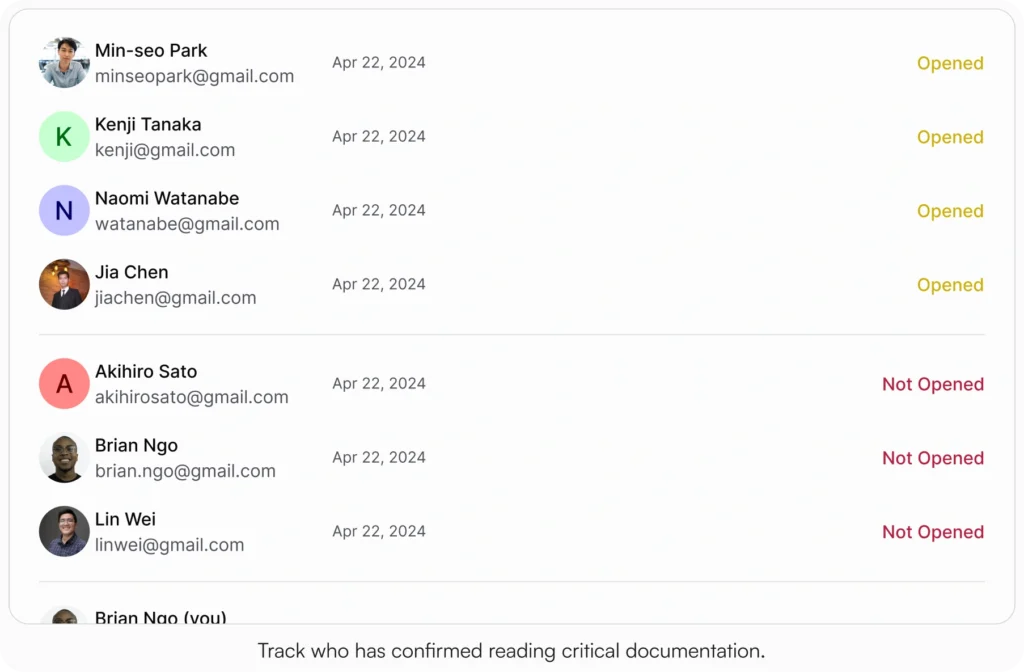
3. Acknowledgments & targeted delivery
What good looks like: target by role, state, employment type; due dates; reminders; dashboards; CSV/PDF exports.
Demo request: “Target CA non-exempt employees, set a 5-day deadline, and show the overdue reminder.”
4. Granular access controls
What good looks like: read/edit/approve at article or category; exception path with audited access changes.
Demo request: “Show a manager-only guide, an HR-only salary band article, and temporary access.”
5. Search that mirrors HR language
What good looks like: synonyms (vacation → PTO, maternity → parental leave), featured answers, tag-aware relevance, zero-result analytics.
Demo request: “Search ‘maternity leave’ and surface Parental Leave plus applicable state addenda.”

6. Analytics & governance
What good looks like: top searches, zero-results, most viewed, acknowledgment rates, owner reminders, content aging.
Demo request: “Show which policies are due for review and the top zero-result terms.”
7. Migration & scalability
What good looks like: bulk import, mass tagging, clear templates, fast navigation at 1,000+ articles, export options.
Demo request: “Bulk-import 20 PDFs, map to templates, tag by state, and show performance.”Give stakeholders a landscape without derailing momentum: 8 Best Knowledge Bases for HR Teams. Decide with the criteria above.
Building your self-serve HR system (start where the questions are)
Implementation succeeds when you start with the problems people actually have. FAQs and procedures first.
Start with last month’s Slack and HR inbox. List the 25 most repeated questions (PTO, direct deposit, timekeeping, benefits, reimbursements).
Those become your first 10 to 15 articles. Write short, high-signal answers. Link to related procedures. Add “last updated” and a named owner.
New to knowledge base fundamentals? Start with Internal Knowledge Base 101.
Make search feel human
“Vacation” should find PTO. “Maternity leave” should pull Parental Leave and FMLA. “Meal breaks” should surface the CA Meal/Rest Addendum for California.
Make it visual
A 30-second screen capture (“How to request PTO”), a one-screen flow (“Draft → Approve → Publish → Notify → Acknowledge”), and a table of who reads what eliminate follow-ups.
For more on search optimization and analytics, see AllyMatter’s Knowledge Base Analytics.
The tools that make it work (start simple, scale smart)
You can start in Google Docs or Notion if you enforce structure, but you’ll hit limits fast.
You can begin in tools you already have if you enforce templates, naming, “last updated,” and a review cycle. Growth exposes the gaps: multiple “finals,” no approver lineage, no acknowledgment tracking, no audit-ready exports.
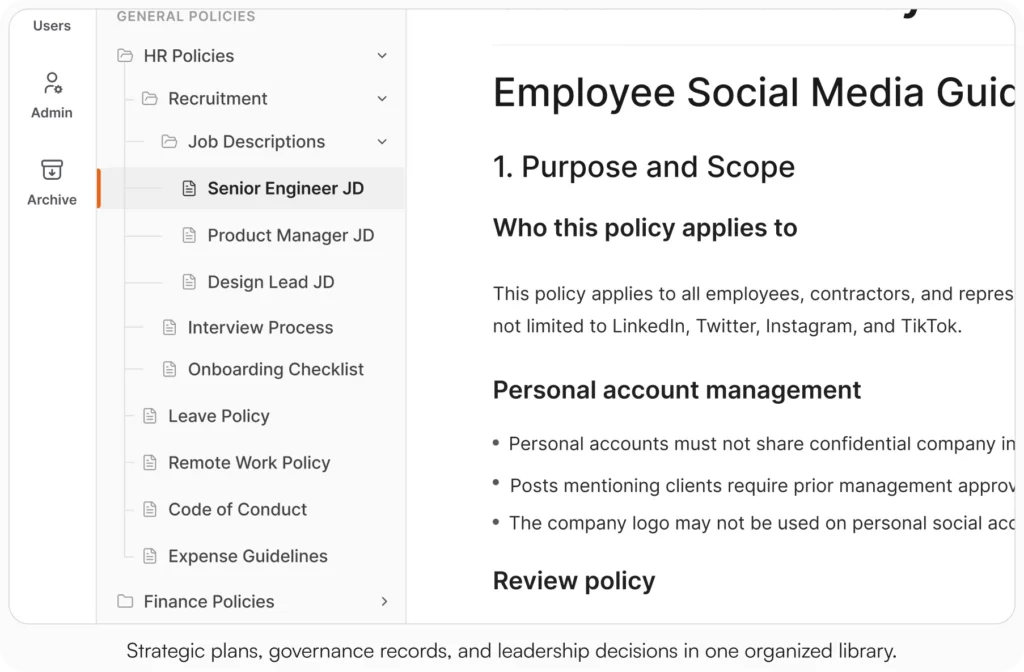
A purpose-built platform like AllyMatter handles all of this in one system:
- Version control with diffs and restore points (who changed what, when, why)
- Approval workflows with approver names and timestamps
- Acknowledgments that prove who read what, with reminders and CSV/PDF export
- Targeting so the right people (CA non-exempt, for example) get the right policy
- Analytics (top searches, zero-results, content due for review)
The deflection and onboarding benefits compound quickly. See How Knowledge Bases Can Help Deflect Tickets and Cut Onboarding Time With AllyMatter.
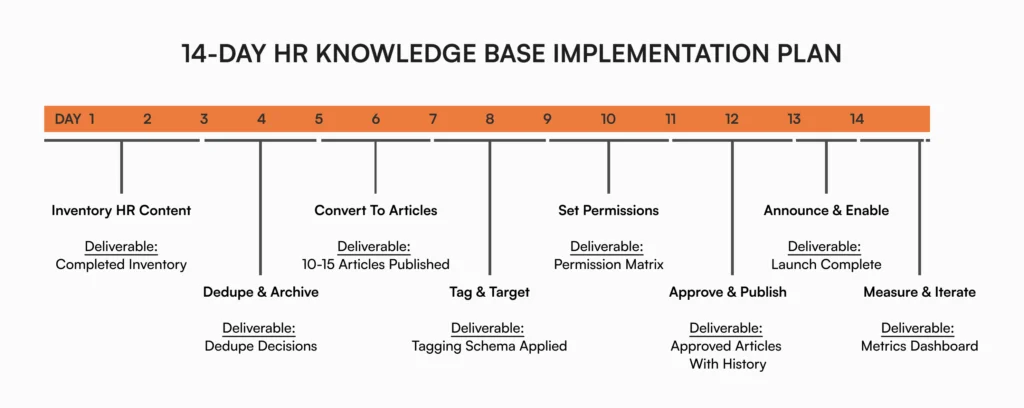
The 14-day HR migration plan
A plan with deliverables keeps momentum. Follow the sequence to launch on time.
Day 1–2: Inventory HR content
Create an inventory with: Title, Type (Policy/Procedure/FAQ), State/Scope (U.S., CA-only, NY-only), Audience (All/Managers/HR), Owner, Last Updated, Status, Notes, Priority.
Policies to list first: At-Will, Anti-Harassment/EEO, ADA, FMLA, PTO & Sick Leave, Holidays, Remote/Hybrid, Timekeeping & Overtime (FLSA), Meal & Rest (state), Code of Conduct, Background Checks, Drug-Free Workplace, HIPAA (if applicable), COBRA, Progressive Discipline, Social Media.
Procedures: I-9 & E-Verify, New-Hire Onboarding, Direct Deposit, W-4 Updates, Benefits Enrollment, 401(k) Enrollment, Expense Reimbursements, Travel/Per Diem, Performance Review Cycle, Termination/Offboarding, Employment Verification Letters.
FAQs: “Update my W-4,” “When do paychecks hit,” “Request FMLA,” “Access 401(k),” “Request ADA accommodation,” “Submit mileage,” “Find my paystubs/W-2.”
Deliverable: Completed inventory.
For role-by-role inspiration, see HR Department Use Cases.
Day 3–4: Dedupe & archive
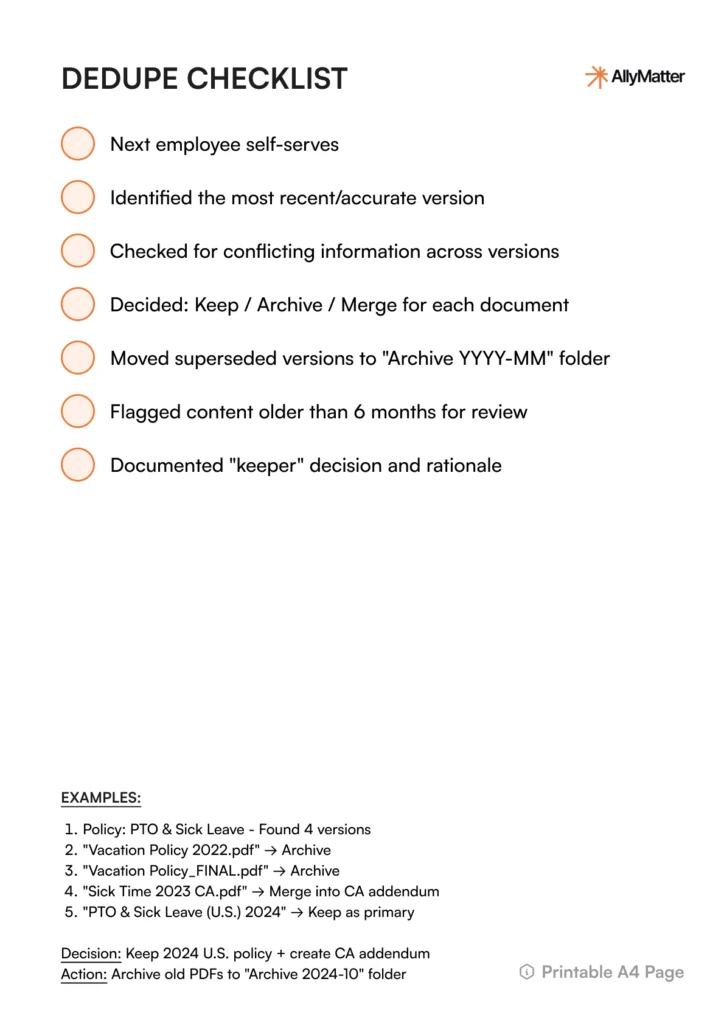
Collapse duplicates into one source of truth. Archive superseded PDFs in an Archive YYYY-MM folder. Flag anything >6 months old. Decide Keep / Archive / Replace / Merge.
Example: Keep PTO & Sick Leave (U.S.) with a California Addendum. Archive “Vacation Policy_FINAL(2).pdf” and “Sick Time 2023 CA.pdf.”
Deliverable: Dedupe decisions and “keeper” per topic.
Avoid common pitfalls by reviewing Top 5 Challenges in Sustaining Your Knowledge Base Long-Term.
Day 5–6: Convert files into living articles
Use three templates (Policy, Procedure, FAQ) for consistency and speed.
Policy example: PTO & Sick Leave (U.S.) – Summary, Applicability (U.S. employees + CA addendum), Details (accrual, request, carryover, state notes), Exceptions, Effective date, Last updated, Owner, Related links (Request PTO, Holidays, CA addendum).
Procedure example: Expense Reimbursements (U.S.) – Purpose, Prereqs (itemized receipt, IRS mileage rate), Steps (submit → approve in 3 biz days → finance in 5 biz days → ACH next payroll), Troubleshooting, Owner, Last updated.
FAQ example: How do I update my W-4? – Short answer, Link to HRIS and IRS info, Owner, Last updated.
Deliverable: 10 to 15 high-impact articles published.
Day 7–8: Tag & target
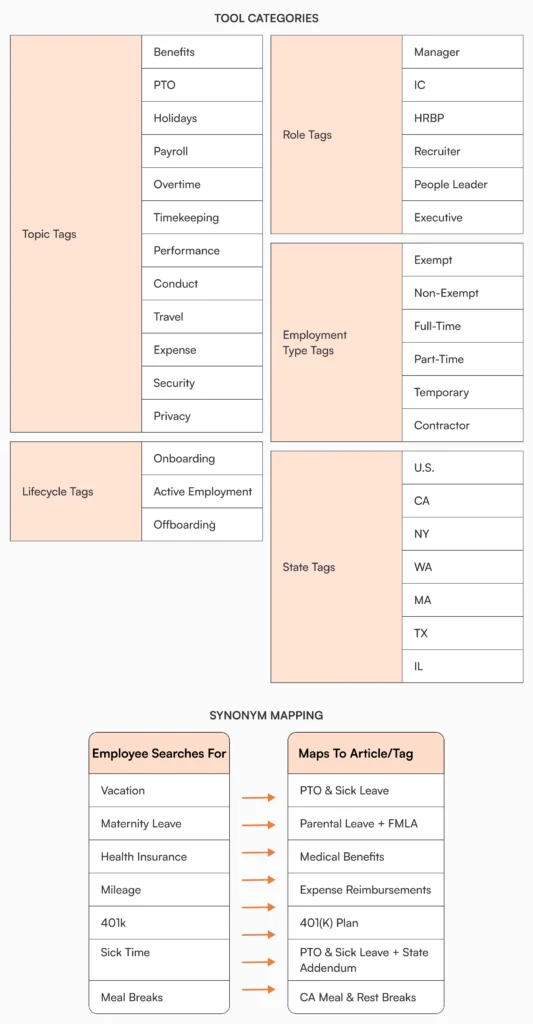
Build a minimal taxonomy.
- Topic: Benefits, PTO, Holidays, Payroll, Overtime, Timekeeping, Performance, Conduct, Travel, Expense, Security, Privacy
- Role: Manager, IC, HRBP, Recruiter, People Leader
- Employment type: Exempt, Non-Exempt, FT, PT, Temp, Contractor
- State: U.S. (general), CA, NY, WA, MA
- Lifecycle: Onboarding, Active, Exit
Synonyms employees use: vacation → PTO; maternity → Parental Leave (+ FMLA); health insurance → Medical Benefits; mileage → Expense Reimbursements; 401k → 401(k) Plan; sick time → PTO & Sick Leave (+ state addendum).
Deliverable: Tagging schema applied.
Day 9–10: Permissions for HR reality
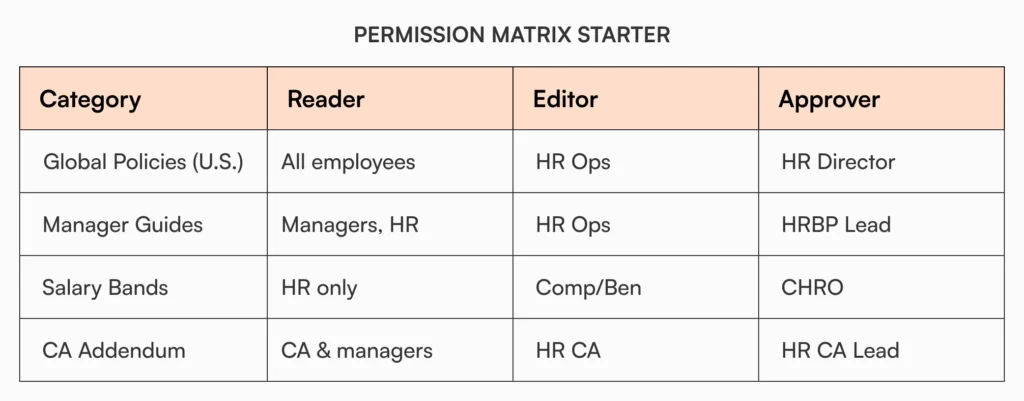
Define who can read / edit / approve per category.
- All employees: PTO & Sick Leave, Holidays, Remote Work, Code of Conduct, Anti-Harassment
- Managers + HR: Performance Calibration, Progressive Discipline
- HR only: Salary Bands, Investigations, RIF playbooks
- State-specific: CA Meal/Rest, CA Paid Sick Leave, NY Paid Family Leave
- Employment-specific: Non-exempt vs Exempt timekeeping
Example matrix
| Category | Reader | Editor | Approver |
| Global Policies (U.S.) | All employees | HR Ops | HR Director |
| Manager Guides | Managers, HR | HR Ops | HRBP Lead |
| Salary Bands | HR only | Comp/Ben | CHRO |
| CA Addendum | CA employees & managers | HR CA | HR CA Lead |
Deliverable: Permission matrix + exception path.
Day 11–12: Approve & publish
Route drafts in the KB: Owner → HRBP → Legal (if needed) → HR Director/CHRO. Record approvers/timestamps. Add a change note. Mark Acknowledgment required for must-read policies.
Change note example: “2025-06-12: Updated PTO accrual; added CA sick leave note. Approved by HRBP West + Legal.”
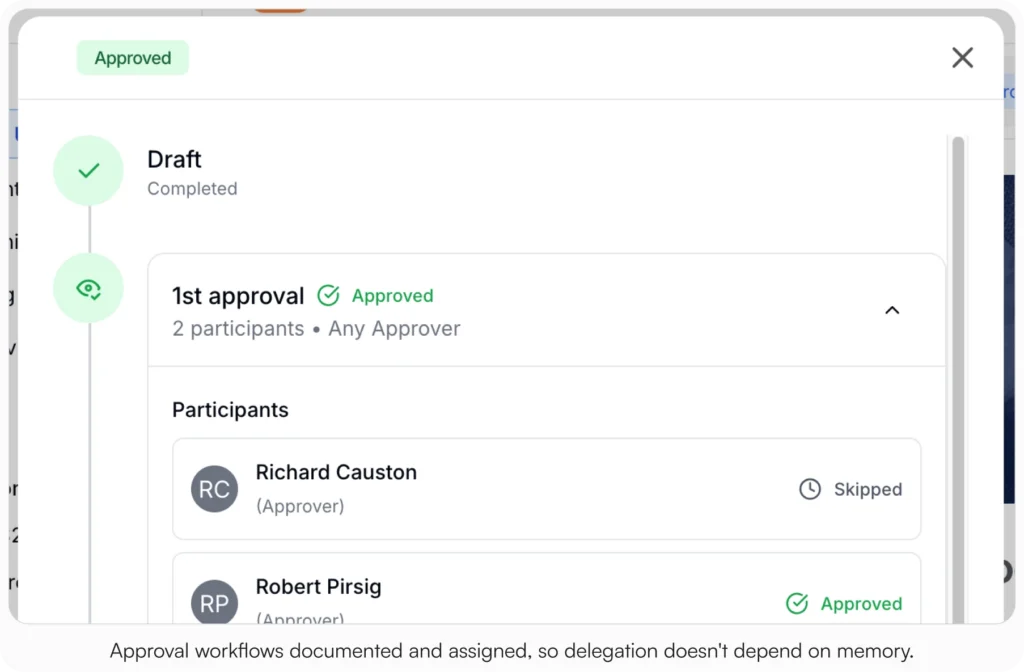
Deliverable: Approved, published starter set with visible history.
For the executive-level business case, share The Indispensable Value of Comprehensive Documentation in Operations.
Day 13: Announce & enable
All-hands note plus manager one-pager. Link the top 5 articles. Teach search terms employees actually use (vacation, 401(k), maternity leave, mileage).
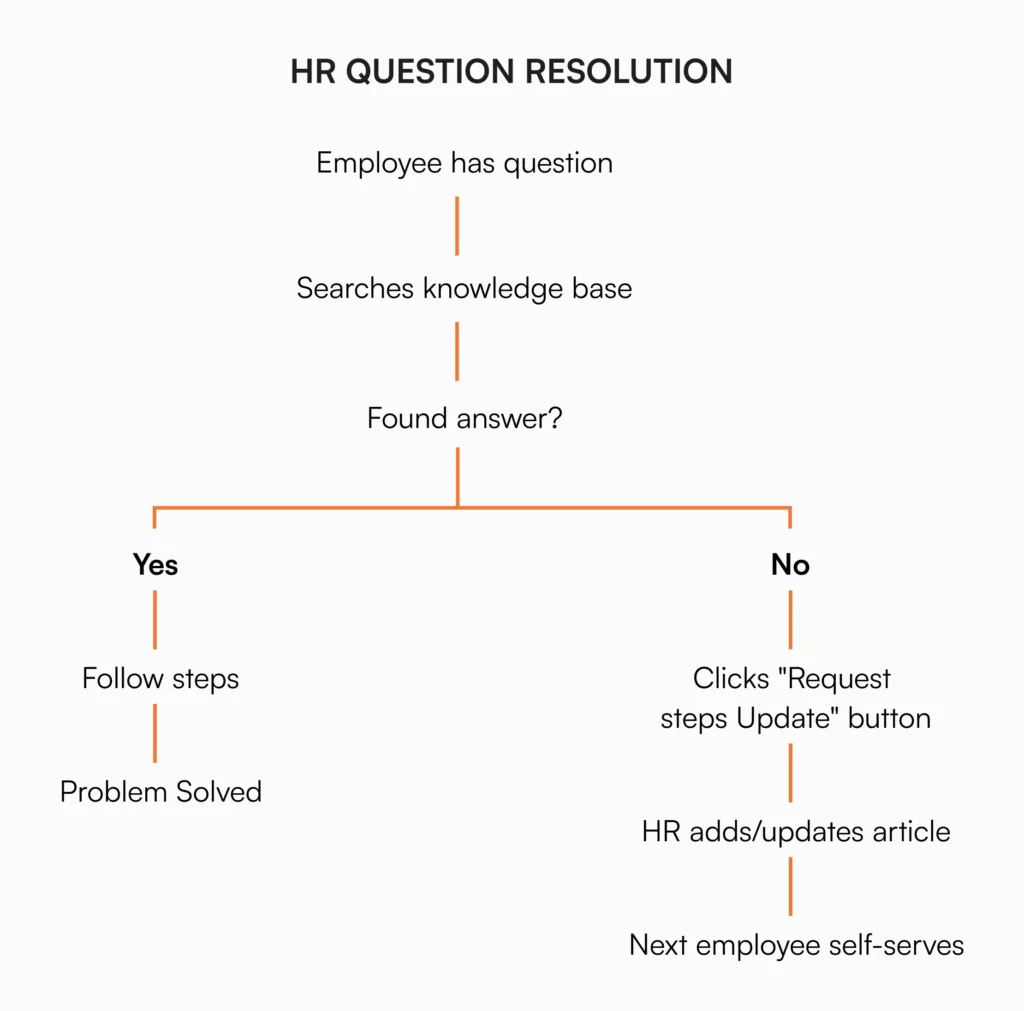
All-hands copy: “Your new HR Hub is live. Start with PTO & Sick Leave, Expense Reimbursements, Direct Deposit Setup, W-4 Updates, Remote Work. If you can’t find something, click Request an Update inside any article.”
Deliverable: Launch email and manager enablement.
Day 14: Measure & iterate
Track top searches, zero-results, most viewed, acknowledgment rates, and repeat HR questions. Feed the backlog.
Hours-saved example: 300 employees × 1.5 questions/mo × 8 min × 40% deflected = 1,440 minutes/month (about 24 hours).
Deliverable: Metrics snapshot and prioritized backlog.
Architecture & naming that scale
Clear titles and summaries improve search and trust. Consistency speeds maintenance.
Quick naming formula: [Type] Topic (Scope) | Owner: Team | Last updated: YYYY-MM-DD
Examples:
- [Policy] PTO & Sick Leave (U.S.) | Owner: HR Policy | Last updated: 2025-06-12
- [Policy] PTO & Sick Leave (California Addendum) | Owner: HR CA | Last updated: 2025-06-12
- [Procedure] Expense Reimbursements (U.S.) | Owner: Finance | Last updated: 2025-05-01
Add a 2-line summary and Applicability near the top. Link related items (policy ⇄ procedure ⇄ FAQ) at the bottom.
Governance & ownership that keep content alive
An HR knowledge base decays without named owners and review cadences. Make accountability visible and routine.
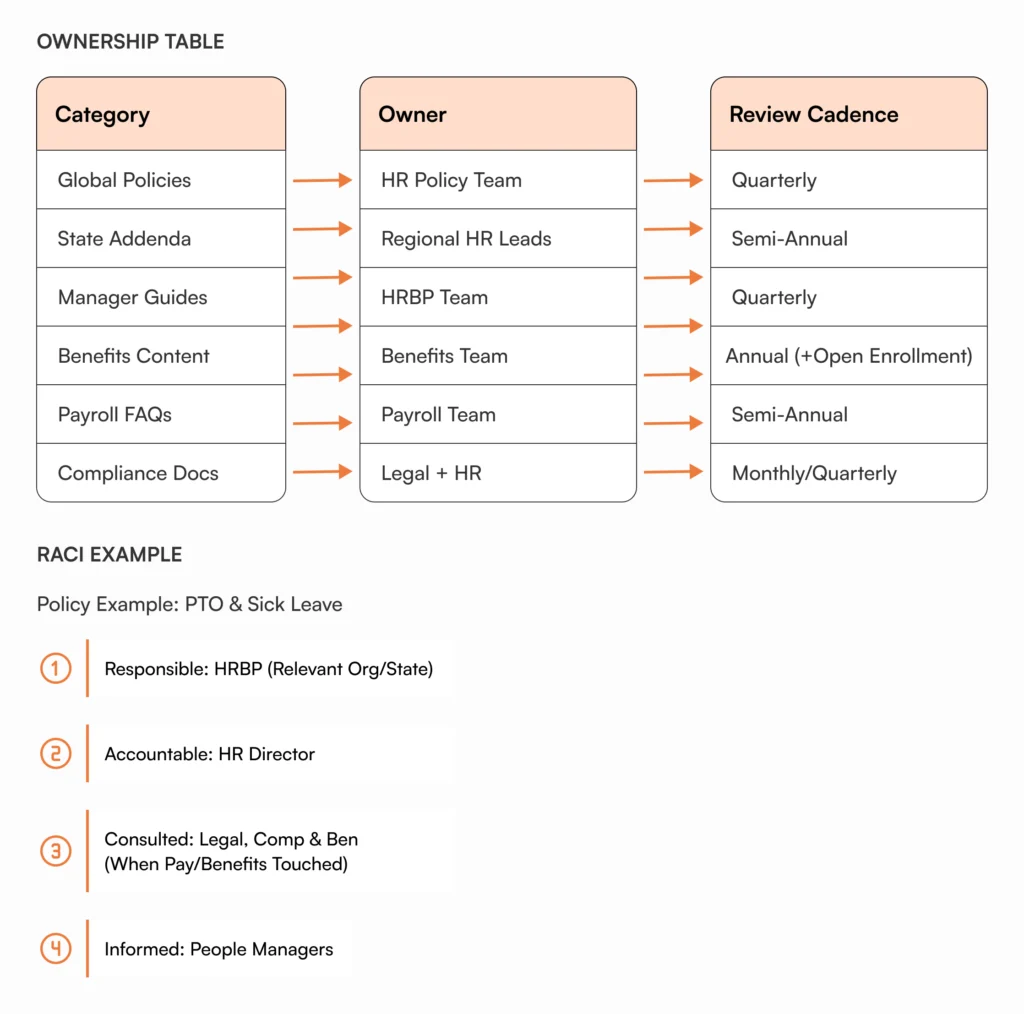
Assign a named human owner to every article. Use a simple RACI for policies:
- Responsible: HRBP (relevant org/state)
- Accountable: HR Director
- Consulted: Legal, Comp & Ben (when pay/benefits touched)
- Informed: People Managers
Review cadence by type:
- Critical policies: monthly or quarterly (Anti-Harassment, Safety, Security)
- General policies: quarterly or semi-annual (PTO, Remote Work)
- Evergreen FAQs: semi-annual (W-4, paystubs, 401(k) access)
Add an SLA: “Policy updates publish within 5 business days of final approval.”
Security & access controls, practically (U.S.)
HR handles confidential content. You need speed with control and a visible audit path.
Patterns that work:
- Role-based: Performance calibration guides → Managers + HR only
- State-based: CA meal/rest and CA sick leave → CA employees + managers
- Employment-based: Non-exempt timekeeping separate from exempt policies
- Sensitive: Salary bands, investigations, RIF playbooks → HR only
Add a just-in-time access path for legitimate exceptions, routed to HR Ops. Record the approval inside the system.
Adoption playbook for U.S. HR teams
A system only works if people use it. Make the KB the fastest path to a correct answer.
- Ask once, document once. If a question appears twice, create an FAQ.
- Embed links in onboarding, open enrollment guides, performance cycle communications, and policy updates.
- Teach search with common U.S. phrases (vacation, 401(k), maternity leave, mileage).
- Normalize acknowledgments for critical policies.
- Collect feedback with “Was this helpful?” and review weekly.
Slack reply pattern: “Sharing here for everyone: PTO & Sick Leave (U.S.) + California Addendum. If we missed a scenario, add a comment on the article and we’ll update it.”
Measurement & ROI leaders care about
Keep metrics simple and repeatable. Share two charts and one action item monthly.
Track:
- Time to answer (goal: under 60 seconds for top 20 HR topics)
- Repeat question reduction (Slack and help desk)
- Acknowledgment completion (target: 95% on time)
- Onboarding time to first contribution
For the complete ROI picture, see 10 Ways AllyMatter Transforms HR Teams.
The multiplier effect
The upside in plain language:
- Time savings: The five daily “Where is the X policy?” pings disappear, returning roughly 30 minutes a day.
- Faster decisions: A Texas manager checks the non-exempt overtime guide and fixes scheduling without DMing HR.
- Better onboarding: New hires complete 80% of setup via the Welcome Kit, then ask smarter questions.
- Audit-ready calm: Legal asks for version history and acknowledgments. You click Export.
Three scenarios
An honest read on whether to put this in place:
If you’re under 30 employees and HR is one person who can hold the policies in their head, a Drive folder with strict naming rules will hold for a while. The HR KB build pays off when the team grows past the size where one person knows everything.
If you’re 30 to 200 employees and the costs at the top of this post are showing up in your week, this is the moment. AllyMatter is what we built for this transition.
If you’re 200+ employees, multi-location, or in a regulated industry (healthcare, finance, legal, government contracting), structured HR documentation with audit-ready acknowledgments and approvals is not optional. AllyMatter or another purpose-built KB makes sense here. We’d start with AllyMatter.
Common HR pitfalls and quick fixes
Most KBs fail for predictable reasons. Avoid them on day one.
- PDF dumps. Convert your top 20 items to articles. Link to plan documents only when legally required, not as a substitute for searchable content.
- Over-tagging. Use 2 to 4 tags per article max. Curate synonyms employees actually use (PTO, 401(k), FMLA) instead of creating 50 categories nobody understands.
- Missing owners. Assign a named human to every article. Team names don’t feel accountable. People do.
- Email approvals. Route approvals inside the KB with visible timestamps. Email archaeology shouldn’t be part of your audit prep.
- Stale content. Add review dates, auto-notify owners, and archive aggressively. A knowledge base isn’t a museum.
Start your 30-day free trial. No credit card to start, and a 30-day money-back guarantee if you convert and change your mind. Or try the live demo to see the approval flow, search, and acknowledgment views with realistic HR content already populated.
Not ready for a trial? Migration from Confluence, Notion, SharePoint, or Drive is on us when you decide. We’ll move your existing HR docs over and have you up and running in about a week.
Frequently asked questions
How do we keep our HR knowledge base from going stale?
Assign named owners, set quarterly reviews by type, and treat major policy changes as immediate triggers. Version control makes changes visible and trusted. The KB is a living system, not a filing cabinet.
Won’t documentation slow us down with red tape?
Good docs speed decisions up. Keep policies clear, approvals visible, and acknowledgments simple. The north star: can my team act faster without DMing HR?
Do we start with policies or procedures?
Start where the pain is. Repeat questions eating up your time? Build FAQs first. Compliance risk keeping you up at night? Ship policy articles with acknowledgments. New hires stalling in week one? Publish the Welcome Kit and backfill the rest later.
How detailed should our manager guide be?
Specific enough to prevent mistakes, light enough to scan. Include overtime scenarios, timekeeping rules, and the performance cycle timeline. Link to deeper policy and procedure pages for the “why.”
What should remain private vs shared?
Share operational info (PTO rules, timekeeping, state addenda, leave requests). Keep sensitive info (salary bands, investigations, RIF playbooks) restricted to HR with granular permissions and audited exceptions.
Related reading
- Notion vs AllyMatter for HR Policy Management
- HR Knowledge Base: Complete Guide for Scale-Ups
- 10 Ways AllyMatter Transforms HR Teams
- Cut Onboarding Time With AllyMatter
- Internal Knowledge Base – HR Department Use Cases

Founder of AllyMatter I’m Sid Varma, founder of AllyMatter, an operations-first knowledge base for growing companies. Before AllyMatter, I co-founded Syren Cloud and helped scale it into a 300-person organization across two countries, leading marketing, operations, and HR. We moved fast, served demanding customers, and learned the hard way that internal knowledge systems built for help docs or IT don’t solve day-to-day operations. AllyMatter is my answer—tools that turn tribal knowledge into trusted, searchable processes. This blog shares the playbooks, checklists, and lessons I wish I’d had while scaling.