Your company just hired an exceptional candidate after weeks of interviews. They’re excited to join. Their first few weeks are filled with confusion, scattered information, and constant interruptions to ask where to find basic resources. By the time they’re fully productive, both they and your existing team are frustrated.
This extended timeline isn’t unusual. According to the Society for Human Resource Management, it takes new hires an average of 8-12 months to achieve full productivity in professional roles. Most of that ramp is information-gathering, not actual work.
Four signals your onboarding is broken:
- HR fields the same five questions every onboarding cycle
- A new hire from the last cohort still doesn’t know where the brand guidelines live
- Your managers spend hours every week answering “where do I find” questions
- A great hire quit in their first 90 days because they felt lost
According to research by Brandon Hall Group, organizations with structured onboarding programs are 103% more likely to see improvements in new hire retention and employee engagement. The structure isn’t optional. It’s the difference between hiring well and hiring wastefully.
AllyMatter was built to solve this exact problem. Onboarding stops being a scattered, manual process and becomes a working system that gets new hires contributing confidently in a fraction of the time.
The hidden costs of poor onboarding
Before walking through the solution, the costs worth naming.
Critical bottlenecks that slow down new hires
When new employees join, they’re immediately hunting across Google Drive, Slack, and old email threads. They lean on mentors who are mid-project. Process knowledge varies by department, and there’s rarely a standard training doc to point to.
These bottlenecks don’t just slow down the new teammate. They ripple through the organization.
The organizational impact
Poor onboarding affects the entire business:
- New employees take weeks or months to reach full productivity
- Existing team members spend hours answering repetitive questions
- HR becomes overwhelmed with admin work
- Training quality varies between departments and locations
- Remote and distributed teams feel it the most
A study by Gallup found that only 12% of employees strongly agree their organization does a great job onboarding new employees. The dissatisfaction directly hits retention. Employees with negative onboarding experiences are twice as likely to look for new opportunities.
The AllyMatter advantage: Centralized, structured, scalable
AllyMatter takes onboarding from a scattered, manual process to a working system. The platform centralizes every knowledge asset, then creates self-service pathways so new hires can find what they need without pinging anyone.
The result is a consistent onboarding experience that scales as you add new team members, new departments, and new locations.
Key features that accelerate onboarding
Centralized knowledge base for new hires
The biggest onboarding problem is information fragmentation. New employees waste hours navigating between tools, emails, and colleagues to find basic information.
AllyMatter fixes this with:
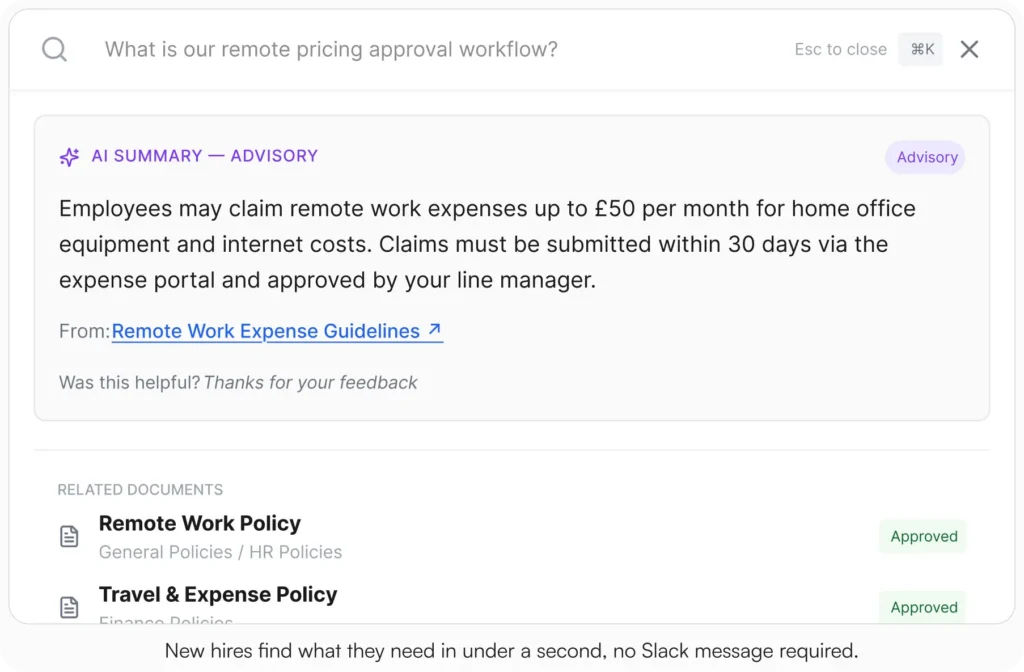
- A single searchable repository for every onboarding material
- Role-based views so each new hire sees only what’s relevant to them
- Organization through smart tags and metadata search
- Access controls that maintain information governance
A new marketing coordinator joins. Instead of emailing five different people for brand guidelines, content workflows, and approval processes, they open their AllyMatter dashboard. Everything they need (company policies, department-specific procedures, role-specific docs) is organized, searchable, and immediately available.
Role-based document organization
Generic onboarding materials rarely help employees understand their specific role. AllyMatter organizes documentation around how each role actually works:
- Tagging system that categorizes content by department, geography, and custom attributes
- Granular access controls so employees see only what’s relevant to their position
- Metadata search that helps new hires find exactly what they need
- Inline image and video support for visual explanations
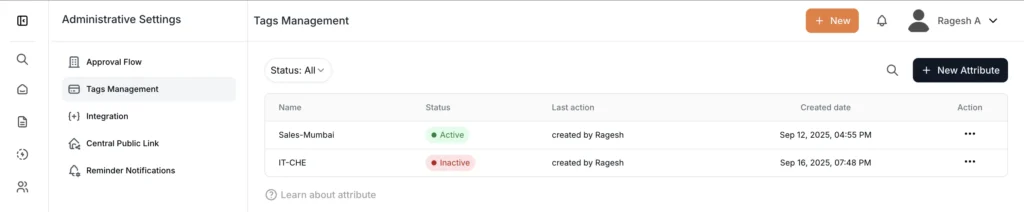
A new marketing coordinator immediately sees content tagged for marketing. The finance hire from the same cohort sees their own docs. The targeted view reduces information overload and helps each new hire focus on what matters for their role specifically.
Document management for HR teams
Manual document management creates unnecessary work for HR and increases the risk of outdated information being shared. AllyMatter gives HR the tools to keep onboarding materials accurate without manual upkeep:
- Audit trails that track every document change and access
- Version control so new hires always see the most current policies
- Document visibility settings (public, internal, or private) for sensitive material
- Acknowledgment tracking so HR knows which employees have read which policy
- Comment functionality for feedback that improves documentation over time
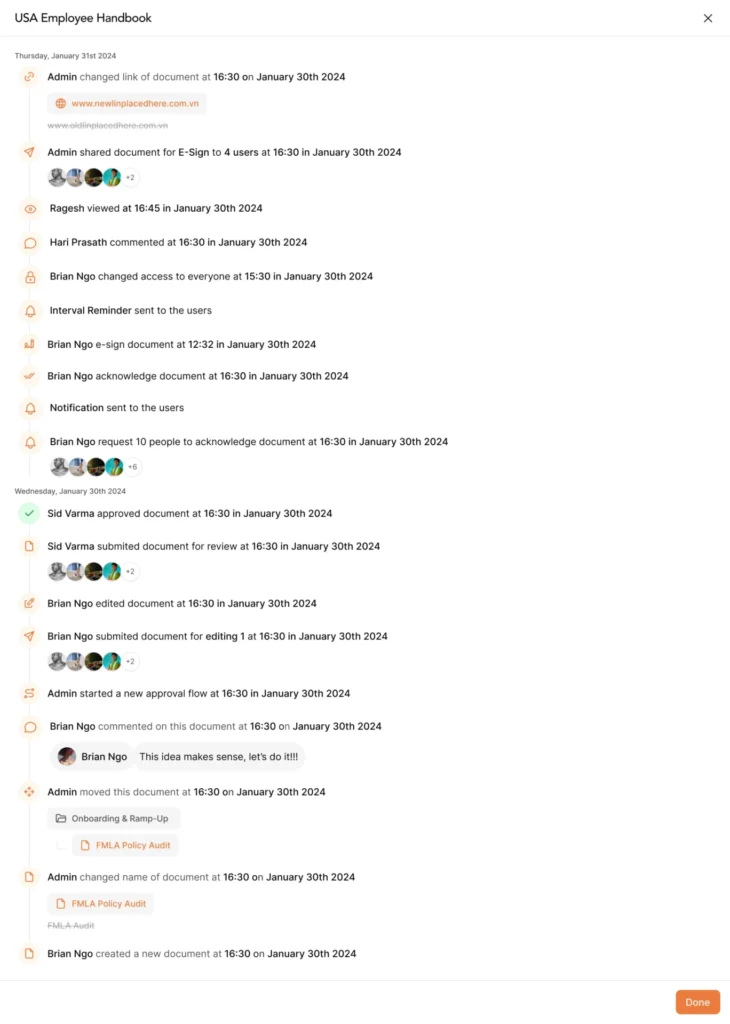
When HR updates the employee handbook, version control makes the new version the only one anyone sees. Acknowledgment tracking confirms each new hire has actually read the critical policies, with a PDF record per person. The audit trail handles compliance documentation without anyone manually tracking anything.
Reduced HR workload through self-service
HR teams often become bottlenecks in onboarding, fielding endless questions about policies, benefits, and procedures. AllyMatter changes the pattern:
- FAQ-style answers cut down on common HR inquiries
- Policy management with version tracking and acknowledgment built in
- Compliance management with audit-ready records and acknowledgments
- Policy updates that instantly reflect across the organization
Instead of emailing HR every time a new hire needs a tool login, they open the KB for the step-by-step instructions and request flow. (More on building an HR-focused KB.)
Onboarding inside the workflow
Documentation delivers maximum value when it shows up where the work happens. AllyMatter connects to where your team already is:
- Direct links from onboarding tasks to the relevant docs
- Embedded KB access inside Slack and Microsoft Teams
- Consistent access across devices and locations
For a technical onboarding, embed task-specific links to the architecture diagrams, coding standards, and access docs directly in the onboarding checklist. The new engineer never has to search.
How a complete onboarding setup looks in AllyMatter
Most teams ship the first Welcome Kit in a week. Here’s the work, step by step.
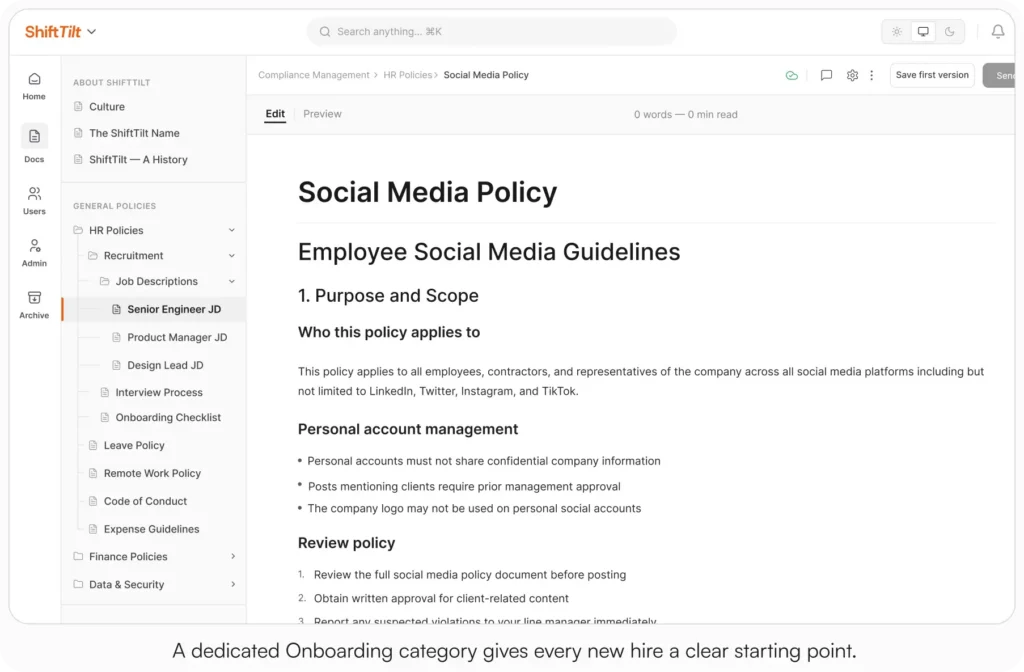
Step 1: Create the Welcome category in your library
Set up a dedicated category in the library for onboarding. Inside that category, create sub-categories for each role or department (Engineering, Sales, Marketing, Customer Success). The structure is what every new hire sees on day one.
Step 2: Tag content by role, department, and location
This is where the library earns its keep. Tag every doc across the dimensions your team thinks in: role, department, region, employment type. Tag-based access means a Sales hire in California sees the right onboarding kit, the right state-specific policies, and nothing they don’t need.
Step 3: Add the required reads with acknowledgment tracking
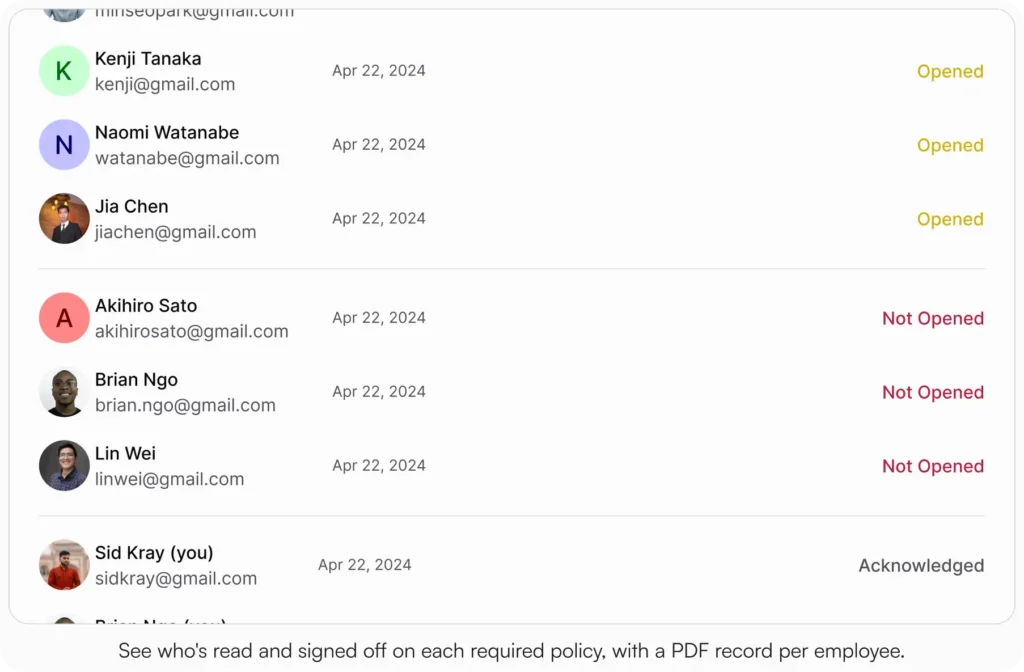
Some docs aren’t just informational. The Code of Conduct, the Harassment Policy, the Data Handling Policy: these need to be read AND acknowledged. Add them to the onboarding category with acknowledgment tracking enabled. Each new hire signs off, with a PDF record stored automatically.
Step 4: Set up approval workflows for the docs that need sign-off
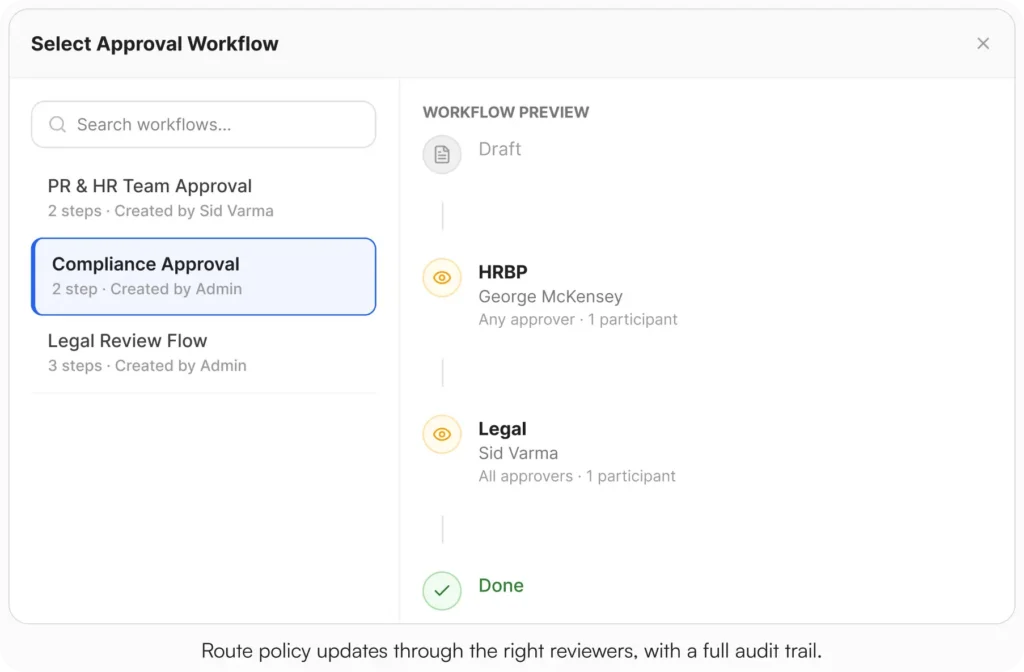
Onboarding materials evolve. When you update a policy or add a new SOP, route the change through the right reviewers (HRBP → Legal → CHRO, or whichever chain you use). Approval workflows capture names, roles, and timestamps so the audit trail is real.
Step 5: Surface the library in Slack or Microsoft Teams
The onboarding library shouldn’t be another tab the new hire has to remember to open. Native Slack and Microsoft Teams integration makes the relevant docs appear where new hires already are. Their first day starts in Slack like everyone else’s, and the answers come to them.
Start your 30-day free trial. No credit card to start, and a 30-day money-back guarantee if you convert and change your mind. Or try the live demo to see the library, search, and acknowledgment views with realistic onboarding content already populated.
Why it works: scaling as the team grows
As your organization grows, onboarding gets more complex. What works for 50 employees rarely scales to 500. AllyMatter holds up because:
- Tagging adapts as the organization expands globally or adds departments
- Role-based views stay correct as team structures evolve
- Version control maintains documentation accuracy through reorganizations
- Search becomes more valuable as the knowledge base grows, not less
Need to share updated HR policies with the new EMEA team? One tag handles it. Want the treasury team to see all relevant financial procedures? One tag. The structure doesn’t break as the company does.
Three scenarios
An honest read on whether you’re ready:
If you’re under 30 employees and HR handles every new hire personally, a Drive folder with strict naming rules will hold. The onboarding system pays off when the team grows past the size where one person knows everything.
If you’re 30 to 200 employees and the four signals at the top of this post are showing up in your week, this is the moment. AllyMatter is what we built for this transition.
If you’re 200+ employees, multi-location, or in a regulated industry, structured onboarding with audit-ready acknowledgments and role-based access is not optional. AllyMatter or another dedicated KB makes sense here. We’d start with AllyMatter.
Reimagine your onboarding process with AllyMatter
Onboarding doesn’t have to be slow, repetitive, or chaotic. With a real knowledge base behind it, the work changes:
- New employees become productive in weeks instead of months
- HR spends less time answering repeat questions and more time on the strategic work
- Managers stop being interrupted every fifteen minutes during a new hire’s first week
- Knowledge stays accessible even as the company scales and team structures change
Start your 30-day free trial. No credit card to start, and a 30-day money-back guarantee if you convert and change your mind.
Not ready for a trial? Migration from Confluence, Notion, SharePoint, or Drive is on us when you decide. We’ll move your existing onboarding docs over and have you up and running in about a week.
Frequently asked questions
How does AllyMatter reduce onboarding time for new hires?
It centralizes every onboarding material into one searchable knowledge base with role-based access. New employees find what they need in under a second instead of waiting on responses or searching through scattered docs. The result is faster time-to-productivity and fewer interruptions for the people training them.
Can AllyMatter integrate with our existing HR systems?
Yes. The KB sits alongside your current HR tools and onboarding workflows. You can embed AllyMatter links directly in onboarding checklists and tasks, so new hires get the right doc when they need it without leaving the workflow they’re already in.
How do we ensure new hires see only relevant information?
Granular access controls and the tagging system organize content by department, role, and location automatically. A new sales hire sees the sales onboarding kit. A new engineer sees the engineering kit. Each new hire sees the policies that apply to them, not the full corporate library.
What happens when we update onboarding policies or procedures?
Version control means every update is the version everyone sees the next time they open the doc. The audit trail captures the change. Acknowledgment tracking confirms each affected employee has read the new version, with a PDF record per person. No manual tracking.
Related reading
- HR Knowledge Base: Complete Guide for Scale-Ups
- Set Up a Self-Serve Onboarding Kit in Your Knowledge Base
- Notion vs AllyMatter for HR Policy Management
- How to Build a Knowledge Base for HR Teams
- Internal Knowledge Base – HR Department Use Cases

Founder of AllyMatter I’m Sid Varma, founder of AllyMatter, an operations-first knowledge base for growing companies. Before AllyMatter, I co-founded Syren Cloud and helped scale it into a 300-person organization across two countries, leading marketing, operations, and HR. We moved fast, served demanding customers, and learned the hard way that internal knowledge systems built for help docs or IT don’t solve day-to-day operations. AllyMatter is my answer—tools that turn tribal knowledge into trusted, searchable processes. This blog shares the playbooks, checklists, and lessons I wish I’d had while scaling.