A founder evaluating knowledge bases sees $450/month and thinks that’s the cost. Three months later, their operations lead is spending 12 hours weekly managing documentation workflows that the “affordable” tool doesn’t actually handle.
Most founders think they are pricing a subscription.
What they are actually pricing is a new cost structure for how knowledge moves through their startup, how often they become interruption targets, and how much hidden admin work documentation creates.
Seat pricing obscures that reality.
I’ve watched leadership teams confidently choose “affordable” knowledge bases, only to discover six months later that documentation is consuming more hours, more tools, and more founder attention than the scattered chaos they replaced.
Let’s fix that.
This is part of our comprehensive startup knowledge base guide, the pricing and TCO component founders need before choosing tools.
What this article covers and what it doesn’t
This is not a vendor comparison. It is not a feature tour. It does not cover onboarding playbooks, remote rituals, or documentation culture.
Those topics matter. They’re covered in Building a startup knowledge base: The complete guide. Come back here when you’re ready to price tools.
Specifically, you’ll get:
- A simple TCO model you can use immediately
- The five cost categories that actually drive knowledge base economics
- Two reference architectures startups consistently grow into
- Guidance on where pricing decisions go wrong
The TCO model startups actually need
Before we talk platforms, start with your baseline. This is the core artifact of this article. Everything else supports it.
Knowledge base TCO spreadsheet inputs
You can drop these directly into a spreadsheet.
Company inputs:
- Headcount
- Average annual compensation
- Annual new hires
Documentation workload:
- Monthly internal questions or tickets
- Average minutes per question
- Policy or process changes per month
Current tooling:
- Annual spend on documentation-related tools
- Time spent maintaining those tools
Core cost calculations
Search and interruption cost
Harvard Business Review research shows workers toggle between applications nearly 1,200 times daily, spending approximately four hours per week reorienting themselves after context switches.
Even modest reductions here matter.
Calculation: Headcount × average compensation × 0.20
Internal support burden
Monthly questions × minutes ÷ 60 × hourly rate × 12
Onboarding drag
Extra days to productivity × daily cost × annual hires
Tool overlap
Annual spend on tools replacing governance features
The output is your annual cost of documentation chaos. That number is what knowledge base total cost of ownership should be compared against.
Why seat pricing fails this model
Seat pricing assumes knowledge base cost scales linearly with headcount. In practice, the opposite happens.
The largest costs are:
- Admin time
- Search waste
- Governance overhead
- Risk exposure
None of these show up on a pricing page. A per-user tool that looks cheap at 15 employees can become expensive at 50, even if the subscription cost itself looks manageable.
Cost driver 1: Admin and governance time
Every knowledge base has an owner. They manage updates, review changes, and answer “is this current?” constantly.
For startups between 30 and 50 employees, I consistently see 8-12 hours per week spent on documentation governance once policies and SOPs matter operationally. That’s not a temporary phase. It’s steady-state.
Rachel, an operations manager at a 45-person fintech startup, tracks her time religiously. She discovered she was spending 11 hours per week just coordinating policy updates across Google Docs, email threads, and Slack channels; chasing down who approved what, manually versioning files, and answering “where’s the latest expense policy?” The real cost wasn’t the $200/month she saved on her knowledge base subscription. It was her $75K salary × 11 hours weekly.
Systems with approval workflows, version control, and clear ownership reduce this work. Systems without them push that work onto people.
Cost driver 2: Tools the knowledge base should have replaced
When governance is missing, startups compensate.
They buy:
- Approval software
- Analytics add-ons
- Versioning extensions
None of these purchases are irrational. They are symptoms.
When you evaluate pricing, list every tool required to make documentation trustworthy. That list belongs in your knowledge base total cost of ownership model.
Cost driver 3: Search and interruption waste
According to a Gartner survey, 47% of digital workers struggle to find the information needed to effectively perform their jobs.
Sarah in Finance doesn’t just lose ten minutes looking for the expense policy. She interrupts Operations. Operations interrupts HR. HR forwards a link that turns out to be outdated. The cost multiplies across the org.
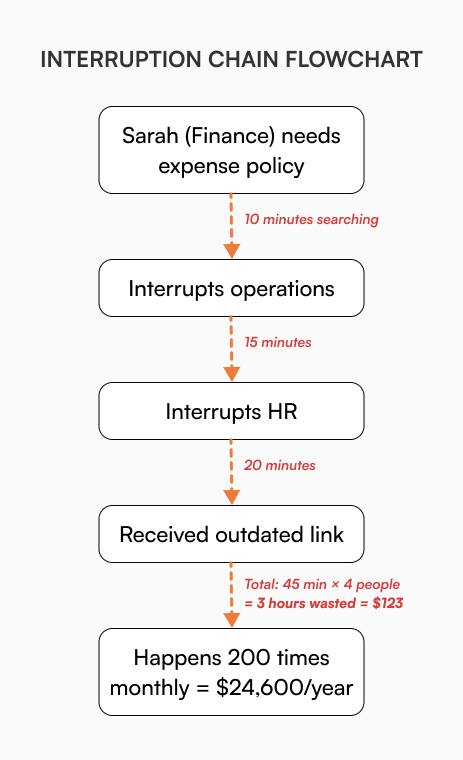
For founders evaluating why fast-growing companies need a standalone internal knowledge base solution, this multiplier effect is the primary justification.
Cost driver 4: Migration is a burst cost, chaos is permanent
Migration always feels expensive because it is visible. Consolidating documentation typically takes 25-45 hours depending on volume and discipline.
What’s less visible is the ongoing cost of fragmented systems. That cost shows up every week. Avoiding migration now often guarantees a more painful one later.
Cost driver 5: Due diligence and export readiness
This cost only appears when stakes are high; fundraising, audits, acquisition conversations.
Teams that can export policies, approvals, and version history in hours avoid weeks of scramble. Documentation becomes an asset instead of a liability. This is difficult to retrofit later.
Two reference architectures startups actually grow into
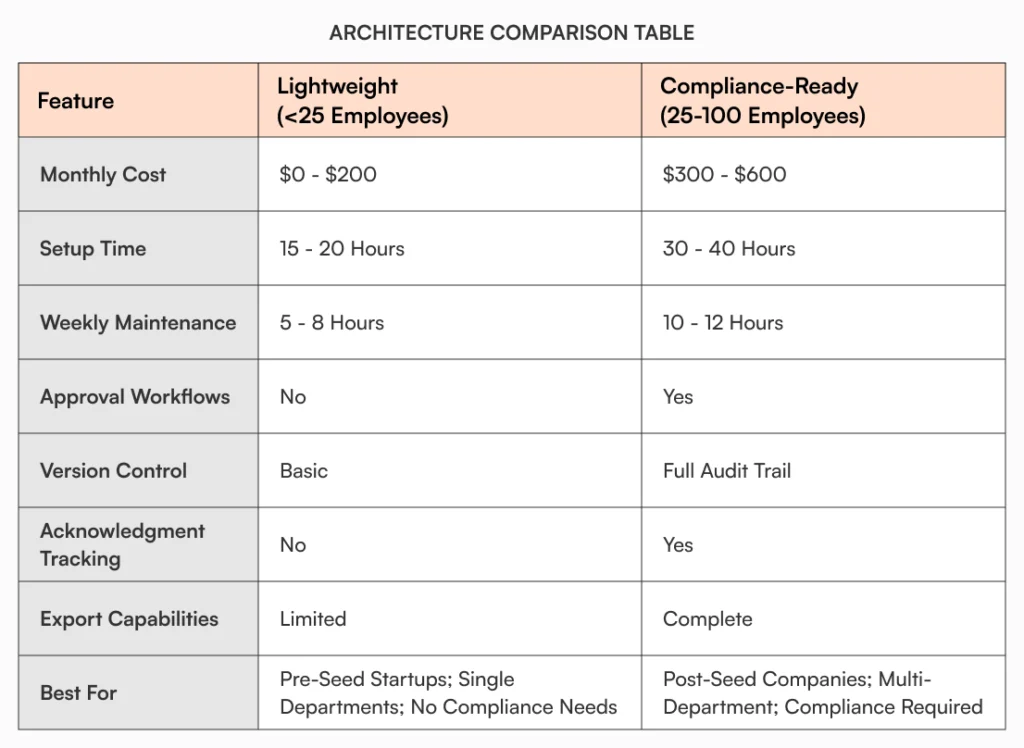
Lightweight architecture (under 25 employees)
This works when documentation is helpful but not yet critical.
Core features:
- Centralized pages
- Basic search
- Minimal governance
Costs:
- Platform: $0-$200/month
- Setup: 15-20 hours
- Maintenance: 5-8 hours weekly
Best for: Pre-seed startups, single departments, teams without compliance requirements
Costs are low, but admin time rises quickly as headcount grows.
Compliance-ready architecture (25-100 employees)
This supports operational reality.
Core features:
- Approval workflows
- Version control with audit trails
- Acknowledgment tracking
- Exportable records
Costs:
- Platform: $300-$600/month
- Setup: 30-40 hours
- Maintenance: 10-12 hours weekly
Best for: Post-seed companies, multi-department teams, anyone facing compliance needs
According to a PwC survey, about 35% of risk executives view compliance and regulatory risk as the top barrier to their company’s growth. This architecture costs more upfront but avoids forced migrations later.
For implementation details on building each architecture, see Building a startup knowledge base: The complete guide.
Why free knowledge bases fail the TCO test
Free tools remove the subscription cost. They do not remove:
- Governance work
- Tool overlap
- Search inefficiency
- Migration risk
Over 18 to 24 months, free setups routinely cost more once workarounds and eventual transitions are included. The bill is just delayed.
Why Google Docs fails as an internal knowledge base explains this dynamic in detail.
Real numbers: What the math actually shows
Let’s run calculations for a 40-person startup at $85K average comp:
Current state (scattered docs):
- Search waste: 40 × $85K × 0.20 = $680K annually
- Support burden: 200 questions/month × 20 min × $41/hour × 12 = $19,680 annually
- Onboarding lag: 8 hires × 20 extra days × $328/day = $52,480 annually
- Tool sprawl: $6,500 annually
- Total annual drain: $758,660
Knowledge base state:
- Subscription: $450/month = $5,400 annually
- Setup: 35 hours × $41 = $1,435 one-time
- Maintenance: 11 hours weekly × $41 × 52 = $23,452 annually
- Total investment: $30,287 year one
Time recovered:
- 50% search improvement: $340K
- 40% support deflection: $7,872
- 30% faster onboarding: $15,744
- Total value: $363,616
Net savings: $333,329 after accounting for all costs
Payback happens in weeks, not quarters.
How AllyMatter changes the TCO equation
AllyMatter was designed around governance from the start. Approval workflows, version control, acknowledgment tracking, and export capabilities are part of the core platform, not add-ons.
For growth-stage companies moving from lightweight documentation to compliance-ready operations, this reduces:
- Admin time
- Tool sprawl
- Migration risk
Specifically, AllyMatter eliminates:
- Approval workflow tools ($600-1,200/year saved)
- Acknowledgment tracking add-ons ($300-500/year saved)
The economics work because fewer systems create fewer hidden costs. AllyMatter’s intelligent search uses smart tags and metadata to surface content quickly. Analytics show exactly what people search for and where they get stuck.
The platform scales from 25 to 100 employees without tier jumps that triple your costs.
What TCO analysis actually reveals
The numbers don’t lie, but they’re easy to ignore when you’re focused on keeping monthly costs low.
A $450/month knowledge base looks expensive compared to free Google Docs. Until you calculate the 11 hours weekly your operations lead spends managing documentation chaos. Or the $680K annually your team wastes searching for information that should be instantly accessible.
The startups that get this right don’t optimize for the cheapest subscription. They optimize for lowest total cost; admin time, tool sprawl, productivity drag, and migration risk included.
Your TCO model tells you whether you’re buying a tool or buying back hundreds of hours and thousands of dollars. Most founders realize this six months too late.
If you just ran these calculations for your own startup, you’ve seen the real numbers. AllyMatter eliminates the hidden costs: admin time, tool sprawl, and search waste. Start your 30-day trial and see what that looks like with your own team.
Frequently asked questions
What does knowledge base total cost of ownership include for startups?
It includes subscription fees, admin time, tool overlap, search inefficiency, onboarding delays, migration costs, and due diligence readiness. License pricing is usually the smallest part. For a 40-person startup, subscription might be $5K annually while admin maintenance costs $23K and recovered productivity is worth $360K+.
When should startups move beyond lightweight documentation?
Typically between 25 and 50 employees, or when policies, audits, or cross-team processes become operationally critical. Clear signals include repeated questions in Slack, new hires taking weeks to find basic information, and governance workflows handled manually through email.
Is per-user pricing always a bad idea?
Not always, but it often becomes expensive as headcount grows while governance costs stay flat. A $25/user platform costs $12K annually for 40 people and $30K for 120 people with no feature improvements. Flat-rate platforms provide predictable costs regardless of growth velocity.
How accurate does the TCO model need to be?
Directionally accurate is enough. Conservative assumptions still reveal where the real costs live. Even rough calculations show that scattered documentation costs 10-20x more than organized systems once you count search time, interruptions, and tool sprawl.
What knowledge base features reduce total cost of ownership most?
Built-in approval workflows, version control, acknowledgment tracking, and granular access controls eliminate separate tool subscriptions worth $4K-$8K annually. Intelligent search reduces the 20% of time employees spend hunting for information, recovering hundreds of thousands in productive capacity for growing teams.
Why do lightweight knowledge bases end up costing more over time?
Free or basic tools shift governance work onto people instead of systems. Without built-in approval workflows, version control, or acknowledgment tracking, teams compensate with manual processes, spreadsheets, and separate tools. A $0/month knowledge base that requires 10 hours of weekly admin time costs $21,320 annually in labor alone for someone earning $41/hour, plus the productivity drag across the entire organization.

Vikas is a B2B marketing professional with over 14 years of experience in content strategy, messaging, and demand generation. He specializes in turning complex business challenges into clear, actionable stories to connect meaningfully with audiences.