The first sign usually isn’t a complaint. It’s a Slack message: “Can someone confirm if this policy is still valid?” Or an HR manager quietly emailing a PDF instead of linking to SharePoint.
I’ve watched this pattern repeat across dozens of companies. The platform is still running, documents still exist, but nobody trusts them anymore.
SharePoint stops being documentation and becomes this passive archive where things go to die. Employees know it’s there. They just don’t believe what they find. HR managers who stop linking to SharePoint in onboarding emails and attach PDFs instead. When asked why, the answer is always some version of “at least I know what version they’re getting.
That’s when you know SharePoint has become a liability rather than an asset.
And look, this isn’t about features or licensing costs. The real problem behind SharePoint documentation challenges is trust. Once it’s gone, the platform doesn’t recover.
The trust breakdown happens quietly
Documentation works when nobody talks about it. People find what they need and move on.
But once it stops working? That’s when you start seeing the workarounds. Employees asking colleagues instead of searching. Saving personal copies of policies. Bookmarking old links they know work. Forwarding attachments because those feel safer than sharing a URL that might point to the wrong version next week.
HR teams usually lose confidence first. They’re answering the same questions over and over, even though the “official” answer supposedly lives in SharePoint. IT admins catch on later, typically when permission problems start multiplying or they discover the third duplicate site library someone created because the first two weren’t usable.
You know documentation trust has fractured the moment someone says, “I’ll just send you the latest version.”
Version chaos no one can untangle
Here’s what actually kills documentation systems.
SharePoint tracks versions, sure. That’s not the same thing as preventing version chaos. Not even close.
The system technically records history. Great. But it won’t stop outdated copies from circulating through email, getting downloaded to local drives, or being reuploaded to different folders by well-meaning employees who think they’re helping.
Fast forward six months. Nobody knows which version is authoritative.
Version confusion is a common SharePoint documentation challenge. Multiple “final” versions of the same policy end up circulating across different department folders, personal libraries with public access settings, or attached to old email threads. Finance operates on one version. Customer service uses another. Audit prep often reveals nobody can definitively say which policy was actually approved and when.
That’s one of the core SharePoint documentation challenges. The system records what happened, but it doesn’t enforce clarity about what matters now.
For SOPs and policies, that uncertainty is worse than having nothing documented at all. People guess. Or they ignore the documentation entirely and do what they think is right.
Search becomes the breaking point
Most employees give up at search.
SharePoint search looks capable on paper. In practice? Relevance is all over the place. Old documents rank above current ones. PDFs don’t index properly if they have embedded content. Metadata is optional, so naturally most teams skip it.
After search fails them a few times, employees stop trusting it. They’ll navigate straight to folders if they remember where something lives. If they don’t remember, they ask a colleague.
Twenty percent of every workweek.
This is why SharePoint documentation challenges aren’t just an IT problem. They bleed into onboarding delays, employee self-service failures, and daily execution friction. When finding information becomes harder than recreating it from scratch, your documentation has completely failed its purpose.
Nobody owns the governance, so nothing gets maintained
SharePoint doesn’t naturally enforce who owns what document or when things need review.
So documentation just ages.
HR managers often discover outdated policies during audit prep. That’s when the system’s failure becomes impossible to ignore.
Unless someone actively manages it, policies written in 2022 still look current in 2025. SOPs reference tools the company stopped using eighteen months ago. Nobody gets pinged to review or retire anything. The platform just accumulates digital dust while everyone assumes someone else is maintaining it.
Governance in SharePoint usually requires custom workflows or constant IT intervention. For companies growing from 50 to 500 people, that’s friction they can’t afford. Updates get delayed. Reviews get postponed indefinitely. Documentation goes stale.
Outdated documentation is one of the least visible SharePoint documentation challenges, but it’s maybe the most dangerous. Employees follow what they find, even when it’s wrong, because they have no way to know it’s wrong.
The policy acknowledgment problem HR can’t solve
This is where trust breaks hardest.
SharePoint can approve documents. That’s different from employees acknowledging they’ve read and understood a policy. Completely different.
Approval workflows time out. Group-level acknowledgments need custom configuration. Tracking who actually saw what becomes a manual spreadsheet exercise.
Worse: SharePoint doesn’t preserve point-in-time records of what employees acknowledged. If a policy changes six months after someone acknowledged it, good luck proving what version was in effect when they signed off. This creates real compliance exposure.
HR teams commonly resort to spreadsheets and email receipts to track acknowledgments. That’s not sustainable at any meaningful scale, and it definitely doesn’t build confidence in your documentation system.
These policy management gaps are a major reason SharePoint fails as an internal knowledge base for growing companies. When compliance depends on trust, brittle systems don’t hold up under pressure.
The UX assumes everyone’s a power user (they’re not)
SharePoint expects a level of technical comfort most employees simply don’t have.
Navigation changes between sites. Formatting is inconsistent. Permissions block access with no clear explanation of why. Mobile experience? Afterthought at best.
Employees don’t complain about this stuff. They adapt. They stop exploring. They stick to the three things they already know how to find.
Over time, SharePoint becomes something people tolerate rather than trust. Documentation feels unofficial even when leadership insists it’s the source of truth.
That disconnect becomes dangerous in growth-stage companies where clarity and consistency matter more with every new employee you hire.
There’s a clear moment when it becomes operational risk
You can see the before and after.
Before the trust is gone: Documentation answers questions. Onboarding includes self-service learning. Policies actually guide behavior.
After: Documentation creates doubt. New hires wait for someone to explain things verbally. Policies get ignored or applied inconsistently.
Leaders often realize too late that their documentation system has quietly failed while they were focused on other priorities. The platform was still running. The subscription was still active. But nobody believed what they read anymore.
At that point, fixing SharePoint is harder than replacing it.
What companies actually need (and what they look for next)
Once trust is gone, teams stop asking “how do we fix SharePoint?” and start asking “what do we actually need?”
The priorities shift fast. Clear ownership so employees know who’s responsible for each document. Version authority that’s unmistakable, not buried in metadata. Search that surfaces the right result instead of the most recently modified file. Governance that doesn’t require opening IT tickets. Audit trails that make compliance defensible instead of dependent on institutional memory.
Clear documentation metrics that actually show whether the system is working become non-negotiable.
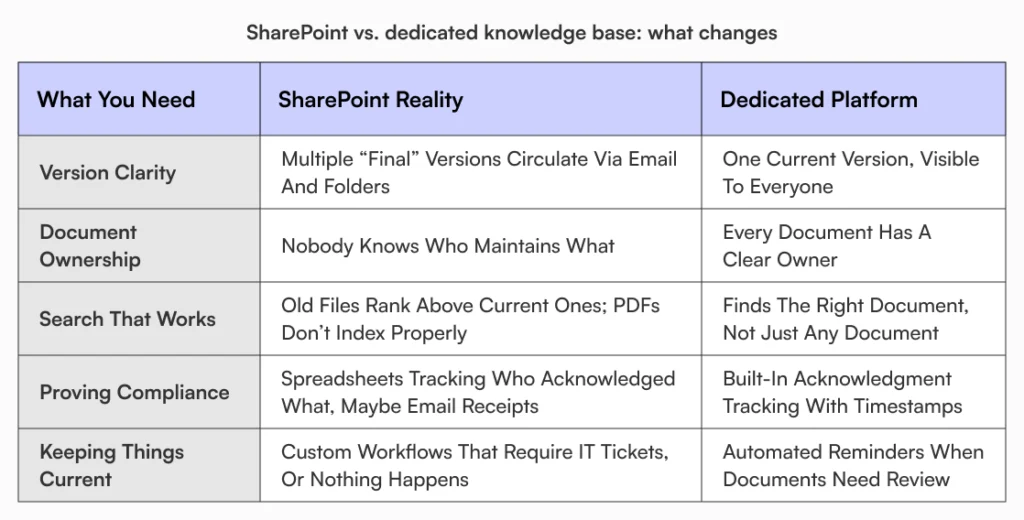
This isn’t about piling on more tools, but restoring confidence that documentation reflects reality instead of being a historical artifact no one maintains.
Why dedicated platforms make the conversation easier
This is usually where leaders start exploring alternatives.
Standalone knowledge base solutions approach documentation as a living system rather than a file repository. They emphasize version clarity, structured workflows, and centralized knowledge that stays current.
AllyMatter, for instance, is built around clear ownership, controlled updates, and acknowledgment tracking that doesn’t force HR or operations teams into technical workarounds. Approval workflows and audit trails exist to support trust rather than just recording activity.
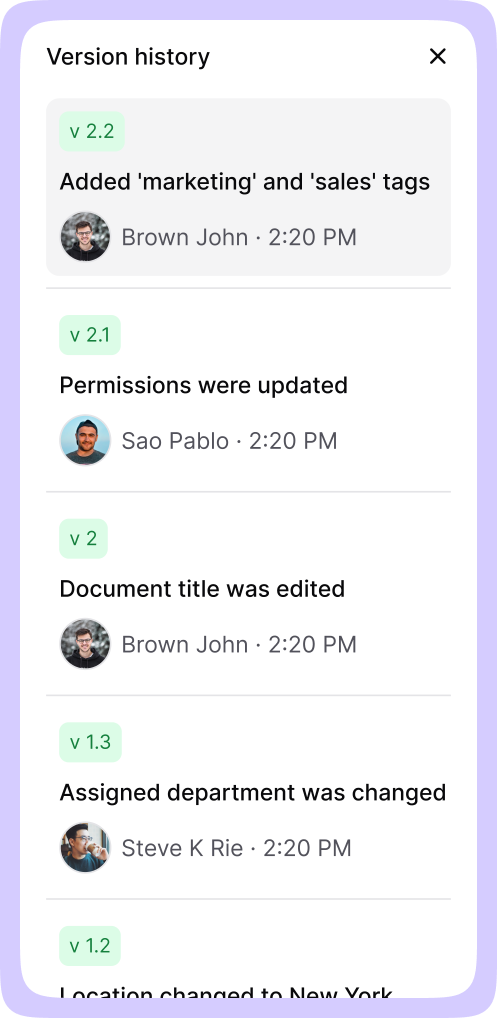
The shift isn’t really about features, though. It’s about rebuilding the belief that documentation reflects what’s actually true and current.
That change shows up in small ways first. HR stops getting “where is this policy?” messages. New hires complete self-service onboarding without needing to ask for help. Audit prep becomes a matter of exporting reports instead of reconstructing timelines from memory and email searches.
These aren’t dramatic transformations. But they’re the differences that compound over quarters and years.
When employees trust documentation again, behavior shifts. Questions decrease. Onboarding accelerates. Compliance conversations become routine instead of stressful.
That’s what growing companies are actually buying when they move on from SharePoint.
The hardest step is admitting you’ve outgrown it
SharePoint isn’t broken. It’s just no longer aligned with how growth-stage companies need to operate.
Once employees stop trusting documentation, the system has already failed its most important job. Clinging to it at that point creates more risk than value.
The hardest step is acknowledging that trust matters more than familiarity or sunk costs.
Everything after that gets easier.
See how AllyMatter helps growing companies rebuild documentation trust with clear ownership, version control, and audit trails that actually work. Try the live demo.
Frequently asked questions
Why do employees stop trusting SharePoint documentation?
Employees lose trust when documents feel outdated, search results are unreliable, and versions conflict. Once employees experience that uncertainty a few times, they stop relying on the system and build workarounds instead. It’s a gradual erosion rather than a single failure point.
Are SharePoint documentation challenges fixable with better governance?
Heavy governance and customization can address surface-level problems. But this requires ongoing IT involvement and sustained discipline that growing companies rarely have bandwidth to maintain. Most teams eventually realize they’re working against the platform rather than with it, which is when they start looking at alternatives.
Is SharePoint suitable for HR policies and SOP documentation?
SharePoint can store policies, but it struggles with acknowledgment tracking, version authority, and audit clarity. These gaps create real compliance risk for HR teams during audits or when they need to prove what employees actually acknowledged at specific points in time.
When should a company move away from SharePoint for documentation?
When employees stop trusting it as a source of truth. That’s the clearest signal the platform no longer supports how your organization operates. Once trust is gone, no amount of training or process documentation will restore it.
What should growing companies prioritize in a documentation platform?
Clarity, ownership, version control, and search reliability. Documentation must be trusted before it can be useful. Everything else is secondary to that fundamental requirement.

Vikas is a B2B marketing professional with over 14 years of experience in content strategy, messaging, and demand generation. He specializes in turning complex business challenges into clear, actionable stories to connect meaningfully with audiences.