

Knowledge Base · 7 min read
SharePoint’s 5,000-Item Threshold: When Libraries Break
The 5,000-item threshold isn’t a bug. It’s SharePoint telling you it wasn’t built for what you’re asking it to do.
If the documents your team relies on include policies that people must read, follow and acknowledge, our guide to the HR knowledge base covers how HR keeps policies, the handbook and everyday answers in one place.
Your IT team just sent another email explaining the 5,000-item limit. HR cannot locate the updated parental leave policy. Three people from operations are asking if there is “another SharePoint” where the current SOPs actually live.
Here is what is really happening. When a SharePoint document library starts breaking, it is rarely misconfiguration. The platform is being stretched past what it was designed to sustain, and the threshold is the most visible symptom of a deeper gap between file storage and knowledge management. (For the fit decision itself, see when SharePoint works for internal documentation and when it doesn’t. This piece is about what the threshold reveals.)
The 5,000-item limit protects the database, not your workflow
Microsoft documents the list view threshold at 5,000 items, a guardrail that protects database performance rather than your workflow. Once a list or library exceeds 5,000 items, SharePoint blocks unindexed queries because they can lock the entire database table. Reasonable in theory, frustrating in practice. A library loads for one person and times out for another. A filtered view works until someone adds a column. Search looks incomplete even though the files exist. The platform has not technically failed, but trust has started to erode.
Indexed columns, filtered views, and disciplined metadata can push the limit back, and IT teams do good work implementing them. The catch is that these fixes assume behavioral discipline most growing companies cannot maintain at speed. Hiring does not pause so metadata stays clean. Policy updates do not wait for views to be reindexed. The system starts demanding perfect execution from hundreds of employees, and that is when it falls apart.
How document libraries become accidental knowledge bases
Most SharePoint document libraries do not start that way. HR creates a space for policies, operations adds SOPs, finance uploads expense procedures, and over months those libraries become foundational while their structure stays what it always was: file storage.
As document counts climb, teams lean harder on metadata, which only helps if everyone applies it consistently and SharePoint can still surface it fast. Search takes the first hit, not because SharePoint search is weak, but because relevance degrades when volume grows without lifecycle controls. People stop trusting results and ask colleagues directly. Onboarding becomes the visible symptom: new hires hear “everything’s in SharePoint,” but nobody can point them to the current version.
IT workarounds mask governance risk
IT administrators carry these systems longer than they should. They build indexed columns, coach teams on filtered views, and write internal guidelines most employees never open. (We once saw a 47-page SharePoint best-practices document that exactly three people had ever accessed.) From IT’s seat the system stays manageable. From everyone else’s, it gets harder to use.
That gap matters at the executive level because workarounds hide operational risk. Policies exist, but are people finding the right ones? SOPs are documented, but are they current? Those questions surface during audits, and the answers get uncomfortable. The real cost is not performance degradation. It is governance overhead: every workaround is another rule to remember, and every rule raises the odds someone bypasses the system entirely. Knowledge systems should not require heroics to function at scale.
File storage logic doesn’t match the document lifecycle
SharePoint excels at what it was designed for: storing documents, enabling collaboration, integrating with Microsoft 365. What it struggles with is enforcing how knowledge should evolve, age, and stay trustworthy. Version history exists; version trust is different. Approval workflows can be configured, but they are optional and inconsistently applied. Ownership blurs as teams reorganize. A proper document library gives documents clear states: draft, under review, approved, outdated, archived. In SharePoint those states are implied through folders and naming conventions, not enforced by the system. That is fine when teams are small and governance is light. It becomes a liability when policies touch compliance, finance, or operations. We cover this in depth in why SharePoint fails governed documents.
Where growing companies feel it first
The pattern is consistent across functions, even when timing varies. HR notices when hiring accelerates: a new HR director at a 400-person healthcare company spent her first week asking seven people where the current benefits enrollment guide lived, and all seven pointed to SharePoint but none to the same document. Finance discovers it during audits, when documentation exists but tracing changes becomes manual work. One CFO described it as “a filing cabinet where half the folders are mislabeled and the other half are duplicates.” Operations hits it when SOPs change faster than they can be communicated: one manufacturing operations manager found three versions of their safety protocol in circulation during an unannounced inspection, all in SharePoint, none marked deprecated. These teams are not creating chaos on purpose. They are responding to growth with a tool that was not built to enforce order at this scale.
When “just use SharePoint” becomes a strategic risk
Performance issues get attention because they are visible. Governance issues develop quietly and carry more risk. Permission complexity compounds as more teams share libraries, exceptions accumulate, and knowledge silos form behind access rules nobody remembers to update. During one security incident, a leadership team found their incident-response documentation in a restricted folder the responders could not open. It was thorough and current. Finding it during the actual incident was not possible. At that point the question shifts from “how do we tune SharePoint?” to “should institutional knowledge be a side effect of file storage?”
Is your SharePoint document library showing strain?
These signals appear before performance crashes. If three or more are familiar, it is time to evaluate alternatives:
- People ask “is this the latest version?” more than once a week.
- New hires cannot find documentation without direct handholding.
- You have multiple “SharePoints” or folder structures that duplicate content.
- IT spends significant time coaching teams on metadata and views.
- Compliance or audit prep involves manual document tracing.
- Teams build their own workarounds in Google Docs, Notion, or email threads.
- Critical SOPs exist but are not trusted to be current.
- Search results feel incomplete or unreliable.
When purpose-built policy management makes sense
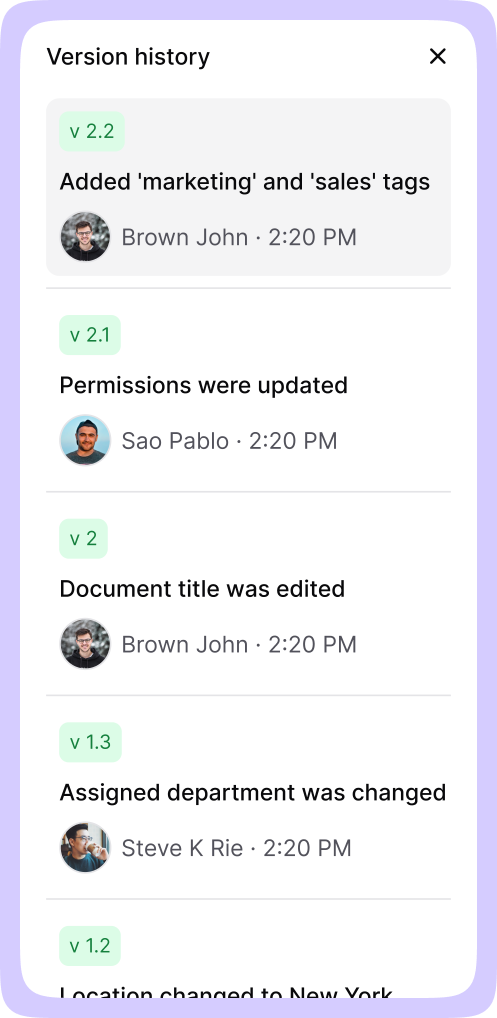
AllyMatter exists for organizations that value documentation but are hitting structural limits. Instead of forcing a file system to behave like a knowledge base, it treats policy management as something that needs governance by default. Every document has a responsible editor, so accountability is clear. Approval workflows are native, not optional. Version control ties to accountability, with version compare showing any two versions side by side and the changes highlighted. Audit trails exist because growing companies need them before compliance requires them, and they export per document, per folder, or per user.
This is not about replacing SharePoint everywhere. Many teams keep it for collaboration and file storage. The shift is recognizing when something mission-critical deserves a system designed for knowledge, not document hosting.
Start your 30-day free trial. No credit card to start, and a 30-day money-back guarantee if you convert and change your mind. Start free or try the sandbox demo.
A decision framework for executives
SharePoint remains the right choice when documentation volume is modest, ownership is clear, and governance requirements are light. It starts constraining teams when documentation becomes mission-critical, spans multiple departments, and changes frequently, when knowledge needs to be trusted rather than just stored. The signal is not document count. It is behavior. If people ask “is this the latest version?” more than once a week, the system is already under strain. If onboarding drags because documentation cannot be trusted, that is a signal. If compliance teams worry about traceability, that is another.
What the threshold reveals
The 5,000-item threshold gets blamed because it is tangible. What it exposes is the gap between file storage and knowledge management. A SharePoint document library can survive past that limit, but only with escalating effort and accumulating risk. Growing companies eventually decide whether internal knowledge is infrastructure or clutter, and the system they choose makes that decision for them. The features that matter for scaling a document library have less to do with storage capacity and more to do with governance, accountability, and trust.
If you decide to move on a yearly plan, migration is on us. We bring your existing documentation across, structure and permissions included, so the switch is not a project you run alone. The migrations page covers how it works.
Frequently asked questions
Does every SharePoint document library hit the 5,000-item limit?
No. Smaller teams with limited documentation and consistent governance may never see it. It becomes a problem when SharePoint serves as a centralized document library across departments without enforced metadata discipline or lifecycle management.
Can indexed columns and filtered views solve it permanently?
They help, sometimes substantially, but they delay the problem rather than remove it. As teams grow and content accelerates, the fixes depend on sustained discipline most organizations cannot maintain during rapid growth.
Why does SharePoint search become unreliable as content grows?
Relevance degrades when content accumulates without lifecycle management. As outdated and duplicate documents pile up, people lose confidence in results and stop using search. The capability exists, but trust erodes.
When should companies move beyond SharePoint for policies and SOPs?
It is less about size and more about complexity. When documentation spans departments, compliance matters, onboarding depends on self-service access, and governance needs enforced workflows, the limits show up quickly.
Should companies replace SharePoint or complement it?
Most complement it. SharePoint stays useful for collaboration and file storage, while mission-critical knowledge moves to a dedicated system designed for governance, accountability, and long-term scale.