Your policy changed last Tuesday. It’s still not live. Legal approved a sentence in email, HRBPs left comments in Slack, and a “FINAL_v6.pdf” is circulating again. Meanwhile, managers are guessing which version applies because the handbook PDF lags your real decisions. That’s not a content problem.It’s an HR policy management workflow problem.
Besides, this isn’t just about efficiency. When your company scales from 200 to 500 people, policy chaos becomes a compliance liability. Every scattered update is a potential audit flag.
This playbook shows how to move from weeks to days (or shorter) using a repeatable flow inside your HR knowledge base:
draft → approve → publish → target → notify → acknowledge → report/export
New to HR knowledge bases? Start with our comprehensive guide on everything you need to know about building a knowledge base for HR.
You’ll set sensible SLAs, target by role/region/employment type, add a “What changed” banner for returning readers, and track completion, and overdue follow-ups, all in one place.
And you’ll see where AllyMatter (purpose-built among knowledge bases for HR) streamlines approvals, version history, policy acknowledgments, targeting, and exports; so speed never becomes risk.
Slow updates, multiple versions, shaky proof
‘Didn’t Legal approve this last week?’
Yes, but finding that approval means digging through three email threads and a Slack conversation that happened while you were on vacation. When policy updates meander through email and shared drives, the business runs on tribal knowledge instead of your HR knowledge base:
- Legal says “approved,” but the policy page never reflects it.
- “Latest version” depends on which folder you opened.
- Managers paste old language because the new policy isn’t published.
- HR spends days clarifying “Which one is current?”
- There’s no acknowledgment trail that ties to a specific version.
This scattered approach has real costs. When policies live in email threads and shared drives, that search time multiplies across your entire organization.
During your next audit or compliance review, these gaps become expensive problems. Regulators want proof you delivered updated policies to the right people at the right time; email forwards and Slack messages don’t qualify as evidence.
Fix: Build a single flow inside your knowledge base where approvals live on the policy, new versions are recorded in version history, audiences are targeted precisely, and read receipts prove the right people saw the right text. This approach to policy management eliminates the chaos entirely.
Need foundational knowledge base guidance? See our internal knowledge base 101 guide.
Consider Rachel, VP of People at a 400-person healthcare tech company. When their data privacy policy needed urgent HIPAA updates, she spent three weeks tracking down who had seen which version. Two departments were operating under outdated guidelines, and their compliance audit flagged it as a material weakness. Now she handles HR policy management directly through their knowledge base with built-in approval chains and acknowledgment tracking. Updates happen in days, with complete audit trails.
The outcome to aim for: Days (even hours), not weeks – without sacrificing proof
“Fast” updates only matter if you can also show:
- Who approved (names, roles, timestamps) and why (change note)
- Which version is current (and which version applied last quarter)
- Who needed to read (audience by role/region/employment type)
- Who actually read (acknowledgment completion, overdue list)
A modern HR compliance knowledge base (like AllyMatter) bakes this into the policy page itself: draft, approval chain, publish (new version), target and notify, acknowledge, and exportable evidence – no spreadsheets, no inbox archaeology.
Define SLAs for each step (so work moves without chasing)
SLAs make expectations visible for HR, Legal, and managers. Calibrate them to your org; the power is in the clarity and repeatability.
Draft (Owner → HRBP review)
- SLA: within 1 business day (minor), up to 2 business days (material)
- Definition of done: clean Summary + Applicability, and a crisp change note (“what/why”)
Legal review (if applicable)
- SLA: within 1–2 business days for material changes; skip minor wording
- Proof: approver name/role/timestamp captured on the policy page (not in email)
HRBP/CHRO sign-off (material)
- SLA: within 1 business day after Legal
- Proof: approver lineage visible on the page
Publish (create new version)
- SLA: same day as final approval
- Proof: new immutable version appears in Version History with timestamp + editor + change note
Notify (targeted)
- SLA: same day as publish
- Scope: role, region/state, employment type (e.g., CA non-exempt, U.S. managers)
Acknowledge (must-reads)
- SLA: 5–7 days to complete; reminders at T+3 and T+6
- Proof: acknowledgment certificate tied to the exact version
Put these in your Policy Change Playbook and link it in the footer of each policy page in your knowledge base. Expectations that are visible get met.
Once your SLAs are clear, implement them through a consistent workflow that eliminates guesswork.
One policy update workflow you run every time
Consistency is your throttle. Use one policy update workflow HR for everything, from PTO tweaks to CA meal/rest clarifications, inside your HR knowledge base.
Draft in the KB
Edit the policy article using your template (Summary, Applicability, Details, Exceptions).
Add a change note: “Clarified accrual table for Year 3+; added CA sick leave note.”
Route approvals in-system
HRBP → Legal (material) → CHRO (material).
Approver names/roles/timestamps captured on the policy itself (no screenshots, no email chains).
Publish = new version
The current page becomes a new version; older versions remain in Version History for audit support.
Target the audience
Deliver to exactly who must know: by role, org, region/state, and employment type.
Notify with context
A short update with the “What changed” note, the policy link, and the Acknowledge CTA (if required).
Acknowledge (as required)
Toggle Acknowledgment required; set a due date and automated reminders.
Employees complete both in one flow: read → acknowledge → timestamped record saved.
Report & export
Track acknowledgment completion; resend reminders as needed.
Export Audit Trail (versions/approvals/notes) and Acknowledgments (CSV/PDF).
In AllyMatter, all seven steps live on the policy. Approvals, version history, targeted delivery, acknowledgment, and exports are native. This is why AllyMatter stands out among knowledge bases for HR.
Target by role, region, and employment type
Blanket blasts create noise, and weak evidence. Targeting ensures the right people receive the relevant change and lets your reports match the exact audience.
- Role: Managers vs ICs; department-specific (People Managers, Field Ops)
- Region/State: U.S. vs CA/NY/WA; country-specific rollouts; site-specific safety
- Employment type: Exempt vs non-exempt; full-time vs part-time; contractors
- Org unit: Teams impacted by a local process update
Examples:
- Timekeeping clarification to U.S. non-exempt employees + People Managers
- CA meal/rest update to California employees and California managers
- Security 101 refresh to all employees with a separate manager heads-up
In AllyMatter: Set role/org/location tags targeting at publish. Your acknowledgments export will reflect the exact population you selected – clean evidence for audits.
Make “what changed?” obvious for returning readers
Don’t make people re-read an entire policy to spot a two-line edit. A simple banner + pinned change note reduces confusion and repeat questions.
- Banner (2–3 lines for 14–30 days):
“What changed (Aug 12): Clarified PTO accrual for Year 3+; added CA sick leave note. Action: Review and acknowledge by Friday (CA employees: read addendum).” - Pinned change note:
A human, one-sentence summary saved with the version – great for Legal and auditors. - Link to action:
If steps changed, link the Procedure (e.g., Request PTO) or Manager Guide.
In AllyMatter: The change note is stored with the version, and you can surface a light banner in the policy summary so repeat visitors see the update immediately.
Notifications that drive action
Your announcement should be short, scoped, and clearly request acknowledgment if required.
- All-employee/manager targeted update
Policy update: PTO & Sick Leave (U.S.). What changed: accrual table for Year 3+; California sick leave note. Action: Review and acknowledge by Friday. CA employees: also read the CA addendum.
- Manager heads-up
Heads-up: Timekeeping (U.S., non-exempt). Clarified daily OT examples; no change to eligibility. Please link this in your team channel. Employees will acknowledge by Wednesday.
In AllyMatter: Publishing lets you notify the targeted audience immediately and start the acknowledgment window with reminders. One click from the message opens the exact version flow in your knowledge base.
Reminders that get done (without sounding punitive)
Think of reminders as a service: concise nudges that keep your record clean.
- Window: 5–7 days to read
- Two automated reminders: day 3 and day 6
- Manager visibility: so leaders can nudge their teams without pinging HR
- Self-serve link: reminder clicks open the exact policy/version flow
Reminder: PTO & Sick Leave update is due for acknowledgment by Fri. Here’s the link. Thanks for helping us keep records current.
In AllyMatter: Reminders are automatic after you set the due date. The Acknowledgment dashboard shows completion % overdue readers and much more.
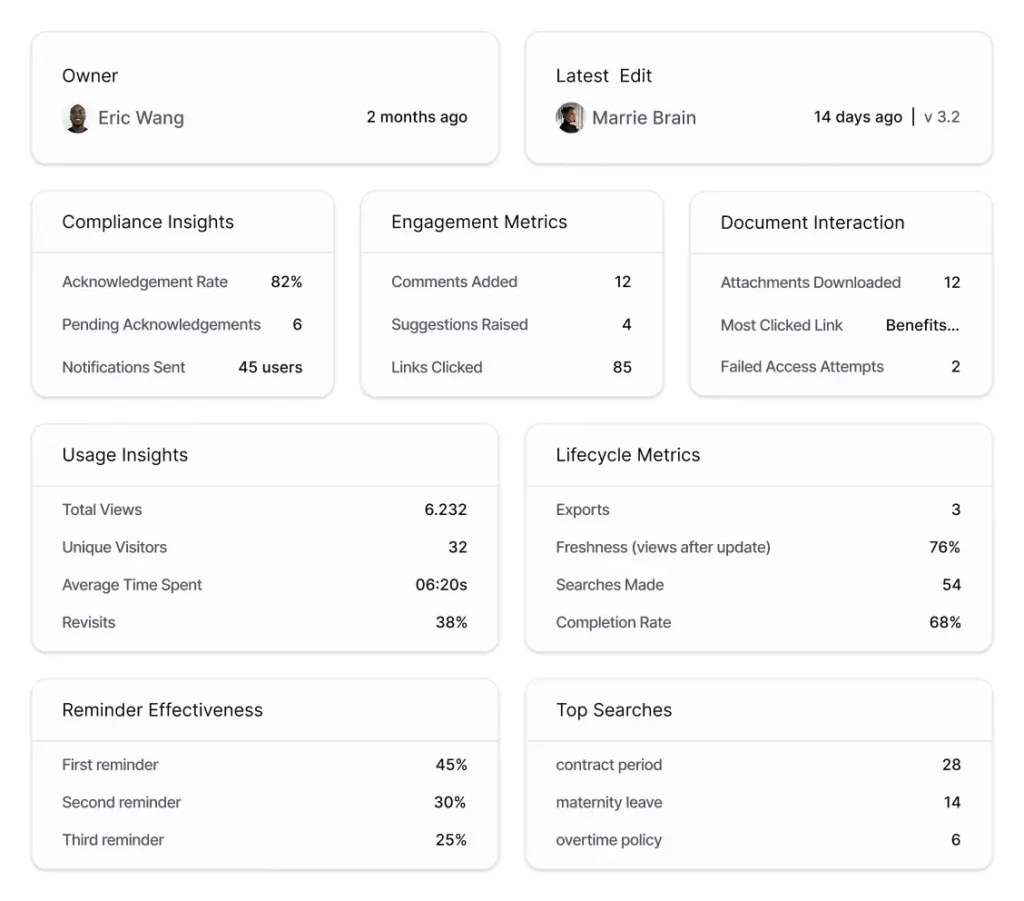
Reporting: Completion and overdue follow-up
Executives and auditors want crisp evidence that lives with the policy in your HR knowledge base. Keep a simple monthly view and export on demand.
Dashboard signals
- Completion rate (acknowledgment) per policy; drill by org/role/location
- Overdue readers (by team) with one-click resend
- Top searches & zero-result searches on the policy topic (are people still confused?)
- Recent versions with change notes + approver lineage
Export artifacts
- Audit Trail (CSV): version_id, edited_at_utc, editor, change_note, approvers + timestamps, published_at_utc, policy_url, version_history_url
- Acknowledgments (CSV/PDF): audience, due date, completion %, overdue list
- Policy packet (PDF): current policy + header (version, approvers, dates, change note)
In AllyMatter: Open the policy → Export → choose Audit Trail and Acknowledgments. Legal gets artifacts in minutes – one of the biggest advantages of using knowledge bases for HR over generic wikis.
Example SLAs, banners, and notes you can copy
Sample SLA Table
| Step | Minor wording | Material content |
| Draft (owner) | 1 business day | Up to 2 business days |
| HRBP review | Same day | 1 business day |
| Legal review | — | 1–2 business days |
| CHRO (if req.) | — | 1 business day |
| Publish + notify | Same day | Same day |
| Acknowledgment window | 5–7 days | 5–7 days |
| Reminders | Day 3 & Day 6 | Day 3 & Day 6 |
“What changed” banner (template)
What changed (MMM DD): Applies to: <audience/region>. Action: <review by date>. No change to eligibility (optional).
Manager heads-up (template)
Manager heads-up: . <1-line substance>. Please link this in your team channel. Employees will acknowledge by .
Before Vs after: What “days, not weeks” looks like
Before (typical)
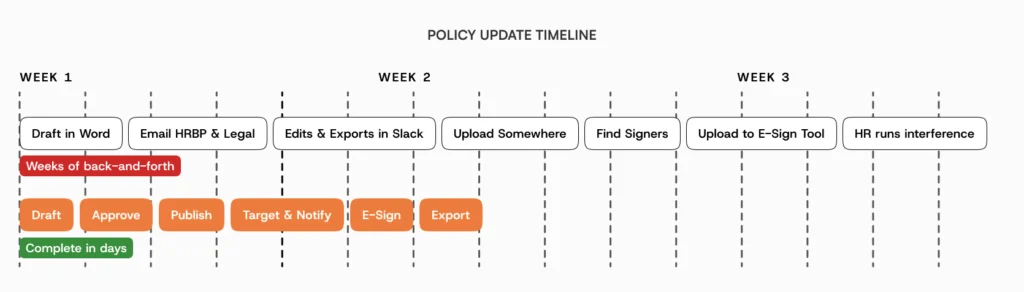
Word doc → email to HRBP → email to Legal → edits in Slack → someone exports a PDF → file uploaded somewhere → no one knows it’s live → three versions exist → Find the Right One → Upload it to an e-sign provider → Select all those who need to sign it → Double Check the list → And HR still runs interference for weeks.
After (target state)
Policy edited in your HR knowledge base (AllyMatter) → approvals captured on-page → publish creates a new version → targeted audience notified → acknowledgment → reports/exports ready for Legal/leadership in minutes.
Implementation checklist (drop into your project doc)
- Require change notes and approvals on publish (HRBP → Legal → CHRO where needed).
- Define SLAs per step; post the Policy Change Playbook in your knowledge base.
- Pre-map audiences (role, region/state, employment) for your top 10 policies.
- Add the “What changed” banner to your policy template.
- Turn on acknowledgment for must-reads; set default windows and reminders.
- Stand up reporting (completion, overdue, zero-result searches).
- Practice exports (Audit Trail CSV + Acknowledgments CSV/PDF + optional policy packet PDF).
- Pilot one policy (e.g., Timekeeping & Overtime, or PTO & Sick Leave + CA addendum).
- Run a retro: Did we hit SLAs? Where did we wait? Tighten handoffs.
Why AllyMatter gets you days – not weeks
You can brute-force updates through a wiki or other non-purpose built knowledge bases and email, but you’ll still chase approvals, lose change notes, and spend nights assembling signature packets. AllyMatter turns the entire flow into a few reliable actions in your HR knowledge base:
- Approvals on the policy (names/roles/timestamps), not buried in email
- Version history by default (open prior versions; restoring creates a fresh version)
- Targeted delivery by role/org/location, so the right people see the change
- Acknowledgments in one flow, with due dates and reminders
- Exports (Audit Trail CSV, Acknowledgments CSV/PDF, policy packet PDF) – clean evidence, fast
When your auditor asks ‘How do you prove managers in California received the updated meal break policy?’, you export a clean report in minutes; no spreadsheet archaeology required. This is exactly what compliance teams need for regulatory reviews.
Policy change shouldn’t be a multi-week slog. With clear SLAs, in-tool approvals, targeted notifications, and acknowledgment tracking inside your HR knowledge base, you’ll ship updates in days, not weeks – with the audit trail to match.
See how growing companies can build audit-ready policy management without enterprise complexity. Join the waitlist to be among the first to experience HR documentation that scales with your business.
See the end-to-end flow: Book a demo
Frequently asked questions
What is the best way to manage HR policies?
The most effective HR policy management approach uses integrated workflows within a knowledge base system, eliminating scattered approvals and ensuring proper audit trails.
Can employees see old versions?
Employees see the current version. Admins/auditors can review prior versions in version history.
How do we prove we notified the right people?
Target at publish (role/org/location). Your acknowledgments export mirrors the exact audience you selected, with completion and overdue detail.
What’s the compliance risk of our current email-based updates?
Email-based policy updates create several compliance vulnerabilities: no proof of delivery to specific roles, unclear acknowledgment trails, version confusion during audits, and difficulty demonstrating due diligence to regulators. When auditors ask “How do you know managers received the updated harassment policy?”, email threads and forwarded attachments don’t provide the clear evidence trail that purpose-built HR knowledge bases offer with targeted delivery and acknowledgment tracking.
How do we justify the investment in purpose-built HR documentation?
Calculate the hidden costs of your current process: HR time spent clarifying which policy is current, compliance risks from inconsistent implementation, and audit preparation time assembling evidence. Most growing companies find the productivity gains and risk reduction pay for the platform within quarters.