
An HR knowledge base is a centralized, always-available hub where employees access everything they need to know about company policies, procedures, and best practices. From answering common questions to sharing important documents and updates, it streamlines communication and reduces dependency on HR for routine information.
By offering a searchable library of HR content, employees find accurate, up-to-date answers without waiting on email replies or meetings. Response times improve, employee autonomy goes up, and HR stops being the help desk for the same five questions every week.
As organizations become more distributed and employee expectations grow, a well-structured HR knowledge base is no longer optional. It ensures consistency, improves transparency, and supports a scalable approach to managing HR communication.
Common workplace situations a working HR KB handles:
- It’s Sunday evening and a new developer has questions about family leave options before her Monday meeting
- A team leader needs to review performance management procedures right before a difficult conversation
- An employee accepting an internal transfer wonders how their health insurance coverage might change
In the past, these meant delayed answers, inconsistent information, or off-hours calls to HR staff. A well-designed knowledge base converts the pain points into self-sufficiency and frees HR to focus on strategic work.
The business case for HR knowledge bases
According to McKinsey, employees spend nearly 20% of their workweek looking for internal information or tracking down colleagues for help. For HR teams, this isn’t just lost productivity. It’s a structural challenge in how organizations manage and share critical employee information.

Source: IDC; McKinsey Global Institute Analysis
Beyond convenience, implementing an HR knowledge base delivers tangible business benefits:
Boost efficiency and productivity
HR teams spend countless hours answering the same questions repeatedly, hours that could be dedicated to strategic initiatives. A KB reduces repetitive inquiries when implemented properly. This frees HR to focus on complex cases that need human attention. Employees find information instantly, and policy application becomes more consistent.
A growing tech company implements an HR knowledge base and tracks a significant reduction in routine HR inquiries within three months. The HR team redirects many hours per week toward recruitment and employee development.
Ensure consistent and accurate information
When HR information lives in email threads, shared drives, and individual team members’ heads, inconsistency is inevitable. A knowledge base creates a single source of truth where everyone receives the same information. It eliminates contradictory answers, reduces compliance risk from outdated information, and makes updates easy to implement.
Consistency matters in HR. Research shows employees are more likely to stay when they receive consistent feedback and information. A knowledge base makes that consistency possible at scale.
Empower employee self-service
Modern employees expect immediate access to information. A knowledge base gives employees 24/7 access, privacy for questions they might not want to ask HR directly, and faster answers without the wait.
Streamline onboarding and training
Onboarding is often overwhelming for new hires and HR teams. A knowledge base simplifies it by providing a single resource for onboarding information. This makes training consistent across departments and locations, lets new hires learn at their own pace, and reduces administrative burden on HR and managers.
Preserve institutional knowledge
When experienced employees leave, critical knowledge often walks out the door with them. A knowledge base captures and preserves organizational knowledge, reducing dependency on specific individuals. This creates continuity during transitions and enables faster ramp-up for new team members.
Starting your HR knowledge base
| Building It Yourself | Hiring an Expert |
| Complete control over design and content | Access to proven templates and frameworks |
| Leverages internal knowledge of your culture | Brings best practices from multiple implementations |
| No external expertise costs | Higher initial investment |
| More time-consuming | Faster implementation timeline |
| Steeper learning curve | Smoother deployment process |
| Requires significant internal resources | Still needs substantial SME involvement |
| Fully customized to your specific needs | May need adaptation to your unique context |
| Team builds valuable skills internally | Experts can train your knowledge owners |
| No external dependencies | Potential for knowledge transfer challenges |
| Perfect alignment with existing systems | May introduce new processes and standards |
Building your HR knowledge base: The step-by-step process
Creating an effective HR knowledge base requires planning and ongoing commitment. Here’s a structured approach to building yours:
1. Designate a knowledge champion
The cornerstone of any successful knowledge base initiative is clear accountability through a dedicated owner. The knowledge champion doesn’t necessarily require a new full-time role, but the responsibility should be formally incorporated into someone’s job with appropriate time and recognition.
The ideal knowledge champion has:
- Strong organizational and project management skills
- Clear understanding of HR functions and common employee questions
- Good relationships across departments
- Attention to detail and quality standards
- Interest in information architecture and content management
This person guides content development, maintains quality consistency, analyzes usage metrics, and advocates for adoption throughout the organization.
2. Extract knowledge from HR experts
Much of your most valuable HR knowledge currently exists only in the heads of your team members. To extract it:
- Interview your most knowledgeable HR specialists
- Ask what questions they answer most frequently
- Identify common misunderstandings and pain points
- Document where information currently resides
An HR specialist at a growing tech company notices she’s answering the same parental leave eligibility question at least five times per week. After documenting it as a knowledge base article with clear step-by-step guidance and eligibility criteria, the routine inquiries drop significantly, freeing time for new wellness initiatives.tep guidance and eligibility criteria, these routine inquiries dropped significantly, allowing Natalie to focus on developing new employee wellness initiatives.
3. Establish a content creation process
Sustainable knowledge management requires clear processes:
- Develop a system for flagging knowledge base opportunities
- Create workflows for drafting, reviewing, and publishing content
- Set up regular content audits and updates
- Build content creation into job descriptions and performance expectations
The best knowledge bases grow organically from real employee questions. Every support ticket or email question becomes a potential KB article:
- HR staff tag inquiries that should become KB content
- Knowledge base owner reviews tagged items weekly
- Subject matter experts draft content
- Technical writers polish for clarity and consistency
- Content is published and promoted
4. Set standards for quality content
Quality trumps quantity. Establish standards for:
- Clear, concise, action-oriented writing
- Consistent formatting and structure
- Appropriate reading level and terminology
- Regular updates and review cycles
Create article templates with standard sections:
- Overview (what this article covers)
- Step-by-step instructions (when applicable)
- Frequently asked questions
- Related policies or articles
- Last updated date and owner
5. Implement technical reviews before publishing
Accuracy is non-negotiable for HR knowledge bases. Build review into your process:
- Workflow where subject matter experts verify technical accuracy
- Separate review for clarity and usability
- Never allow content to publish without review
- Document who approved content and when
What to put in your HR knowledge base
The content of your knowledge base should be driven by employee needs, not organizational structure. Use these strategies to determine what to include:
Understand employee needs
Start by gathering data on what employees actually need:
- Analyze common HR inquiries and support tickets
- Survey employees about information they struggle to find
- Review onboarding feedback for gaps in initial information
- Check search logs from your intranet or existing knowledge resources
Essential categories for your HR knowledge base
While every organization is different, most HR knowledge bases should include the categories below.
Benefits and compensation
- Health insurance options and enrollment processes
- Retirement plans and contribution information
- Bonus and incentive structures
- Paid time off policies and procedures
- Leave policies (parental, bereavement, medical, etc.)
Workplace policies
- Code of conduct
- Remote/hybrid work policies
- Expense reimbursement procedures
- Technology usage guidelines
- Safety and security protocols
Career development
- Performance review processes
- Training and education opportunities
- Internal job posting procedures
- Promotion and transfer policies
- Professional development resources
Onboarding and offboarding
- New hire paperwork and procedures
- Training requirements for new employees
- Exit interview processes
- Equipment return procedures
- Knowledge transfer guidelines
Company information
- Organizational structure
- Company mission, vision, and values
- Office locations and facilities information
- Company events and traditions
- Department overviews and contacts
For role-by-role inspiration, see Internal Knowledge Base – HR Department Use Cases
Best practices for building an effective HR knowledge base
A working HR knowledge base is more than a static repository. It’s a platform that gives employees clarity, confidence, and autonomy. Nine practices for planning, building, and maintaining it well.
Define the scope and structure from the start
Clarify whether your HR knowledge base will be internal, employee-facing, or both. An internal KB is designed for HR teams and stakeholders to access detailed processes, compliance protocols, and workflows. An employee-facing portal simplifies these into accessible guidance on leave, benefits, reimbursements, and more.
A hybrid approach often works best: a streamlined external layer for common employee queries, backed by an internal layer with richer detail for HR team use. Defining this upfront sets the right tone, structure, and prevents content sprawl.
Set clear roles and permissions
Allowing too many people to create or edit content leads to inconsistencies. Assign ownership to a few trusted team members who understand both the content and how employees interact with it.
Restrict editing privileges so published content is vetted. Not all content needs to be visible to everyone. Use role-based access for sensitive topics like performance management frameworks or compensation guidelines.
Organize for discoverability
A well-written article doesn’t help if it’s buried. Structuring the knowledge base effectively is as important as the content. Use categories to group related topics (payroll, onboarding, leave, benefits) and apply consistent tagging.
Hierarchy matters. General guidance at the top level, specific instructions nested beneath. A user searching for “maternity leave” should find both a summary policy and related FAQs or documentation in one coherent section.
Write clear, simple, actionable content
Good HR content is clear, not clever. Write in plain language. Avoid acronyms or jargon. Break complex processes into step-by-step guides. Use bullets, numbered lists, and subheadings to make content scannable.
It’s often better to be too detailed than too vague. Instead of “submit your documents for reimbursement,” walk through exactly how to do that, where to upload them, and when to expect a response.
Maintain and improve regularly
Outdated information is worse than no information. Set regular review cycles (monthly or quarterly) and tie updates to policy changes or compliance updates. Mark articles with review dates. Clearly indicate articles under revision.
Retire old articles or merge redundant ones. A leaner knowledge base often performs better than a bloated one.
Curate a reliable information ecosystem
Think of your knowledge base as an interconnected system. Link related articles to each other, embed relevant PDFs or resources, offer next steps at the end of each entry.
Encourage collaboration and community input
Use feedback buttons, suggestion forms, or comments to gather real-time insight on what’s missing, unclear, or most useful.
Integrate knowledge creation into routine workflows
Don’t wait until the end of the quarter to write documentation. After every onboarding session or town hall, collect the top questions and turn them into short articles. If someone asks something twice in Slack, consider it a candidate for the KB.
Enable sharing and feedback
Treat your knowledge base like any other product. Encourage employees to share articles. Monitor which content gets shared or bookmarked most. Use simple surveys to measure whether articles are helpful or outdated.
What to look for in knowledge base software
The right platform can make or break the initiative. Key features to consider.
Search functionality
Modern knowledge bases improve search results through:
- Natural language processing to understand employee queries
- Learning from search patterns over time
- Automatic suggestion of related content
- Support for synonyms and alternative terminology
If an employee searches “maternity,” the system should recognize this is related to parental leave, family leave, and FMLA, even if those exact terms aren’t used.According to Deloitte research, survey respondents who found it difficult to obtain information from repositories also rated the value of that information below average. On the other hand, 71% who considered access easy perceived its value as above average. Accessibility and perceived value are directly linked.
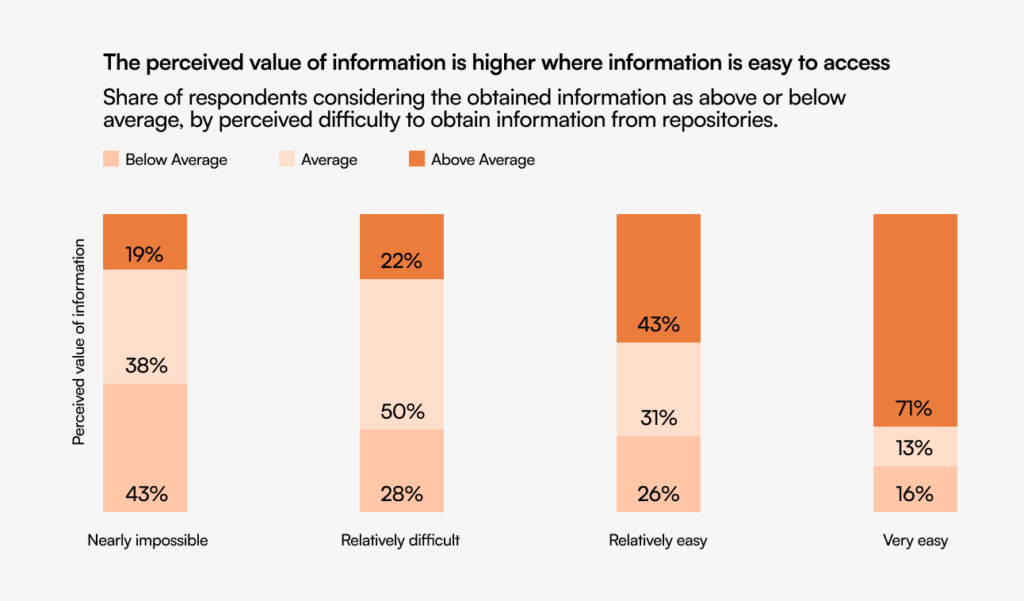
Source: Deloitte European Workforce Survey, 2020
Categorization and tagging
- Flexible category structures with multiple levels
- Comprehensive tagging capabilities
- Cross-reference content across categories
- Automated tag suggestions based on content
Version control
- Complete history of content changes
- Ability to revert to previous versions if needed
- Clear indication of when content was last updated
- View changes between versions
Version control is critical for compliance. You may need to verify what policy was in effect at a specific point in time.
User permissions and access control
- Granular permission settings for different user groups
- Restrict sensitive content to specific roles
- Options for temporarily providing elevated access
- Complete audit logs of content access
Multimedia support
- Support for videos, images, and audio
- Document linking for policies and forms
- Mobile-friendly display of all content types
Analytics and reporting
- Content usage statistics to identify popular articles
- Search analytics to find gaps in content
- User feedback tracking to measure satisfaction
Analytics might reveal that your parental leave policy is viewed frequently but users spend very little time on the page, suggesting the content isn’t clear or complete.
How to structure your HR knowledge base
The structure directly impacts usability.
Define clear categories
Start with broad, intuitive categories aligned with how employees think about HR information:
- Benefits and Compensation
- Workplace Policies and Procedures
- Career Development
- Onboarding and Training
- Time Off and Leave
- Health and Wellness
Create logical subcategories
Break down each main category into subcategories. Under “Time Off and Leave,” you might include:
- Vacation Time
- Sick Leave
- Parental Leave
- Medical Leave
- Bereavement
- Sabbaticals
- Holidays
Use consistent naming conventions
- For processes: start with action verbs (“Requesting Time Off,” “Enrolling in Benefits”)
- For policies: use descriptive titles (“Remote Work Policy,” “Code of Conduct”)
- For explanations: use “Understanding…” or “About…” (“Understanding Your 401(k) Options”)
Tag articles with relevant keywords
- Include synonyms and alternative phrasings
- Add role-specific tags (manager, new hire, remote employee)
- Include related process or policy names
- Tag by office location if policies vary by location
Establish article templates
Standardize the format to improve readability:
- Overview/purpose
- Applicability
- Details
- Procedures (when applicable)
- FAQs
- Related content
- Contact
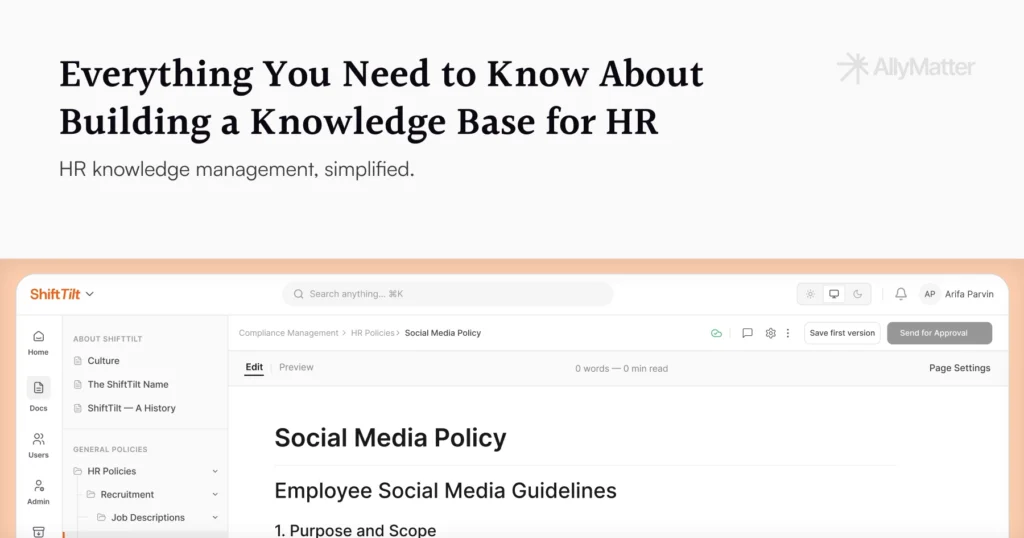
For more, see Everything You Need to Know about Building a Knowledge Base for HR.
Measuring the success of your HR knowledge base
Metrics help you demonstrate value and identify improvement opportunities.
Key performance indicators
- Usage statistics: number of articles viewed, search queries, unique users
- Time savings: reduction in HR inquiries, faster resolution times
- Employee satisfaction: feedback scores, willingness to recommend
- Content quality: accuracy, completeness, and clarity ratings
- Business impact: onboarding time reduction, compliance improvement
Continuous improvement strategies
- Regular content audits based on usage and feedback
- Gap analysis comparing search queries to available content
- User testing to identify navigation or clarity issues
- Benchmarking against industry best practices
If analytics show that users frequently search for terms not included in the KB, that’s a content gap to address.
YThree scenarios
An honest read on whether you’re ready:
If you’re under 30 employees and HR is one person who can hold the policies in their head, a clean Drive folder with strict naming rules will hold for a while. The full HR KB build pays off when the team grows past the size where one person knows everything.
If you’re 30 to 200 employees and HR is fielding repeat questions, drowning in policy versioning, or prepping for an audit, this is the moment. AllyMatter is what we built for this transition.
If you’re 200+ employees, multi-location, or in a regulated industry, a structured HR KB with audit-ready acknowledgments and approvals is not optional. AllyMatter or another purpose-built KB makes sense here. We’d start with AllyMatter.
Your path to HR knowledge base success
An effective HR knowledge base transforms how your organization manages information, supports employees, and enables HR to deliver strategic value:
- Employees self-serve instead of waiting on HR
- HR spends less on admin and more on strategic work
- Policy application is consistent across the company
- Institutional knowledge survives transitions
- Compliance and risk management improve
Treat your KB as a living system, not a one-time project. The organizations that get the most from it are the ones that build maintenance into the routine from day one.
Building your HR knowledge base with AllyMatter
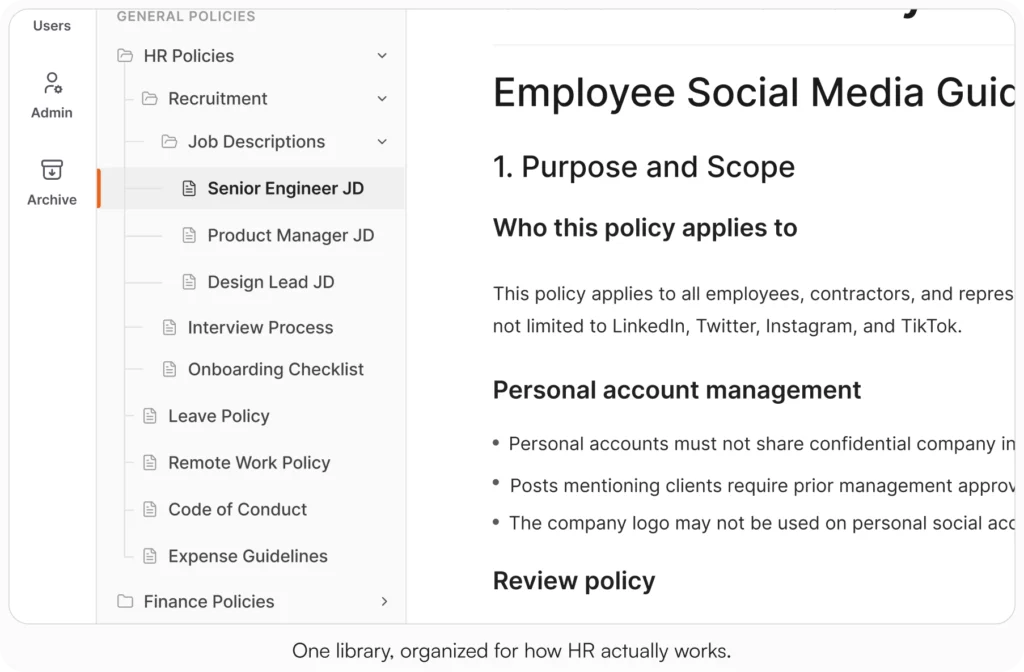
AllyMatter addresses the specific challenges HR teams face when creating and maintaining documentation. Granular access control ensures sensitive HR information reaches only appropriate team members while making general policies available to all employees. Approval workflows route updates through the right reviewers before publication.
The platform’s organization capabilities use tags and metadata search to help employees find what they need. Built-in audit trails track every change, supporting compliance while providing transparency.
For growing organizations, AllyMatter scales with your needs. User management lets you add team members and adjust permissions as the company expands, while version control ensures everyone accesses current information.
For more on specific comparisons, see Notion vs AllyMatter for HR Policy Management, Confluence vs AllyMatter for HR Operations, and Why HR Teams Can’t Track Policy Acknowledgments in SharePoint.
HR documentation that can’t keep up with your headcount creates problems that compound quickly. Start your 30-day free trial. No credit card to start, and a 30-day money-back guarantee if you convert and change your mind. Or try the live demo to see search, tag-based access, and acknowledgment tracking with realistic HR content already populated.
Not ready for a trial? Migration from Confluence, Notion, SharePoint, or Drive is on us when you decide. We’ll move your existing HR docs over and have you running in about a week.
Frequently asked questions
What’s the difference between an HR knowledge base and a traditional employee handbook?
An employee handbook is typically a static document covering company policies. An HR knowledge base is a dynamic, searchable platform that includes policies, procedures, FAQs, and step-by-step guides. Knowledge bases offer real-time updates, multimedia content, and self-service capabilities that handbooks can’t provide.
How long does it take to build an effective HR knowledge base?
Most organizations launch a basic HR knowledge base within 4-6 weeks, starting with essential policies and common employee questions. Building a comprehensive knowledge base is an ongoing process that evolves with the organization.
Should our HR knowledge base be internal-only or accessible to all employees?
The best approach is often a hybrid model with different access levels. Create employee-facing sections for policies, benefits, and common procedures, while maintaining internal-only sections for sensitive HR processes and detailed workflows that require HR expertise.
How do we ensure employees actually use our HR knowledge base?
Make it easily discoverable, well-organized, and genuinely helpful. Promote it during onboarding, include links in email signatures, regularly communicate new additions. Most importantly, content has to be accurate, up-to-date, and in plain language.
Related reading
- 10 Ways AllyMatter Transforms HR Teams
- How to Build a Knowledge Base for HR Teams
- Internal Knowledge Base – HR Department Use Cases
- Notion vs AllyMatter for HR Policy Management
- Avoid HR Headaches: Stay Compliant without Legal Bottlenecks

Founder of AllyMatter I’m founder of AllyMatter, an operations-first knowledge base for growing companies. Before AllyMatter, I co-founded Syren Cloud and helped scale it into a 300-person organization across two countries, leading marketing, operations, and HR. We moved fast, served demanding customers, and learned the hard way that internal knowledge systems built for help docs or IT don’t solve day-to-day operations. AllyMatter is my answer—tools that turn tribal knowledge into trusted, searchable processes. This blog shares the playbooks, checklists, and lessons I wish I’d had while scaling.