It is the same five questions every week.
- “When do paychecks hit?”
- “How do I request PTO?”
- “Where do I update my W-4?”
You answer, people thank you, and then someone else asks again tomorrow. That loop does not scale. The fix is not “more patience,” it is a simple HR FAQ knowledge base that employees can search in seconds.
McKinsey found that employees spend nearly 20% of their workweek looking for internal information or tracking down colleagues for help. A well-structured HR FAQ knowledge base cuts that time dramatically.This playbook shows you how to mine last month’s requests, structure high-signal answers, tag and synonym-proof your content, and measure the reduction in HR tickets. You will also get a HR FAQ template and a backlog sheet so you can start today.
The problem scene: Five questions, fifty times
Every HR ops leader knows the pattern: payroll timing, PTO requests, benefits enrollment windows, expense reimbursements, and address or banking updates. Each answer takes only a few minutes, but together they consume hours. An HR FAQ knowledge base breaks this loop by making the correct answer faster than asking a human.
Scenario: It is 9:07 AM and a new hire cannot find direct deposit. They Slack HR. You point them to the HRIS menu. Now multiply that by five new hires per week and ten managers who do not remember the path either. The FAQ entry “How do I set up direct deposit?” with a 30-second clip ends the loop.This pattern shows up in every HR function.
For more on HR-specific knowledge challenges, see Internal Knowledge Base – HR Department Use Cases.
Identify what goes into your HR FAQ knowledge base
You do not need guesswork. Your candidates are already in your tools.
Mine these sources for 30 minutes:
- Search logs from your knowledge base or intranet: top 50 terms and zero-result searches
- Slack or Teams: #ask-hr and #benefits threads from the last 30 days
- HR help desk tickets: categories and top questions
- HR inbox: subject lines and repeated replies
- Onboarding surveys: “What was hard to find in week one”
Create a single backlog with columns:
- Question, Source, Frequency (per week), Owner, Status, Last Updated, Link to Answer, Notes
Decision rule to prioritize (logic tree):
- If frequency ≥ 3/week → FAQ now
- Else if high risk/compliance → FAQ now
- Else if takes HR > 5 minutes to answer → FAQ this month
- Else → park it, review next sprint
Structure FAQs for instant answers
Your goal is a featured answer that can be read in 10–15 seconds, with a path to detail if needed. Keep each FAQ single-purpose.
Use this title and answer format:
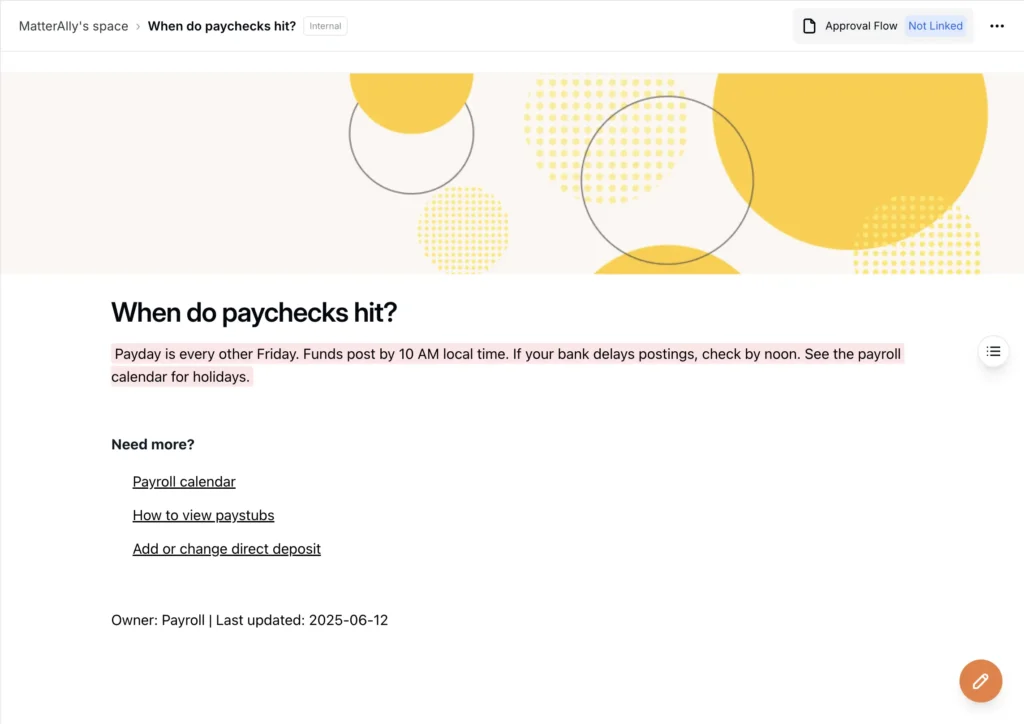
- Title (as a natural question): “When do paychecks hit?”
- Featured answer (2–4 lines): “Payday is every other Friday. Funds post by 10 AM local time. If your bank delays postings, check by noon. See the payroll calendar for holidays.”
- “Need more?” links: Payroll calendar, How to view paystubs, Add or change direct deposit
- Owner + Last updated: Payroll, 2025-06-12
Micro-templates you can copy:
- PTO Requests: “Go to HRIS → Time Off → Request PTO. Choose dates, add a note if needed, submit. Your manager approves within 3 business days. See PTO & Sick Leave.”
- W-4 Updates: “HRIS → Payroll → Tax Withholding. Submit by Tuesday 2 PM to see changes on Friday’s paycheck.”
- Expense Reimbursements: “Submit within 10 days of purchase in Expenses app. Attach itemized receipts. Mileage reimburses at the current IRS rate. See Expense Policy.”
For more examples of HR documentation structure, see Crafting HR Ticketing System Documentation.
Write for scanning:
- Lead with the step employees take first
- Bold the menu path (HRIS → Payroll → Tax Withholding)
- Link the policy or procedure, never a file dump
- Keep tone neutral, never punitive
Sarah from Finance pinged HR three times in one week asking about expense policies. Each time, someone sent her a different PDF. When HR finally published a single FAQ titled ‘How do I submit expenses?’ with a featured answer and links to the live policy, Sarah found it in eight seconds. The pings stopped.
“Need more?” links that prevent rabbit holes
An FAQ is the first step, not the whole journey. The HR FAQ knowledge base should point to deeper content.
Link target examples:
- “How do I request PTO?” → link to the Procedure: Request PTO
- “How do I update my address?” → link to HRIS profile update and benefits carrier note
- “How do I request parental leave?” → link to Policy: Parental Leave and FMLA overview
- “What counts as overtime?” → link to Manager Guide: Timekeeping & Overtime and any state addendum
Pro tip: Add a short “What changed” banner on linked policies when they update to avoid re-answering “did anything change here”.
Tagging and synonyms that match how employees ask
Findability is everything. An HR FAQ knowledge base only works if “vacation” returns PTO and “maternity leave” returns Parental Leave.
Add a minimal taxonomy (and stick to it):
- Topic: Payroll, PTO, Benefits, Overtime, Timekeeping, Expenses, Onboarding
- Role: Individual Contributor, Manager, HRBP
- State: U.S. general, CA, NY, WA, MA
- Employment type: Exempt, Non-exempt, Contractor
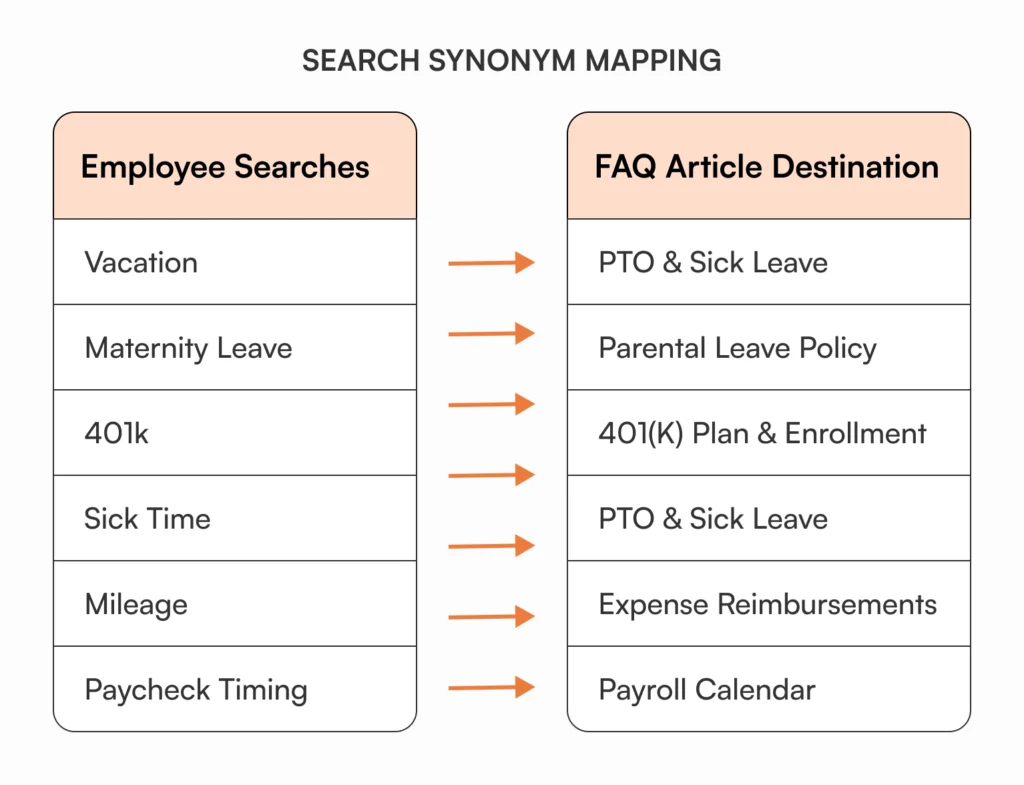
Synonyms to wire in immediately:
- Vacation → PTO
- Maternity leave → Parental Leave (plus FMLA if eligible)
- 401k → 401(k) Plan
- Sick time → PTO & Sick Leave (plus state addenda)
- Mileage → Expense Reimbursements
- Paycheck timing → Payroll calendar
Before: Employee searches “sick days” → zero results → Slacks HR → waits 2 hours → gets answer → forgets where answer came from → asks again next month
After: Employee searches “sick days” → synonym surfaces “PTO & Sick Leave” → reads 15-second answer → submits request → done in 90 seconds
Need more depth on taxonomy and KB basics? Keep Internal Knowledge Base 101 handy while you tag.
Make answers faster than asking a human
If searching is slower than DMing HR, your FAQ fails. Speed comes from featured answers, synonyms, and smart search that understands partial phrases.
Checklist for “fast to answer” FAQs:
- Title is a question in employee language
- Featured answer fits on one mobile screen
- First step is above the fold, bolded
- “Need more?” links point to live procedures or policies
- Owner and last updated visible
- Tagging and synonyms tested with real terms
Optional helpers:
- 15–30 second screen capture for menu paths
- Table snippets for payroll calendars or benefit deadlines
- Tiny logic trees: “If you are non-exempt and work in CA, see addendum”
Publishing rules that prevent drift
Consistency builds trust. Treat your HR FAQ knowledge base like a living product.
Do this for every FAQ:
- Assign a named owner and review cadence (quarterly for core FAQs)
- Stamp Last updated and log change notes
- Link to exactly one source of truth for policy or procedure
- Avoid screenshots of policies; link the live article instead
- Keep one FAQ per topic; split questions that have different intents
If you’re building your HR knowledge base from scratch, Everything You Need to Know about Building a Knowledge Base for HR covers governance and ownership models in depth.
I’ve watched HR teams screenshot their HRIS menu and paste it into FAQs. Three months later the interface updates and the screenshot is wrong, creating confusion instead of clarity.
Governance note: After two identical questions in Slack or email, write or update the FAQ, then reply with the link. Train the habit.
Measure deflection and iterate
Deflection is your north star. You want employees to use internal self service before they open a ticket or DM HR.
Research from Panopto shows that 81% of employees are frustrated when they can’t access the information they need to do their jobs. Your deflection metrics reveal whether you’re solving this problem. Here are five signals to track:
- FAQ page views on your top 25 questions
- HR pings about those same topics (Slack, email, help desk)
- Zero-result searches that need new FAQs
- Time on page and bounce for FAQ pages
- Onboarding survey notes about “hard to find” items
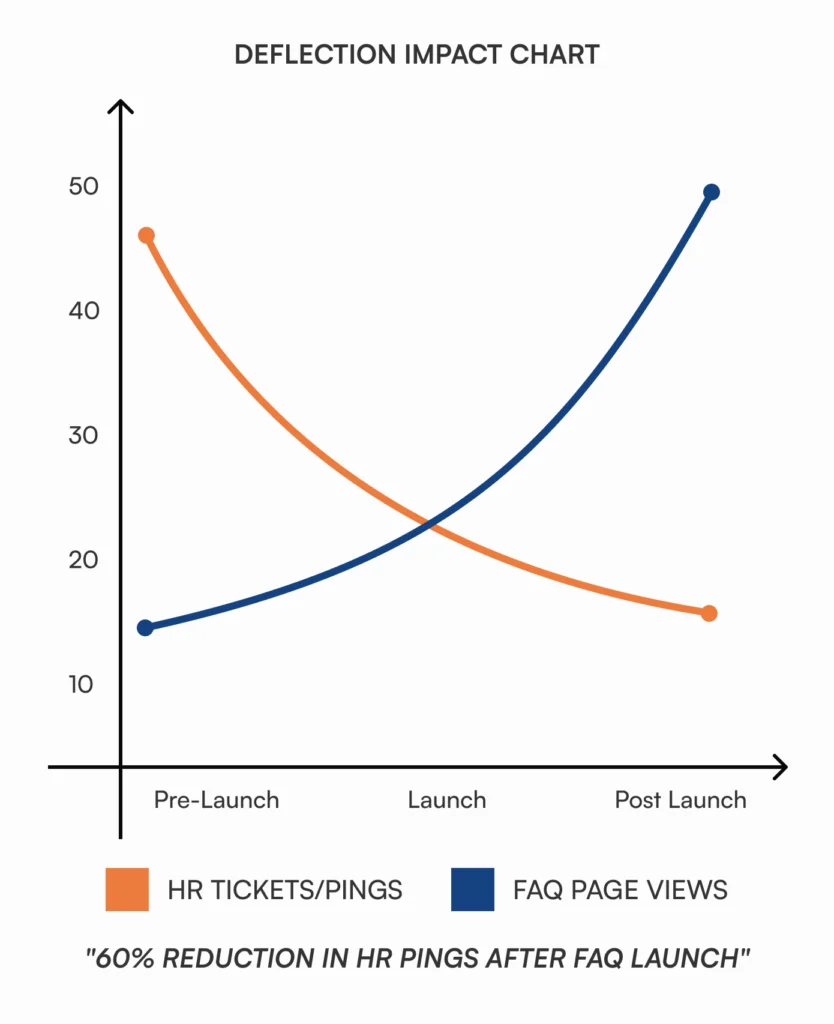
Show the pre vs post trend:
- Baseline 30 days → launch → 30 days after launch
- Plot FAQ views vs HR pings for the same topics
- Add a simple commentary: “Expense questions dropped 38% after adding receipts and mileage examples”
Hours-saved calculator you can use:
Employees × avg HR questions/employee/month × minutes per answer × % deflected ÷ 60 = hours saved/month
Let’s put real numbers to this: A 300-person company where each employee asks HR 1.5 questions monthly, each taking 8 minutes to answer. If your FAQ deflects 40% of those questions:
300 × 1.5 × 8 × 0.40 ÷ 60 = 24 hours saved per month
That’s three full workdays your HR team gets back to focus on hiring, retention, and strategy instead of answering ‘When do paychecks hit?’ for the fifteenth time.
When you are ready for the next step, plan a sprint from How Knowledge Bases Can Help Deflect Tickets.
HR FAQ template you can copy
A tight template makes every answer feel familiar. This is the HR FAQ template we use in briefs and drafts.
Title (question):
How do I request PTO?
Featured answer (2–4 lines):
Go to HRIS → Time Off → Request PTO. Pick your dates, add a short note if needed, submit. Managers approve within 3 business days. See the PTO & Sick Leave policy for accrual and blackout dates.
Need more?
- Procedure: Request PTO
- Policy: PTO & Sick Leave (U.S.), California Addendum
- Related: Holiday calendar, Timesheet corrections
Who this applies to:
All U.S. employees. State exceptions listed in policy addenda.
Owner & last updated:
HR Ops, 2025-06-12
Tags and synonyms:
Topic: PTO, Role: Individual Contributor, State: U.S.; Synonyms: vacation, sick time
Walkthrough: Building the first 10 FAQs in one afternoon
You can get to value today. This is the quick path.
Pull sources
- Export last month’s searches, Slack threads, help desk topics, HR inbox subjects.
- Mark the top 25 by frequency.
Draft answers
- Write 10 featured answers using the template.
- Bold the first step, add “Need more?” links.
Use this checklist while drafting:
- Question in employee language? (‘When do paychecks hit?’ not ‘Payroll disbursement schedule’)
- First step bolded and above fold?
- Links to live policy, not PDF?
- Owner and date stamped?
- Synonyms added to tags?
Tag and test
- Add topic, role, state tags.
- Add synonyms and test real terms like “vacation” and “maternity leave.”
Publish and announce
- Post links in #all-company and #ask-hr.
- Ask managers to pin the FAQ in their team wikis.
Measure and share
- After two weeks, chart FAQ views vs HR pings.
- Share “wins” and add two FAQs for top zero-result terms.
Common pitfalls and quick fixes
A strong HR FAQ knowledge base avoids these traps.
- FAQ too long: If your featured answer takes a scroll, you wrote a policy. Split it.
- No owner: Assign a named human, not a team. Add a review cadence.
- No links: Always link to the policy or procedure, not a static file.
- No synonyms: Employees will search 401k, not 401(k). Add both.
- No measurement: Without a baseline and a simple chart, leadership will not see the deflection story.
Red flags your HR FAQ knowledge base isn’t working
If you see these signals, your FAQ needs immediate fixes:
- Employees still ping HR about topics covered in FAQs (synonyms missing or search broken)
- FAQ page views are low but HR tickets stay high (findability problem)
- Zero-result searches growing instead of shrinking (content gaps)
- Managers forwarding FAQ links instead of employees finding them (adoption issue)
- “Last updated” stamps from 6+ months ago (governance breakdown)
Real-world examples that work
“When do paychecks hit?”
Featured answer with time, bank posting caveat, and a link to the payroll calendar. Result: payroll timing pings drop in week one.
“How do I update my address?”
Featured answer with HRIS path and a reminder to update benefits carrier if required. Result: fewer “my card shipped to my old address” problems.
“What counts as overtime?”
Featured answer that defines non-exempt, links to FLSA summary, and sends CA employees to the state addendum. Result: managers make decisions without waiting for HR.
For deeper operational patterns, align your FAQ linking with the content types in Internal Knowledge Base 101.
How AllyMatter supports your HR FAQ strategy
When you’re managing FAQs across Google Docs, Notion, and Slack threads, employees waste time hunting while you waste time answering the same questions. AllyMatter centralizes your HR FAQ knowledge base with smart search that understands how employees actually ask questions.
Tag articles by topic, role, and state so “vacation” automatically surfaces your PTO policy and “maternity leave” finds Parental Leave. Track which FAQs get the most views, monitor zero-result searches to spot gaps, and assign owners with review cadences so answers stay current without manual audits.
Role-based access keeps sensitive compensation or performance information protected while making benefits, PTO, and expense FAQs instantly available to everyone. Your deflection metrics live in one dashboard, so you can show leadership exactly how many hours you’re saving each month.
Want to see how other HR teams are using knowledge bases? Read HR Knowledge Base: 10 Ways AllyMatter Transforms HR Teams.
Start with ten FAQs and iterate from there
Your HR FAQ knowledge base doesn’t need to be perfect on day one. Start with the ten questions you answered most often last month. Write featured answers using the template, add synonyms for how employees actually search, assign owners, and publish.
Measure deflection after two weeks. Track FAQ views against HR pings for those same topics. Add two more FAQs based on zero-result searches and recent Slack threads. Repeat monthly.
The goal isn’t a comprehensive encyclopedia. The goal is employees finding answers faster than asking HR. When your chart shows FAQ views climbing while HR tickets drop, you’ve built something that scales. When managers start linking FAQs instead of re-explaining policies, you’ve changed the culture.
Stop answering the same questions every week. Build the FAQ, measure deflection, and give your team those hours back.
Want fewer repeat questions in your inbox? Join the AllyMatter waitlist to build an HR knowledge base that employees can actually find and use.
Frequently asked questions
Do we need approvals for FAQ entries?
Treat FAQs like product micro-copy. HR Ops can publish, then link to approved policies and procedures. If an FAQ touches compliance, route the linked policy through formal approval and version control.
How many FAQs should we have?
Enough to remove the top 80% of repeat questions. Start with 10–15, then add two per week from zero-result searches and recent pings.
Should FAQs require acknowledgment?
No. Reserve acknowledgments for policies. FAQs should be fast, friction-free answers that point to the policy if acknowledgment is needed.
Where should FAQs live?
In your HR FAQ knowledge base, not a slide deck or static PDF. The search box must find them by employee language. If you are still in a wiki, enforce templates and review cadences.
What does “internal self service” mean here?
Employees get the right answer without opening a ticket or DMing HR. Your chart should show FAQ views going up, HR tickets going down.
For background on HR communication and policy clarity, see the SHRM Knowledge Center at shrm.org. Use it for definitions and state compliance context, then keep your internal answers short and action-oriented.