Your VP of Operations can’t find last quarter’s compliance policy. The support team is answering the same question for the tenth time this week. Your engineering lead just wasted three hours searching for documentation that might not exist.
Whether it’s internal processes, onboarding documentation, technical know-how, or product support, the goal remains the same: get the right information to the right people at the right time.
Two terms often dominate this conversation: wiki and knowledge base. While they sound similar, they serve different purposes and are best suited to different use cases. Choosing the wrong one can lead to confusion, clutter, and missed opportunities for your team or customers.
This article explores the differences between a wiki and a knowledge base, compares their strengths and limitations, and helps you decide which tool is right for your organization.
What is a wiki?
A wiki is a collaborative platform that allows users to create, edit, and link together pages of information. It’s often open to many contributors and designed to evolve over time as knowledge grows and changes.
Wikis were originally developed as open-ended knowledge spaces, similar to Wikipedia where anyone can edit, connect ideas, and add context. Inside companies, wikis are often used to document internal processes, team guidelines, meeting notes, and project plans.
Common features of wikis include:
- Page linking and interconnectivity
- Open editing for multiple users or teams
- Search functionality
- Revision history and version control
Wikis are flexible, often informal, and highly adaptable for fast-moving or collaborative environments.
In practice, I’ve seen wikis work best when speed matters more than precision and when teams accept that not everything will stay clean.
Teams documenting fast-moving work often start with an internal wiki, especially during early growth.
What is a knowledge base?
A knowledge base is a centralized repository of structured information, designed to help users find answers to common questions. It can be public-facing for customers or private for internal teams. The content is usually curated, reviewed, and organized to serve a specific support or informational function.
Unlike a wiki, a knowledge base is often more controlled and managed. It’s used to document frequently asked questions, troubleshooting steps, company policies, onboarding processes, and product documentation.
Look for these features:
- Structured categories and hierarchy
- Search-optimized articles and tagging
- Editorial control with approval workflows
- Analytics on content usage and gaps
A knowledge base isn’t just about storing information. It’s about presenting it in a way that’s easy to find, easy to trust, and easy to act on.
This distinction matters more as companies grow, because outdated or inconsistent documentation starts creating real operational and compliance risk.
Key differences between a wiki and a knowledge base
The distinctions matter more than you’d think. Here’s what separates them:
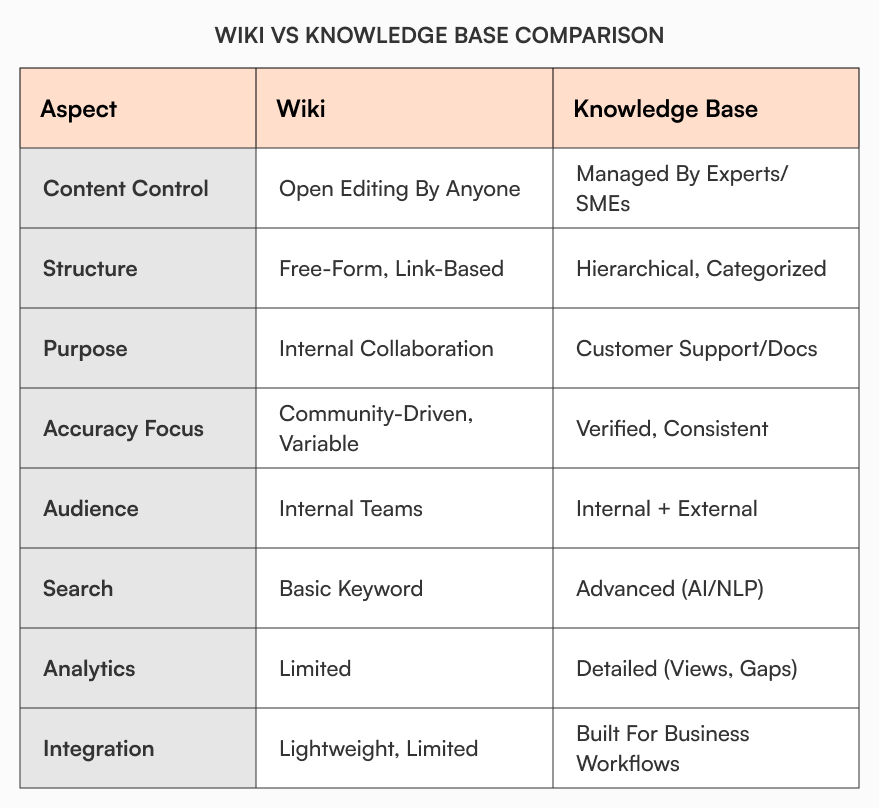
The most critical distinction for growing companies is governance. Wikis rely on collective responsibility, which works until it doesn’t. Once you’re past 50 employees, the lack of clear ownership means outdated policies sit alongside current ones, and no one knows which version to trust.
Search capabilities matter more than teams expect. Basic keyword matching works fine when you have 20 documents. At 200 documents across multiple teams, employees waste hours hunting for information they assume exists somewhere. Knowledge bases with semantic search and tagging surface relevant content even when people don’t know the exact terms to search for.
Integration needs also shift as you scale. Early-stage companies can manage with standalone tools. But once you’re running approval workflows, tracking policy acknowledgments, or connecting documentation to your HRIS or support desk, a knowledge base that integrates with your existing systems eliminates manual handoffs and version control problems.
When to choose a wiki
A wiki may be the right choice if:
- You need a flexible, collaborative tool for documenting evolving processes
- Your team wants to contribute freely without heavy editorial oversight
- You’re documenting internal knowledge, meeting notes, or ongoing projects
- You value speed of content creation over structure
Examples of good wiki use cases:
- Engineering team documentation
- Internal project planning
- Team handbooks and culture guides
- Technical brainstorming and drafts
Popular wiki tools include Confluence, Notion, DokuWiki, and MediaWiki.
Where wikis break down is ownership. If no one is accountable for accuracy, they quietly turn into historical artifacts instead of living documentation.
This is why many startups set up an internal wiki before governance becomes a priority.
When to choose a knowledge base
A knowledge base may be the better choice if:
- You need to provide structured answers to repeatable questions
- You have a growing user base or employee count that needs self-service help
- You need control over publishing, versioning, and access
- You want to measure and improve the effectiveness of your content
Examples of good knowledge base use cases:
- HR onboarding documentation
- Product support FAQs
- IT troubleshooting guides
- Compliance and security policies
At this stage, most teams start evaluating dedicated knowledge base software rather than repurposing collaboration tools.
Common knowledge base tools include AllyMatter, Helpjuice, Zendesk Guide, Guru, and Document360.
Can you use both?
In many cases, organizations benefit from using both a wiki and a knowledge base, each serving a different purpose.
For example:
- Use a wiki for internal collaboration, experimentation, and team-specific notes
- Use a knowledge base for finalized, structured information that should be widely accessible and trusted
Some platforms blur the line between the two, offering features that allow collaborative creation with editorial controls and analytics layered in. Notion and Confluence, for example, can serve both roles depending on how you structure them.
The key is to define roles and purpose clearly. Don’t try to make one system do everything if it leads to messy or confusing experiences for users.
A simple rule I use: if content needs approval, consistency, or acknowledgment, it doesn’t belong in a wiki.
How knowledge bases support scaling companies
For growing companies between 50 and 1000 employees, the wiki vs knowledge base decision often comes down to governance and accountability.
As headcount grows, informal knowledge sharing breaks down. According to a Gartner survey, 47% of digital workers struggle to find the information needed to effectively perform their jobs. That friction shows up in onboarding delays, policy confusion, and duplicate work across teams.
Knowledge bases address this by combining structure with usability. You get approval workflows for sensitive documents, version control for all changes, and role-based access that separates team-level notes from company-wide policies.
AllyMatter approaches this specifically for the scale-up phase. You can maintain the iteration speed that made wikis attractive while adding the controls needed for compliance, onboarding, and cross-functional alignment. Features like acknowledgment tracking, audit trails, and granular permissions let you govern documentation without slowing teams down.
The shift from wiki to knowledge base typically happens when documentation quality starts affecting business outcomes: slower onboarding, compliance gaps, or employees repeatedly asking questions that should have clear answers.
Questions to ask before you decide
These questions matter most when you’re hiring your 50th employee, preparing for Series A due diligence, or facing your first compliance audit.
To choose the right system for your needs, ask:
- Who is the primary audience for this content?
- Does the information need to be verified and approved?
- Will multiple teams or contributors be involved?
- How important is it to control access to specific articles?
- Do you need to analyze usage and improve based on feedback?
- Is the content short-term and evolving or long-term and repeatable?
Your answers will guide you toward the right solution or a combination of both.
Making the right choice for how your company scales
A wiki and a knowledge base are both valuable tools in your knowledge management strategy, but they solve different problems.
A wiki thrives in fast-paced, team-driven environments where collaboration and experimentation are key. A knowledge base thrives where structure, accuracy, and discoverability matter most. In my experience, most growing companies wait too long to move beyond a wiki, and they feel the cost later through rework, onboarding delays, and policy confusion.
By understanding their strengths and limitations, you can make a smarter decision for your team, improve how knowledge flows across your organization, and reduce time spent answering the same questions again and again.
Join the AllyMatter waitlist to see how internal knowledge bases evolve beyond wikis.
Frequently asked questions
What is the main difference between a wiki and a knowledge base?
A wiki prioritizes open collaboration and speed. A knowledge base prioritizes structure, accuracy, and trust. One is built for contribution, the other for reliable consumption.
Is a wiki enough for internal documentation in a growing company?
Early on, yes. As headcount grows, wikis often struggle with ownership, consistency, and outdated content, especially for policies, onboarding, and SOPs.
When should a company move from a wiki to a knowledge base?
Usually when documentation starts affecting onboarding speed, compliance confidence, or cross-team alignment. That’s the point where structure matters more than flexibility.
Can a knowledge base replace a wiki entirely?
Not always. Many teams still use wikis for drafts, brainstorming, or team-specific notes, while reserving the knowledge base for approved, trusted information.
Which is better for employee self-service: a wiki or a knowledge base?
A knowledge base. Employees rely on self-service content being accurate and current, which requires ownership, version control, and clear structure.