Most IT managers don’t go looking for a SharePoint replacement. Usually, something forces the decision. A new Ops hire joins and spends their first week trying to figure out why the employee handbook lives in three different folders. HR sends out an updated leave policy but has no way to confirm who’s actually read it. An auditor asks for proof that someone signed off on the refund process SOP before it went live, and the answer is a forwarded email chain from 2022.
That’s the moment the question changes from ‘how do we fix our SharePoint setup?’ to ‘is SharePoint even the right tool for this?’ This comparison is meant to answer that honestly, without a stake in which direction you go.
What SharePoint is best for
SharePoint is a Microsoft enterprise product, and it works best when treated as one. If your team runs on Microsoft 365, the integration is genuinely useful. Document libraries connect directly to Teams channels. Files open in Word and Excel without leaving the browser. OneDrive syncs everything locally. For teams already inside that ecosystem, SharePoint is a natural extension.
It also has real depth for organizations with dedicated IT resources. A skilled SharePoint admin can build custom intranet portals, configure complex metadata structures, and connect workflows through Power Automate. Enterprises with large document libraries, specific compliance frameworks tied to Microsoft’s stack, or established SharePoint practices already in place often have good reasons to stay.
Where it earns its place: deep Microsoft 365 integration, large-scale file storage, and enterprise intranet builds backed by technical staff.
What AllyMatter is best for
Growing companies between 50 and 1,000 employees often hit the same wall: they need more than a file repository, but don’t have the bandwidth to maintain a complex enterprise platform. That’s the gap AllyMatter addresses.
Think of a 200-person healthcare technology company. Their HR team is managing 14 active policies, each requiring sign-off before distribution, while Finance has SOPs for vendor payment processes that need approval before going live. The Ops lead wants to know, at any given moment, which employees haven’t acknowledged the updated data handling policy. None of that is a file storage problem. Governance and accountability are where SharePoint falls short, and neither comes natively.
AllyMatter organizes everything around document workflows: creation, approval, distribution, acknowledgment, and audit. HR managers, Operations leads, and Finance teams can own their documentation directly, without routing every permission request through IT.
If your team is spending more time chasing sign-offs and managing version confusion than actually using your documentation, that’s a sign the tool isn’t doing its job.
Feature comparison
The two platforms approach the same problems very differently. Here’s how they compare across the dimensions that matter most to growing teams:
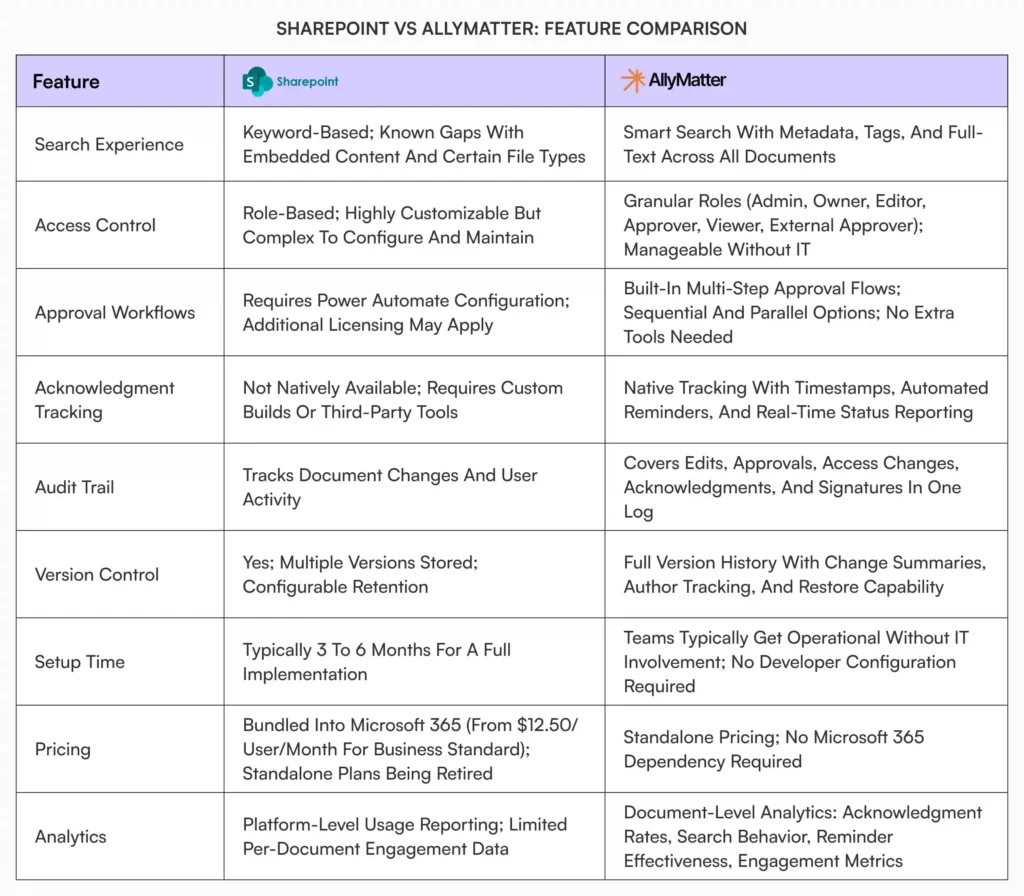
SharePoint pricing source: Microsoft 365 plans
For a deeper look at AllyMatter’s access control approach, see Document access control with tags.
Setup and adoption: where the reality sets in
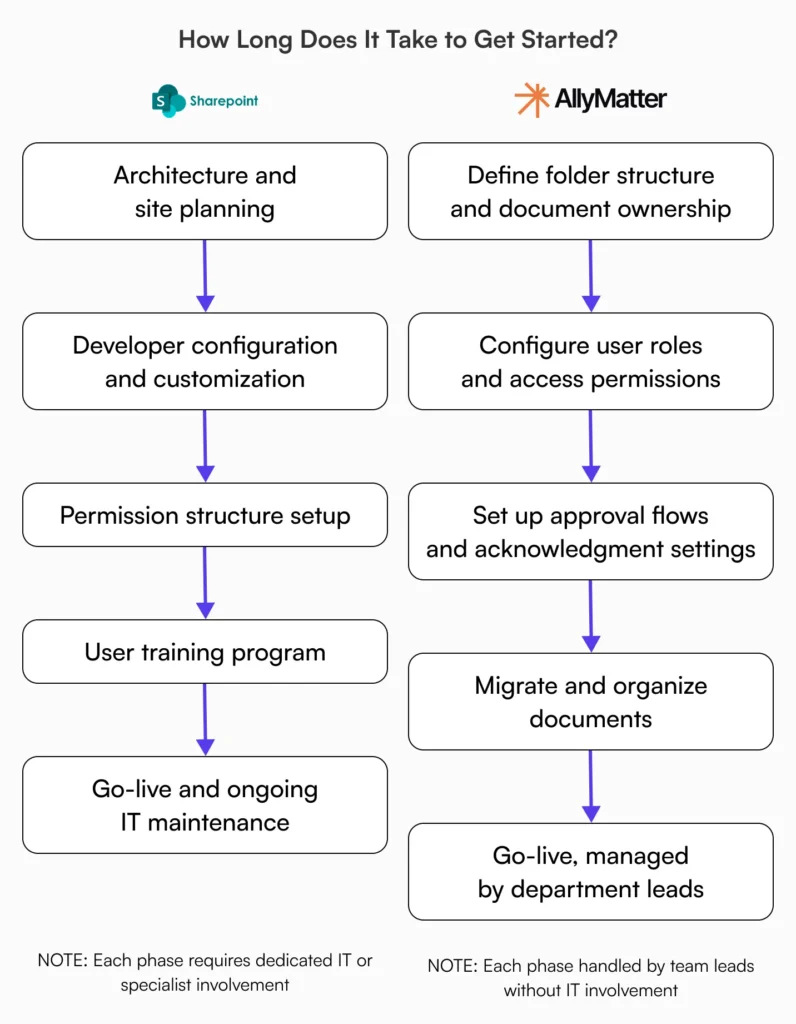
SharePoint implementations are rarely quick. Scoping the architecture, configuring permissions, building approval workflows through Power Automate, and training users each take meaningful time before the system is actually usable; and that’s before user training.
That timeline isn’t a flaw exactly; it reflects how open-ended the platform is. You’re making architectural decisions from scratch: how to structure site collections, which content types to configure, how to handle permissions across departments, whether to use Power Automate for approvals or build something custom. Every organization ends up building a slightly different thing
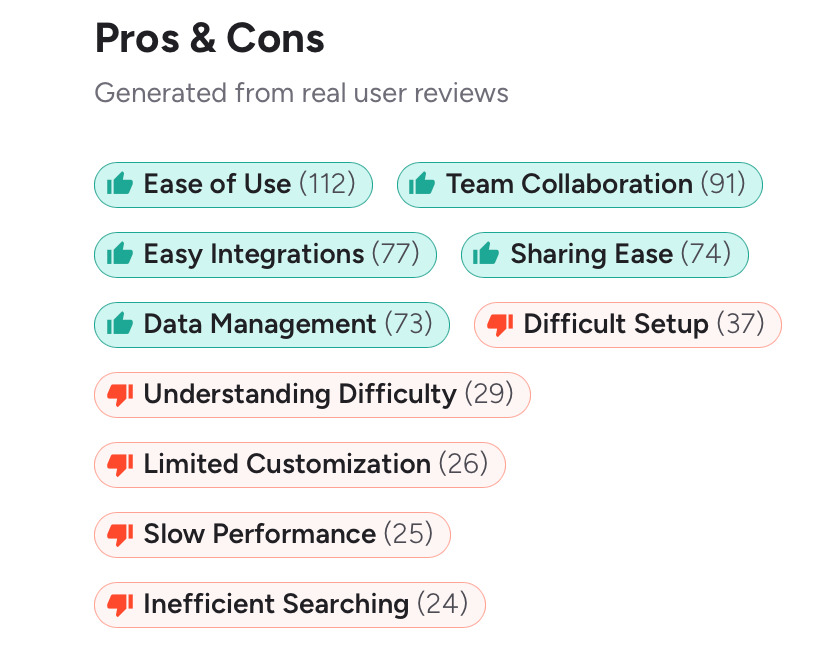
Adoption is where it gets worse. G2 user reviews tell a clear story. Difficult setup, understanding difficulty, and inefficient searching account for 90 mentions across verified reviews, while ease of use leads the pros at 112 mentions, almost all tied to Microsoft 365 integration*. The platform works well for people already inside that ecosystem. For everyone else, the friction is real.
*As of March 2026
Permissions troubleshooting alone is one of the most common IT support requests in SharePoint environments. When employees can’t find what they need or keep hitting access errors, they stop using the system and go back to asking colleagues directly, which defeats the purpose entirely.
Take a scenario most IT managers recognize: a 150-person scale-up deploys SharePoint for internal documentation. Eight months later, the library has grown to hundreds of files across multiple site collections, nobody agrees on the folder structure, HR is still distributing policy updates by email because the SharePoint permissions are too confusing to manage, and the IT admin is fielding four or five access requests a week. The platform is technically deployed. Nobody would call it working.
AllyMatter is opinionated by design. There are defined structures for documents, user roles, and workflows. You’re configuring something purpose-built rather than constructing it from components. Teams can get operational much faster, and day-to-day management, adding users, updating permissions, running approval flows, doesn’t require IT to be in the loop.
Worth being honest about though: if your SharePoint environment is already functioning well within a Microsoft 365 setup, rebuilding for its own sake rarely makes sense. The real question is whether what you have is actually serving your documentation and compliance needs, or just storing files.
Read more: Why SharePoint fails as an internal knowledge base
Who should choose SharePoint
If you’re still unsure which direction makes sense, run through these. Check most items in one list and that’s your answer.
Choose SharePoint if you can check most of these:
- Your team runs on Microsoft 365 and needs tight integration with Teams, Outlook, and OneDrive
- You have IT staff or a SharePoint specialist available for configuration and ongoing maintenance
- Your documentation needs center primarily on file storage and Office document collaboration
- You’re at 1,000-plus employees with the resources to support a complex implementation
- Your compliance requirements are already covered through Microsoft’s enterprise compliance framework
Who should choose AllyMatter
Choose AllyMatter if you can check most of these:
- You’re between 50 and 1,000 employees and have outgrown basic tools like Google Drive, Notion, or a poorly configured SharePoint setup
- You need policy acknowledgment tracking, approval workflows, and audit trails that HR or Ops can manage without IT
- Your documentation is tied to compliance, HR policies, SOPs, or financial processes requiring sign-off and proof of receipt
- Setup speed matters and you can’t commit months to a custom implementation
- You want department leads, not IT, owning their documentation workflows day to day
See how AllyMatter’s knowledge base features support these use cases: AllyMatter knowledge base features
Migration path if you’re switching
The instinct is usually to migrate everything, which is the wrong starting point. This conversation often surfaces during an annual software review, when someone finally counts how many IT hours went to SharePoint maintenance that quarter.
Start with a content audit. SharePoint environments accumulate years of documents, many of which are outdated, duplicated, or completely inactive. Before migrating anything, identify what’s actually in use: documents accessed in the last 90 days, policies currently enforced, SOPs referenced in onboarding or training. Everything else can be archived or discarded.
Map your structure to ownership before you touch a single file. AllyMatter organizes around departments and document categories, so the cleanest approach is to define who owns what first. HR owns their policy library. Finance owns their process documentation. Ops owns their runbooks. Once ownership is clear, the folder and access structure follows naturally.
For compliance-relevant documents, the migration is also the right moment to set up acknowledgment and approval workflows correctly from the start. Assign document owners, configure the relevant approval flows, and lock down access permissions before the first employee logs in. Retrofitting governance onto a live knowledge base is harder than building it upfront.
AllyMatter offers dedicated migration services for teams moving from SharePoint, covering content transfer, structure setup, and implementation guidance.
Try it before you commit
See how AllyMatter handles your documentation workflows in a live environment, no IT setup, no commitment. Try the live demo
Frequently asked questions
Can AllyMatter replace SharePoint entirely?
The honest answer is that AllyMatter and SharePoint aren’t solving the same problem. If your primary use is file storage and Office document collaboration within Microsoft 365, AllyMatter isn’t a direct replacement. But if you’re using SharePoint as an internal knowledge base, policy hub, or document approval system, AllyMatter is purpose-built for exactly those use cases and delivers them with far less configuration overhead. Many teams end up running both: SharePoint for file storage within their Microsoft ecosystem, AllyMatter for knowledge management and compliance documentation.
Is AllyMatter only for teams that have outgrown SharePoint?
Not necessarily. Some teams come to AllyMatter from Google Drive, Notion, or no structured system at all. The common thread isn’t which tool they’re leaving, it’s the problem they’re trying to solve: documentation that needs governance, not just storage. If your team is managing policies, SOPs, or compliance documents that require approval trails, acknowledgment tracking, and audit-ready records, that’s the use case AllyMatter is built around, regardless of what you’re using today.
How long does AllyMatter take to set up compared to SharePoint?
The setup section above covers this in detail, but the short version is this: SharePoint requires architectural decisions, developer time, and user training before it’s usable as a knowledge base. AllyMatter is structured so that department leads, not IT, can get it running. The gap in time-to-value is significant.
What happens to acknowledgment records if we migrate from SharePoint?
SharePoint doesn’t natively track policy acknowledgments, so most organizations manage this through email confirmations or manual logs. When you move to AllyMatter, acknowledgments are logged automatically with timestamps, reminder sequences are configurable, and compliance reporting is available in the dashboard. Legacy acknowledgment records can be stored as reference documents within the platform.

Vikas is a B2B marketing professional with over 14 years of experience in content strategy, messaging, and demand generation. He specializes in turning complex business challenges into clear, actionable stories to connect meaningfully with audiences.