Most teams don’t choose SharePoint as an internal wiki. They drift into it.
Someone creates a few pages for onboarding. HR adds a folder for policies. A “Wiki” tab appears, and SharePoint becomes the place where things get “written down.” At 30 or 40 employees, this works well enough.
Then the company grows past 100. New departments form. Regulations show up. Auditors ask uncomfortable questions. The internal wiki that once felt helpful starts slowing everyone down.
I’ve seen this pattern repeat across scale-ups in healthcare, financial services, and tech. SharePoint itself isn’t the problem. What breaks is using it as a reliable internal knowledge system after the headcount crosses 100.
SharePoint works until expectations change
Early on, teams care mostly about access. Can people find the document? Can they edit it?
Past 100 employees, expectations shift. Your CFO wants to know who owns the vendor payment policy. HR needs proof that employees read the updated harassment policy. Operations needs consistency across three regional offices. IT gets asked to lock things down without becoming a bottleneck.
SharePoint was designed around collaboration on files and pages, not these accountability requirements. The gap stays hidden until scale exposes it.
Governance breaks quietly, then all at once
In smaller teams, informal ownership works. Everyone knows who “usually updates” a page.
At scale, that social contract disappears. Wiki pages linger without owners. Review dates get forgotten. Policies live in multiple versions across sites. No one deletes anything because no one knows what’s safe to remove.
SharePoint leaves ownership and review cycles to memory and good intentions. You can build workarounds, but they rely on people remembering to follow them. Across departments and time zones, that rarely holds.
Permissions add another layer of friction. What starts as a simple structure turns into dozens of sites, each with slightly different access rules. I’ve spent hours untangling who can see what, only to discover that someone shared a sensitive policy through a copied link anyway.
Compliance turns a wiki into a risk surface
This is when your CFO starts asking uncomfortable questions.
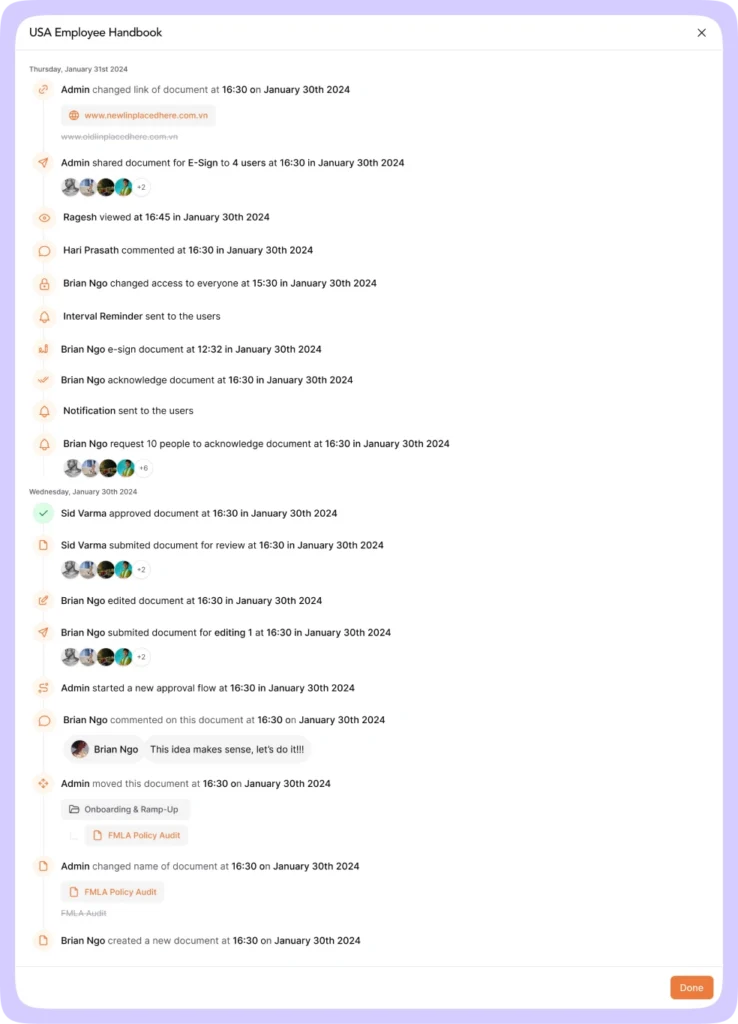
Auditors don’t ask whether a policy exists. They ask which version was acknowledged, by whom, and when. They want acknowledgment records to be intact and traceable.
SharePoint stores files well but struggles with compliance records at scale. Acknowledgments get tracked through custom lists or workflows that slow down or fail once they grow large.
I’ve seen HR teams assume acknowledgments were being tracked, only to discover during an audit that the workflow expired weeks earlier. No alert. No warning. Just missing evidence.
At that point, the wiki isn’t just messy anymore. It’s a liability.
Performance limits show up at the worst time
Performance issues rarely appear during calm periods. They show up during audits, policy updates, or organizational changes.
According to a Deloitte study, employees lose 32 days per year toggling between workplace applications to find necessary information. SharePoint contributes to this problem once list views and reporting become unreliable.
HR teams can no longer answer basic questions like who hasn’t acknowledged a policy. Document libraries tell a similar story. As file counts rise and sync loads increase, users start seeing outdated versions or conflicts. Trust erodes.
When employees stop trusting the system, they stop using it. Information leaks back into email threads, shared drives, or chat tools.
Organization breaks down as teams work around the system
Most internal wikis rely on folders and pages. That works when the audience is small and context is shared.
At scale, employees don’t browse. They search. When using SharePoint as an internal wiki, search depends heavily on consistent metadata, and metadata tagging is manual. People skip it, misapply it, or use different terms for the same thing.
The result is predictable. Sarah in accounting pulls up what she thinks is the expense policy, only to discover it references a vendor portal that shut down eight months ago. She asks in Slack instead of searching again because it’s faster.
Knowledge silos form inside a tool meant to centralize information.
Usability friction hits non-technical teams first
IT admins often understand SharePoint’s logic. Many employees do not.
Simple actions like editing a page, finding the latest version, or understanding check-in and check-out behavior require training. Mobile access adds another hurdle. For frontline or deskless employees, opening a SharePoint site just to find and acknowledge a document creates enough friction to delay action.
When adoption drops, leadership often assumes a communication problem. In reality, it’s a usability problem.
What changes when knowledge systems are designed for scale
Systems that work beyond 100 employees tend to share a few traits.
Ownership is explicit, not implied. Review cycles are enforced, not remembered. Version history connects people to specific document states. Access is based on role and context, not site sprawl.
For companies building internal knowledge systems that scale, these aren’t nice-to-have features. They’re fundamental requirements.
Where AllyMatter fits when SharePoint reaches its ceiling
I’ve seen teams keep SharePoint for project work and collaboration while moving policy and operational documentation into AllyMatter.
The shift usually starts with HR or compliance. They need clear ownership, reliable acknowledgment tracking, and audit-ready records without custom engineering. Over time, operations and finance follow for the same reasons.
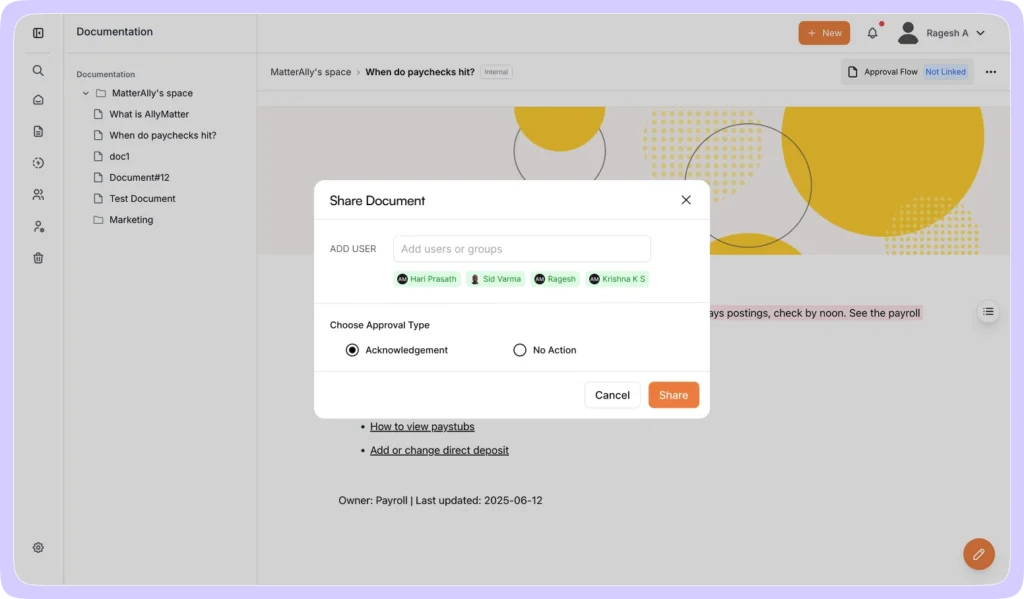
What changes is confidence. Leaders stop wondering whether the wiki reflects reality. Employees stop guessing which document is current.
AllyMatter handles what SharePoint struggles with at scale: explicit document ownership, enforced review cycles, granular access control, comprehensive audit trails, and acknowledgment tracking that doesn’t break under load. These aren’t add-ons layered onto collaboration software. They’re handled directly within the system.
For teams at the early stages of building an internal wiki, SharePoint might still serve you well. But once compliance matters, headcount accelerates, or policies need to branch by role or region, the limitations surface fast.
Making the call before risk forces it
If your company is still under 100 employees, SharePoint as an internal wiki may be fine. Many teams stay there longer than they should because nothing has broken yet.
The moment audits matter, headcount accelerates, or policies start branching by role or region, the cracks widen fast. At that point, the decision is no longer about preference. It’s about risk management and operational clarity.
Waiting until something fails is the expensive option.
Try AllyMatter’s live demo
See what changes when your knowledge system is built for companies past 100 employees.
Frequently asked questions
At what company size does SharePoint become problematic as an internal wiki?
SharePoint can work as an internal wiki in early stages, especially for teams under 100 employees. It provides basic page creation, permissions, and collaboration. Problems surface as organizations grow. Governance, ownership, and compliance tracking aren’t enforced by default. For growing companies with audit, HR, or regulatory needs, SharePoint often becomes difficult to manage consistently past the 100-employee mark.
What are the biggest SharePoint wiki limitations past 100 employees?
The most common issues are governance gaps, acknowledgment tracking failures, performance limits on lists, and inconsistent search results. These problems appear during audits or policy updates. At that stage, teams struggle to prove who acknowledged what and when.
Why does SharePoint struggle with policy acknowledgment and audits?
SharePoint tracks files well but doesn’t natively track policy acknowledgment as a durable record. Most teams rely on custom lists or workflows that slow down or break as data volumes grow. When workflows expire or lists hit limits, acknowledgment records can become incomplete or inaccessible, which creates audit risk.
When should a company move beyond SharePoint as an internal wiki?
The shift makes sense when policies require formal acknowledgment, audits become routine, or documentation needs differ by role or location. Another signal is when IT spends increasing time maintaining permissions and workflows instead of enabling teams. Companies at different stages of internal knowledge base maturity will recognize these signals at different times.
Can SharePoint be fixed with customization instead?
Customization can extend SharePoint, but it adds operational overhead and long-term maintenance risk. Many teams build complex workflows only to find they don’t scale reliably. Growing companies move critical documentation into systems designed to handle ownership, accountability, and audits without constant IT intervention.

Vikas is a B2B marketing professional with over 14 years of experience in content strategy, messaging, and demand generation. He specializes in turning complex business challenges into clear, actionable stories to connect meaningfully with audiences.