Your IT team just sent another email explaining the 5,000-item limit. HR can’t locate the updated parental leave policy. Three people from Operations are asking if there’s “another SharePoint” where current SOPs actually live.
Here’s what’s actually happening: when a SharePoint knowledge base starts breaking, it’s rarely misconfiguration. The platform is being stretched beyond what it was designed to sustain.
The 5,000-item limit protects the database, not your workflow
Microsoft implemented the list view threshold to prevent performance collapse. Once a list or library exceeds 5,000 items, SharePoint blocks unindexed queries because they can lock the entire database table.
Reasonable in theory. Frustrating in practice.
A document library loads for one team member but times out for another. A filtered view works perfectly until someone adds a column. Search results look incomplete even though the files exist. The platform hasn’t technically failed, but employee trust has started eroding.
The gap between “fixable” and “keeps breaking” matters here. Indexed columns, filtered views, and disciplined metadata can push the limit back. IT teams do excellent work implementing these workarounds. The catch? These solutions assume behavioral discipline that most growing companies can’t maintain at speed.
Hiring doesn’t pause so metadata stays clean. Policy updates don’t wait for views to be reindexed. Standard operating procedures change faster than documentation can keep up. The system starts requiring perfect execution from hundreds of employees, and that’s when things fall apart.
How document libraries become accidental knowledge bases
Most SharePoint knowledge bases don’t start with that intention. They begin as document libraries that grow into something critical.
HR creates a space for policies. Operations adds SOPs. Finance uploads expense procedures. Over months, these libraries become foundational, but their structure remains what it always was: file storage.
That distinction creates problems down the road.
As document counts climb, teams rely more heavily on metadata. Department, owner, last updated, document type—all logical choices. But metadata only helps if everyone applies it consistently, and if SharePoint can still surface it quickly enough to be useful.
Search takes the first hit. Not because SharePoint search is inherently weak, but because relevance degrades when content volume grows without lifecycle controls. Employees stop trusting results. They ask colleagues directly.
This fragmentation is why many organizations eventually realize they need standalone knowledge base solutions purpose-built for knowledge management, not adapted from file storage systems.
Onboarding becomes a visible symptom. New hires hear “everything’s in SharePoint,” but no one can confidently direct them to the current version.
IT workarounds that mask governance risk
IT administrators often carry these systems longer than they should. They build indexed columns. They coach teams on filtered views. They write internal guidelines that most employees never open. (I once saw a 47-page SharePoint best practices document that exactly three people had accessed.)
From IT’s perspective, the system remains manageable. From everyone else’s perspective, it’s getting harder to use.
That gap matters at the executive level because workarounds mask operational risk. Policies exist, but are employees finding the right ones? SOPs are documented, but are they current? These questions surface during audits or compliance reviews, and the answers get uncomfortable quickly.
The real cost isn’t performance degradation. It’s governance overhead. Each workaround adds another rule people need to remember. Each rule increases the likelihood that someone bypasses the system entirely.
Knowledge systems shouldn’t require heroics to function at scale.
File storage logic doesn’t match knowledge lifecycle needs
SharePoint excels at what it was designed for: storing documents, enabling collaboration, integrating with Microsoft 365. What it struggles with is enforcing how knowledge should evolve, age, and remain trustworthy across an organization.
Version history exists. Version trust is different.
Approval workflows can be configured, but they’re optional and inconsistently applied. Document ownership blurs as teams reorganize. In a proper internal knowledge base, documents have clear lifecycles: draft, under review, approved, outdated, archived. In SharePoint, these states are implied through folder structures and naming conventions, not enforced by the system.
That works when teams are small and governance requirements are light. It becomes a liability when policies directly affect compliance, finance, or operations.
We’ve covered this gap in detail in Why Sharepoint Fails as an Internal Knowledge Base. The architecture simply wasn’t designed for what growing companies need.
Where growing companies feel the breaking points first
The pattern is consistent across functions, even if the timing varies.
HR teams notice when hiring accelerates. Employee self-service depends on fast, reliable policy access. When multiple versions circulate, HR fields repetitive questions they expected documentation to eliminate.
Sarah, the new HR Director at a 400-person healthcare company, spent her first week asking seven different people where the current benefits enrollment guide lived. All seven pointed to SharePoint. None pointed to the same document. HR knowledge management becomes nearly impossible when the system can’t enforce a single source of truth.
Finance discovers this during audits. Documentation exists, but tracing changes becomes manual work. Confidence drops even when nothing is technically missing. One CFO described it as “having a filing cabinet where half the folders are mislabeled and the other half are duplicates.”
Operations hits this when SOPs change faster than they can be communicated. Old procedures persist because no one is certain which ones remain valid. A manufacturing operations manager told me they discovered three versions of their safety protocol in circulation during an unannounced inspection. All were in SharePoint. None were marked deprecated.
These teams aren’t creating chaos intentionally. They’re responding to growth with tools that weren’t designed to enforce order at this scale.
When “just use SharePoint” becomes a strategic risk
Performance issues get attention because they’re visible. Governance issues develop quietly and carry more risk.
Permissions complexity compounds as more teams rely on shared libraries. Exceptions accumulate. Knowledge silos form behind access controls that made sense six months ago but no one remembers to update.
During a security incident, one leadership team discovered their incident response documentation lived in a restricted folder that key responders couldn’t access. The documentation was thorough and current. Finding it during the actual incident wasn’t possible.
At that point, the question shifts from “how do we tune SharePoint?” to “should we treat institutional knowledge as a side effect of file storage?”
Quick checklist: Is your SharePoint knowledge base showing strain?
Look, these signals show up before performance crashes. If you’re seeing three or more, it’s time to evaluate alternatives:
- People ask “is this the latest version?” more than once a week
- New hires can’t find documentation without direct handholding
- You have multiple “SharePoints” or folder structures that duplicate content
- IT spends significant time coaching teams on metadata and views
- Compliance or audit prep involves manual document tracing
- Teams create their own workarounds (Google Docs, Notion, email threads)
- Critical SOPs exist but aren’t trusted to be current
- Search results feel incomplete or unreliable
When purpose-built knowledge management makes sense
AllyMatter exists for organizations that understand documentation’s value but are hitting structural limits. Instead of forcing file systems to behave like knowledge bases, it treats knowledge management as something requiring governance by default.
Documents have designated owners. Approval workflows aren’t optional. Version control ties to accountability. Audit trails exist because growing companies need them before compliance requires them.
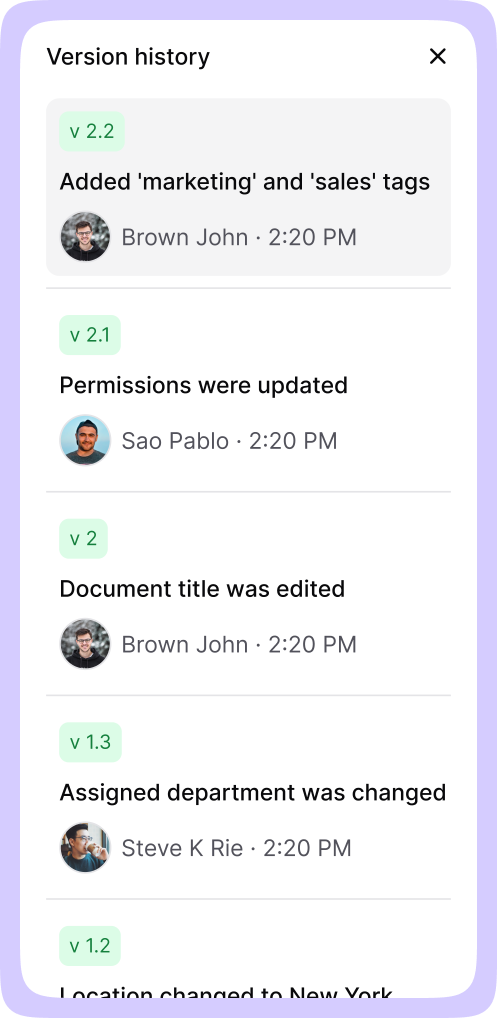
This isn’t about replacing SharePoint everywhere. Many teams continue using it for collaboration and file storage. The shift is recognizing when something mission-critical deserves a system designed specifically for knowledge sharing, not document hosting.
A decision framework for executives
SharePoint remains the right choice in specific scenarios. When documentation volume is modest, ownership is clear, and governance requirements are light, it works well.
It starts constraining teams when documentation becomes mission-critical, spans multiple departments, and changes frequently. When knowledge needs to be trusted, not just stored.
The signal isn’t document count. It’s behavior. If people ask “is this the latest version?” more than once a week, the system is already under strain. If onboarding takes longer because documentation can’t be trusted, that’s a signal. If compliance teams express concern about traceability, that’s another.
What the threshold actually reveals
The 5,000-item threshold gets blamed because it’s tangible. What it actually exposes is the gap between file storage and knowledge management.
A SharePoint knowledge base can survive past that limit, but only with escalating effort and accumulating risk. Growing companies eventually decide whether internal knowledge is infrastructure or clutter. The systems they choose make that decision for them.
The features that actually matter for scaling your internal knowledge base have less to do with storage capacity and more to do with governance, accountability, and trust.
If you’re approaching that inflection point, step back and ask what you need your knowledge base to do over the next three years, not just the next quarter. The answer will clarify which tools belong in your stack.
Ready to see knowledge management without technical ceilings? Try the AllyMatter live demo.
Frequently asked questions
Does every SharePoint knowledge base hit the 5,000-item limit?
No. Smaller teams with limited documentation and consistent governance may never experience it. The threshold becomes problematic when SharePoint serves as a centralized knowledge base across departments without enforced metadata discipline or lifecycle management.
Can indexed columns and filtered views solve the 5,000-item threshold permanently?
They help, sometimes substantially. These solutions delay the problem rather than eliminate it. As teams grow and content accelerates, they depend on sustained behavioral discipline that most organizations can’t maintain during rapid growth.
Why does SharePoint search become unreliable as content volume grows?
Search relevance degrades when content accumulates without lifecycle management. As outdated, duplicate, and partially governed documents pile up, employees lose confidence in results and stop using search altogether. The technical capability exists, but trust erodes.
When should companies move beyond SharePoint for knowledge management?
It’s less about company size and more about complexity. When documentation spans multiple departments, compliance matters, onboarding depends on self-service access, and governance requires enforced workflows, SharePoint’s limitations become visible quickly.
Should companies replace SharePoint or complement it with a standalone knowledge base?
Most mature organizations complement it. SharePoint remains valuable for collaboration and file storage. Mission-critical knowledge benefits from purpose-built internal knowledge base software designed specifically for governance, accountability, and long-term scale.

Vikas is a B2B marketing professional with over 14 years of experience in content strategy, messaging, and demand generation. He specializes in turning complex business challenges into clear, actionable stories to connect meaningfully with audiences.