Your Head of HR updates the data handling policy, uploads it to Drive, pastes the link in a Slack channel, and considers it done. Six weeks later, a vendor audit asks for documented proof that the relevant employees received, read, and acknowledged the updated policy. The document is there. The record of who engaged with it is not.
This situation comes up more than people expect, and it rarely gets flagged until the moment it causes a problem. Google Drive didn’t fail here. It just wasn’t built for this.
Growing companies reach a point where the distinction matters. Drive is a file storage and collaboration tool, and it does that well. An internal knowledge management system is something different: structured access, formal approval chains, acknowledgment records, audit trails. The two categories overlap just enough to create confusion about which one you actually need.
This comparison covers both tools plainly so you can make that call for your own situation.
Where Google Drive genuinely wins
Drive earns its place in most companies’ stacks, and that’s worth acknowledging before getting into where it falls short.
For teams already running on Google Workspace, Drive is embedded in how work happens. Docs, Sheets, Slides – everything lives there, and the co-editing experience in Google Docs is genuinely capable. For collaborative working files, project briefs, marketing assets, or shared reference documents, it’s a practical, low-friction choice. Pricing is bundled into Workspace plans, so for teams already paying for Gmail and Calendar, Drive adds no incremental cost.
Familiarity carries real weight too. A tool people actually open and use beats a better tool that doesn’t get adopted. Drive has that advantage, and it shouldn’t be dismissed.
The problem develops when your team starts using Drive as a policy management system, an onboarding documentation hub, or a compliance record. Google designed it for none of those things.
Where AllyMatter wins
The differences aren’t about interface preferences or search speed. They’re structural. AllyMatter supports specific workflows that Drive simply cannot.
Approval workflows
Drive has no native approval mechanism. The common workaround is a comment thread, an email, or a Slack message confirming that someone reviewed a document. That approval then lives outside the document itself, disconnected from the version the reviewer actually saw.
In AllyMatter, documents move through defined approval stages with assigned reviewers and approvers. Each participant is notified when it’s their turn. The document captures every decision. When a policy goes through reviewers across legal, HR, and finance, the full chain is visible and traceable inside the platform, not scattered across inboxes.
Acknowledgment tracking
Sharing a document and confirming that the right people actually read it are two different problems. Drive handles the first. It has no mechanism for the second.
AllyMatter tracks acknowledgments at the individual level. When you share a policy update with a team, you can require each recipient to formally acknowledge it. The system shows exactly who has completed that action and who hasn’t, and sends automated reminders on a schedule you configure. For any document where an employee claiming ignorance of a change creates legal or operational risk, this record is not optional.
Audit trails
Version history in Drive records what changed in a document. An audit trail answers a different question entirely: not just what changed, but who took each action, when, and in what sequence – creation, edits, visibility changes, approval decisions, acknowledgments received, reminders sent.
I’ve seen companies attempt to reconstruct this kind of documentation from email threads and Slack exports ahead of a compliance audit. It’s a painful process, and the gaps it exposes tend to be expensive. AllyMatter maintains that chronological record as a matter of course.
Access control
Drive’s sharing model prioritises flexibility, which makes it useful for collaboration but difficult to govern at scale. Giving a department access to a folder puts everyone on the same access level. Managing who can view versus formally approve a specific document, enforced at the system level, is not something Drive was built to do.
AllyMatter’s permission structure is role-based: Internal Viewer, Internal Editor, Internal Approver, External Approver, Owner, and Enterprise Admin. Each role has defined capabilities applied at the document level. You can set visibility to fully public, internal users only, or private to specific users. AllyMatter logs any change to those settings in the audit trail.
Search
Drive searches across everything in your account – working drafts, old versions, files shared with you from other teams. For an employee trying to locate the current, approved version of a specific SOP, that breadth creates noise rather than clarity.
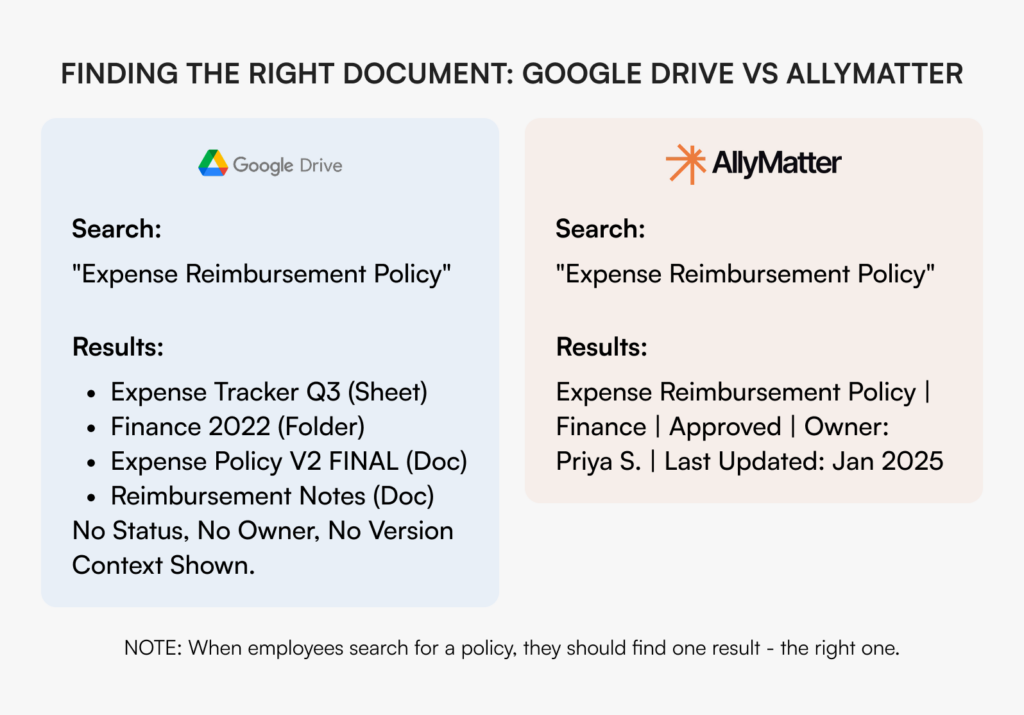
AllyMatter’s search operates within your internal documentation, using department tags, geography attributes, and custom metadata to sharpen results. Employees retrieve the right document – the approved, current version – without sorting through unrelated content.
Feature comparison
The table below captures how the two tools compare across the features that matter most for internal documentation. A few things worth noting before you read it: the gaps on Drive’s side aren’t product failures. They reflect the fact that Drive was designed for a different purpose. The question is whether your use case has grown beyond that purpose.
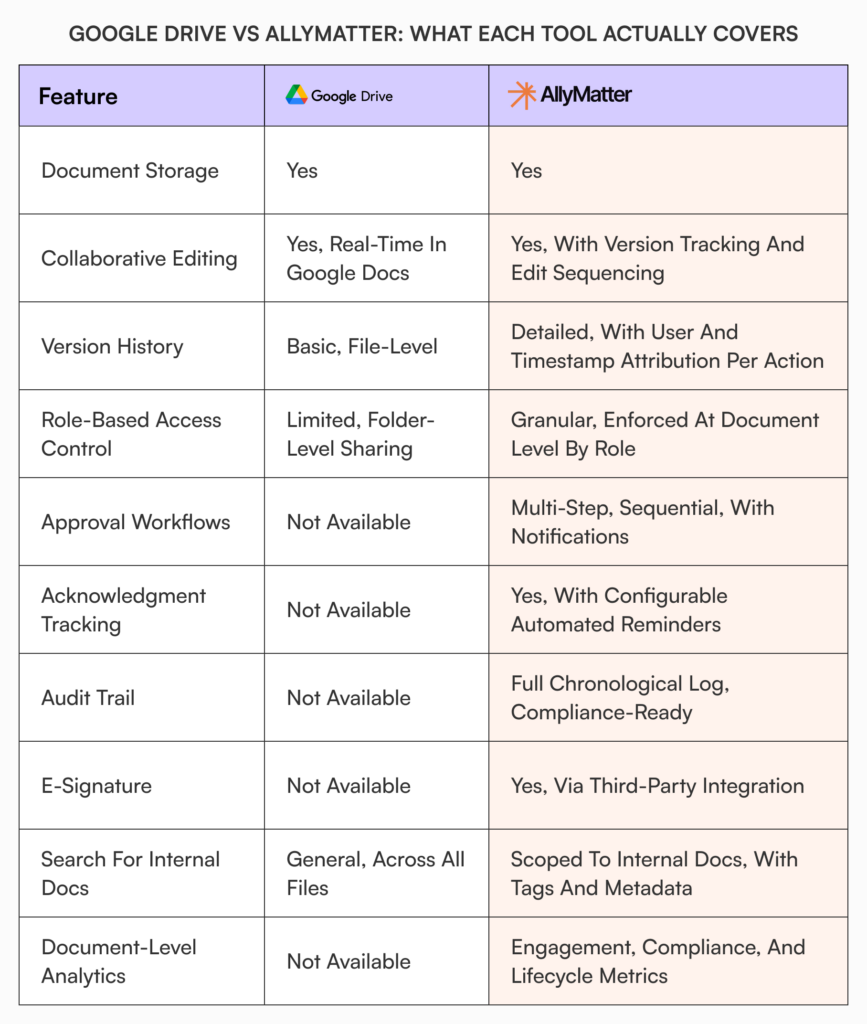
What the table makes visible is a clear split. The left column is a capable file collaboration tool. The right column is a documentation governance system. For teams whose work stays in the collaboration zone, Drive is sufficient. For teams managing policies, SOPs, or compliance documentation that require a formal paper trail, the right column represents the actual requirement.
The use cases where Google Drive is enough
Drive is the right tool when documentation needs are genuinely simple and the risk profile is low.
A team of 30 people sharing project files, collaborating on working documents, and storing reference materials with no compliance requirements doesn’t need to replace Drive. The same applies to early-stage companies where everyone has context through proximity, or marketing teams managing campaign assets and creative files.
The deciding question is whether any of your documents carry accountability requirements. If no one will ever need to prove who approved a document, who read a policy, or what state a procedure was in on a specific date, Drive’s file management is sufficient for the job.
The use cases where you need AllyMatter
The trigger is usually a specific event rather than a general sense that things have gotten disorganised.
Priya is Head of HR at a 200-person healthtech company. Her team updated the data handling policy after a vendor audit flagged compliance gaps. She uploaded the revised document to Drive, notified the team by email, and moved on. The process felt complete.
At the follow-up audit six weeks later, the auditor asked for evidence that employees with access to patient data had specifically received and acknowledged the updated policy. Priya had the document. She had the email. What she could not demonstrate was who, at the individual level, had seen it and confirmed their understanding. The audit finding went against her team.
This is not an unusual situation for companies past a certain size in regulated sectors. And it is not a problem that better folder organisation in Drive can solve.
Beyond compliance scenarios, AllyMatter is the right choice when:
- Policy updates circulate without a formal approval chain, leaving no record inside the document of who reviewed it.
- Teams track employee acknowledgment of critical documents manually in spreadsheets or email threads.
- Multiple versions of the same policy are in circulation with no clear record of which one is current and approved.
- Audit preparation involves reconstructing approval history from email and messaging tools rather than pulling a report from a single system.
- The company operates in healthcare, financial services, legal services, pharma, or manufacturing, where documentation standards carry regulatory weight.
If any of those describe the current situation, the risk of staying with Drive for formal documentation is already present. Understanding why general-purpose tools consistently fall short for internal documentation helps explain why the problem tends to persist even when teams try to work around it with better naming conventions or folder structures.
Decision tree: which tool fits your situation
Work through this in sequence.
Is your team under 50 people with no regulatory obligations and no requirement to demonstrate that specific individuals received and acknowledged specific documents? Drive is sufficient for your current documentation needs.
Is your team between 50 and 200 people? Have you had even one situation where you couldn’t confirm who approved a document, or whether a policy update reached the right people? If yes, you’ve already encountered the gap this article is describing. If no, the question is whether your risk profile is growing – new hires, new markets, new regulatory attention.
Is your team over 200 people, or operating in a regulated industry? A full audit trail and individual acknowledgment tracking are not optional at this scale. The question is not whether you need them but how soon the absence of them creates a documented problem.
Are you preparing for an external audit in the next 12 months? For any compliance-relevant documentation, the question auditors ask is not whether a document exists. It’s whether you can prove it was reviewed, approved, and acknowledged by the right people on a specific timeline.
What moving looks like
The concern about switching usually centres on disruption. It’s worth addressing plainly.
AllyMatter doesn’t require IT involvement to configure. HR managers and operations leads set it up directly – users, roles, folder structures, approval flows – through an admin interface that doesn’t require technical knowledge or engineering support.
The more substantive work before any migration is a documentation audit: identifying what’s current, what your team has superseded, and what’s genuinely policy-relevant versus what has accumulated over time. That work is worth doing regardless of platform. This guide on internal knowledge base best practices covers how to approach it systematically before and during a transition.
Many teams don’t replace Drive entirely. They keep it for working files and active collaboration, and move formal documentation – policies, SOPs, compliance-relevant content – to AllyMatter. For most organisations, that division of function is actually the right architecture. The AllyMatter features page covers how the platform handles the specific workflows described in this article.
Getting this decision right
The companies that handle this transition well tend to act when the risk becomes visible rather than after it becomes costly. A missed acknowledgment in an audit, a compliance finding that traces back to an undocumented approval, a policy dispute with no record of who signed off. These are avoidable problems, but only if the infrastructure to prevent them is in place before the moment of scrutiny.
Drive is not the wrong tool. It is a tool being asked to do something it wasn’t designed for. Recognising that distinction is what makes this decision straightforward.
If you want to see how these workflows operate in practice, try AllyMatter sandbox to explore approval flows, acknowledgment tracking, and audit trails in your own environment before making any commitment.
Frequently asked questions
Can I use Google Drive and AllyMatter together?
Yes, and most teams do. Drive continues to serve as the workspace for active collaboration – drafts, project files, working documents. AllyMatter handles the formal documentation layer: policies, SOPs, compliance content, anything that requires an approval chain, acknowledgment tracking, or a defensible audit trail. In practice, the overlap between the two is minimal because they’re solving different problems.
Does AllyMatter require IT to set up?
No. HR managers, operations leads, and administrative teams configure it directly. Adding users, assigning roles, building folder structures, and creating approval flows are all managed through an admin interface that doesn’t require technical knowledge or engineering support.
What makes AllyMatter’s search different from Google Drive’s search?
The scope. Drive searches everything associated with your account. AllyMatter searches only your internal documentation, and filters results by tags that you determine are the right way to organize your documentation including departments, geographies, approval status, and any other custom tags that your team defines. So instead of choosing between ten files with similar names, an employee sees the one document that’s current and approved.
Is AllyMatter suitable for regulated industries?
It’s where the platform is most clearly the right fit. The full audit trail, individual acknowledgment tracking, configurable approval workflows, and
what compliance audits require from a documentation system. Healthcare, financial services, legal services, pharma, and manufacturing each carry documentation obligations that a basic version history in Drive doesn’t satisfy. AllyMatter treats those requirements as a baseline, not an add-on.

Vikas is a B2B marketing professional with over 14 years of experience in content strategy, messaging, and demand generation. He specializes in turning complex business challenges into clear, actionable stories to connect meaningfully with audiences.