Your team has outgrown Slack threads and Google Drive folders. Critical policies live in someone’s email. Your new hire asked where to find the vacation policy, and three people gave different answers. You need a real internal knowledge base.
The question isn’t whether you need one. It’s which tool will actually work for a 20-person startup without a dedicated knowledge manager. If you’re still using Google Drive for company policies, you’re not alone, but it’s creating problems you might not see yet.
Confluence shows up in every search. It’s powerful, established, and your engineering team probably already uses it. But you’ve also heard it can become a maze of pages, requires constant gardening, and needs plugins for basic compliance features.
AllyMatter addresses exactly this moment when you’re moving from startup chaos to structured processes, but you’re still lean. No IT admin. No documentation specialist. Just you and your team trying to capture knowledge before it walks out the door.
Let me walk through what actually matters when you’re making this decision.
What you’re actually comparing
Confluence is a collaboration wiki that grew out of software teams needing a place to document everything. Confluence’s flexibility makes it powerful for project documentation and technical specs. You design the structure that fits your team.
AllyMatter focuses specifically on policies, SOPs, onboarding materials, and compliance documentation. It assumes you’re a growing company that needs structure without complexity.
Both tools work well. They just work well for different things.
How document creation differs
Sarah, head of operations at a 35-person healthcare startup, needed to create a PTO policy. In Confluence, she first decided which space to use, picked a page template, figured out the hierarchy, and set permissions. The policy itself took 20 minutes to write. The setup took considerably longer.
In AllyMatter, she clicked “New Document,” selected “HR Policy” as the category, wrote the policy, and designated the approver. The platform assumed she wanted to create a policy document that follows a standard approval process.
Neither approach is wrong. Confluence gives you complete control over structure. AllyMatter makes assumptions about how startup policies should work. Which one fits depends on whether you want flexibility or speed.
The documentation pivot from informal to structured often happens between 15-30 employees. Most startups realize too late they’ve outgrown their current approach.
Built-in features vs marketplace plugins
Confluence’s core product focuses on collaborative editing and page creation. When you need approval workflows, read tracking, or electronic signatures, you typically add plugins from the Atlassian marketplace.
Common Confluence plugins for policy management include Comala Document Management for approval workflows, ScrollViewport for read confirmations, and DocuSign for Confluence for e-signatures. Each plugin requires separate licensing, configuration, and integration management.
AllyMatter includes approval workflows, version control with clear history, read tracking, acknowledgment capture, and electronic signatures as core features. No marketplace hunting. No integration headaches.
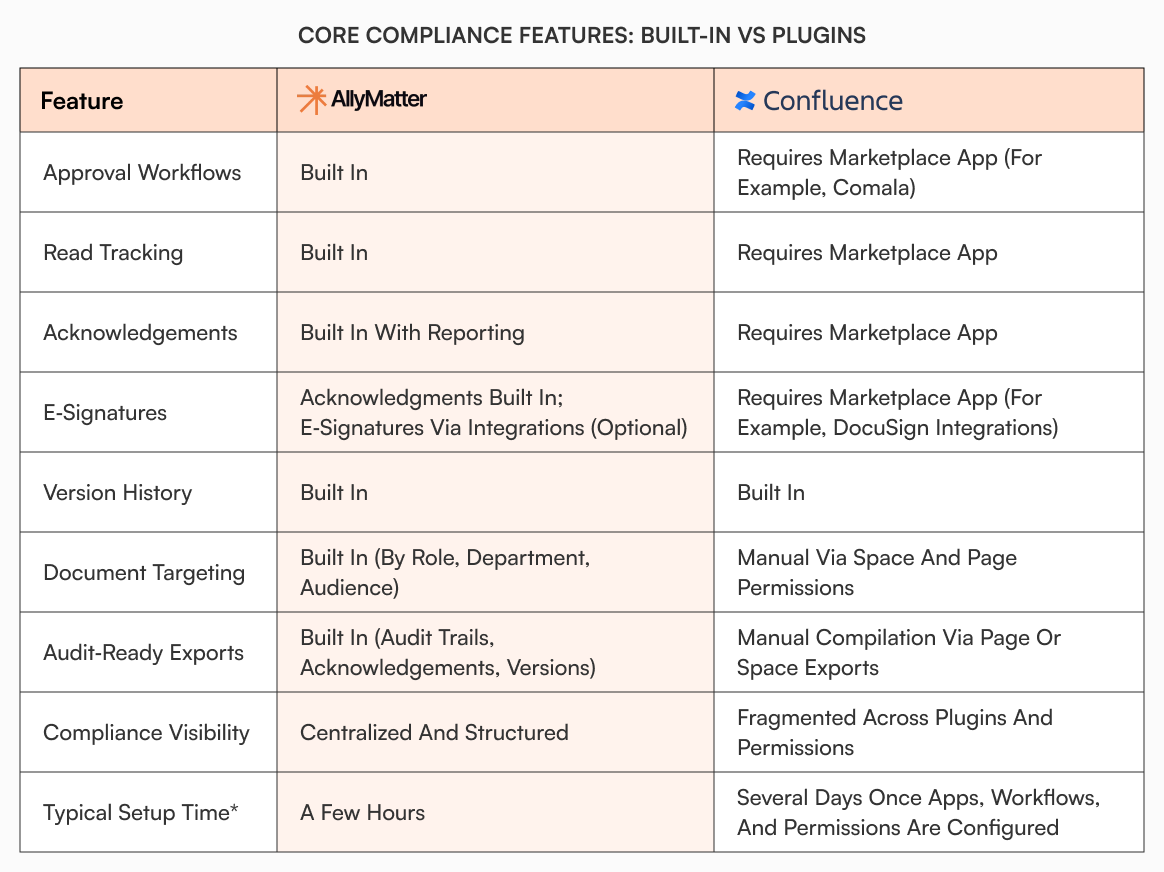
The tradeoff matters when you’re a compact team. When scaling your knowledge base, fewer moving parts means faster implementation. Plugins give you exactly the features you want. Built-in features mean less configuration work.
Version history and audit trails
Confluence tracks every edit with detailed diffs. You can see exactly what changed at the character level between any two versions. This level of detail works well for collaborative editing where multiple people are iterating on specs or project documentation.
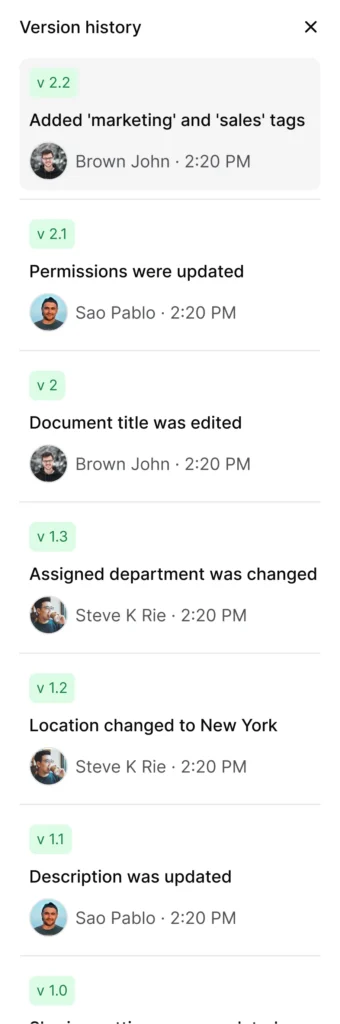
AllyMatter’s version history shows you what changed, who changed it, and why in plain language. When your auditor asks “when did you update the data retention policy,” you can show them immediately without parsing through detailed diffs.
Both approaches track changes. Confluence optimizes for collaborative iteration. AllyMatter optimizes for compliance and audit readiness.
How targeted document delivery works
You update the parental leave policy. In Confluence, you publish it to a space and notify people through comments, Slack, or email. People who have access to that space can find it. Tracking who has actually read it requires add-ons or external tracking.
AllyMatter lets you target documents by department, role, and location based on user tags. When you publish that parental leave update, you send it specifically to relevant groups. You track who’s read it and require acknowledgment with exportable proof for compliance.
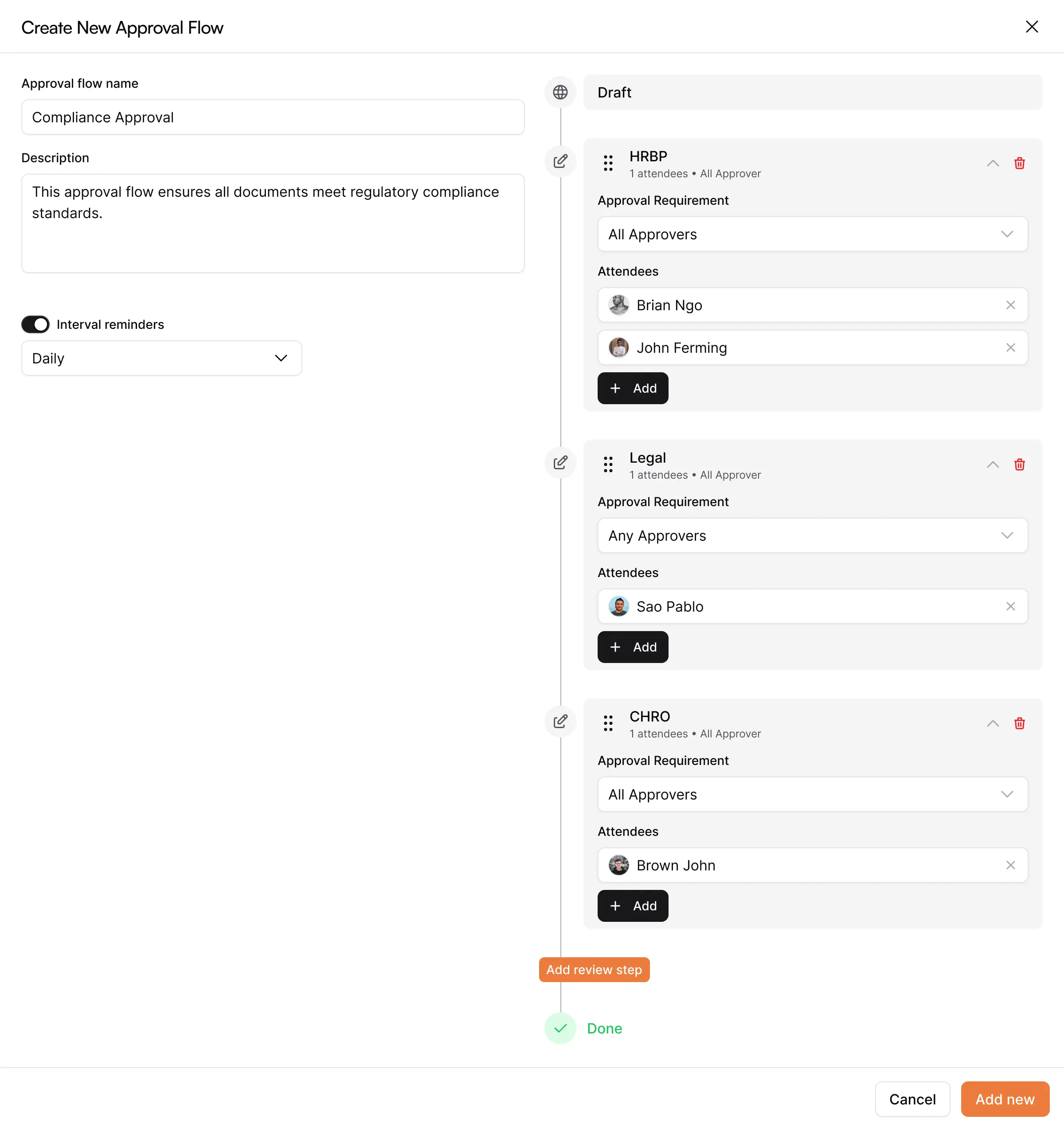
This difference shows up most clearly during audits or when you need to prove that specific groups received and acknowledged updated policies.
Built-in compliance workflows vs manual coordination
A policy change in Confluence typically involves creating or editing the page, notifying reviewers through comments, tracking approvals separately (maybe in Jira), publishing when approved, and manually tracking acknowledgments through external tools.
The same process in AllyMatter involves creating the policy, assigning approvers, letting the system track approval, publishing with one click, automatic notification to affected employees, and built-in acknowledgment tracking with exportable audit trails.
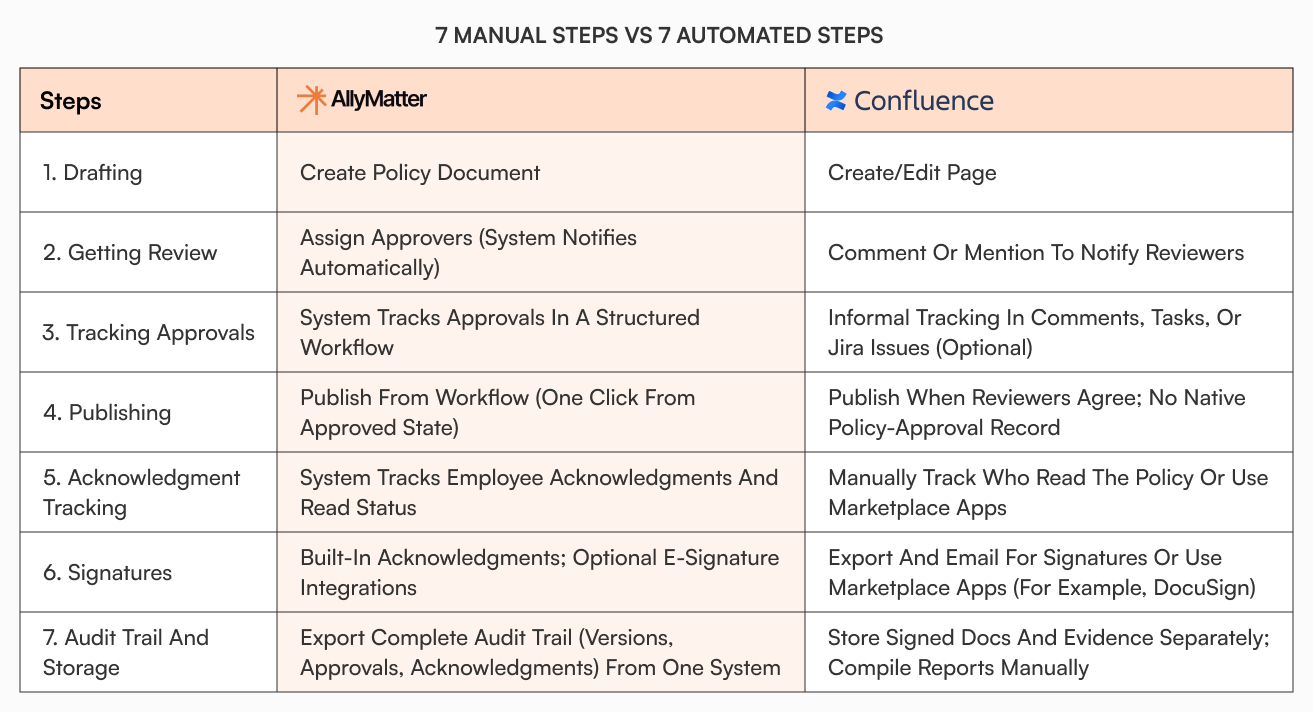
Confluence gives you the flexibility to design your own approval process. AllyMatter provides a standard process that works for most policy changes. Pick based on whether you need custom workflows or want a working solution immediately.
Export readiness for due diligence
When you’re raising Series A or going through an acquisition, investors ask for policy documentation with full audit trails.
In Confluence, you compile pages from multiple spaces, dig through comments for approval records, check Jira for related tickets if you tracked approvals there, pull acknowledgment data from wherever you stored it (probably a spreadsheet), search through Slack channels for notification confirmations, manually create a change log showing policy evolution, and export pages individually to PDF.
In AllyMatter, you filter to relevant document categories (like “HR Policies” or “Security”), and export the audit pack complete with approvals, acknowledgments, version history, and access logs.
According to the Society for Human Resource Management, it takes an average of 44 days to fill a position. The knowledge transfer gap extends even longer. When key people leave, you need systems that preserve institutional knowledge without requiring manual compilation during critical moments like fundraising or acquisition due diligence.
The pilot plan that reveals real differences
Run this specific test with both systems:
Week 1: Import five representative documents. Pick one HR policy (PTO, expenses, something you update regularly), one operational procedure (customer refund process), one onboarding checklist, one compliance document, and one cross-departmental process. Import these into both platforms. Time how long it takes. Note what friction you hit.
Week 2: Run one complete policy change end-to-end. Update your expense reimbursement policy with a real change. Then route for approval from your finance lead and CEO, publish to all employees, notify specific groups separately (full-time employees, contractors), capture acknowledgments, collect e-signatures where required, and export the complete record. Measure completion time. Track how many manual steps each system requires. Count how many tools or plugins you needed beyond the base platform.
Week 3: Test retrieval and reporting. Have three people who weren’t involved in the policy change try to find the current version of that policy, who approved it and when, who has acknowledged it, and the version from before the change. Time how long it takes them. Note what they struggled with.
This pilot reveals whether you’re choosing a tool that fits your team’s actual workflow or one that requires your team to adapt to its complexity.
The admin overhead reality
Confluence requires active management. Spaces proliferate. Page trees need organization. People create duplicate content because they can’t find the original. Permissions become complex as you grow. This isn’t a criticism of Confluence. It’s the natural consequence of a flexible system that can be organized many different ways.
AllyMatter’s opinionated structure (organized by department and document type) means less maintenance. You’re not deciding how to organize things or preventing structure drift. You’re using a pre-defined system that mirrors how people think about company information.
As your internal knowledge base matures, maintenance becomes a bigger factor. The question is whether you want control over structure or want structure decisions made for you.
When Confluence is the right choice
Confluence excels at collaborative project documentation. Choose it when you’re already deep in the Atlassian ecosystem (Jira, Bitbucket, Confluence), your primary use case is collaborative editing on specs and meeting notes, you have someone who can dedicate time to maintaining structure, engineering documentation is your main concern, or you need extensive customization.
The free tier is genuinely useful for small teams that want a wiki without compliance requirements. Many engineering teams use Confluence effectively for technical documentation while using other tools for company policies.
When AllyMatter is the right choice
Choose AllyMatter when you need a structured knowledge base for policies, procedures, and onboarding. Nobody on your team has bandwidth to be a full-time knowledge manager. You’re preparing for audits or due diligence. Compliance tracking (who read what, when) matters. You want approval workflows without building them. You’re moving off Notion, Google Drive, or Slack and need less flexibility, more structure.
Startups can’t afford systems people don’t use. When only half your team adopts a knowledge base, you still have knowledge scattered everywhere. AllyMatter optimizes for adoption over flexibility.
Comparing permissions approaches
Confluence uses space-and-page permission combinations. You set permissions at the space level, then optionally override them for individual pages. As you add more teams, locations, and roles, the permission combinations multiply. You need to track which groups have access to which spaces and pages.
AllyMatter uses role-based permissions (Owner, Editor, Approver, Viewer) combined with document tags. Tag a document with department and location attributes, and those groups can access it automatically. Simpler to set up, easier to maintain, less likely to accidentally expose sensitive documents.
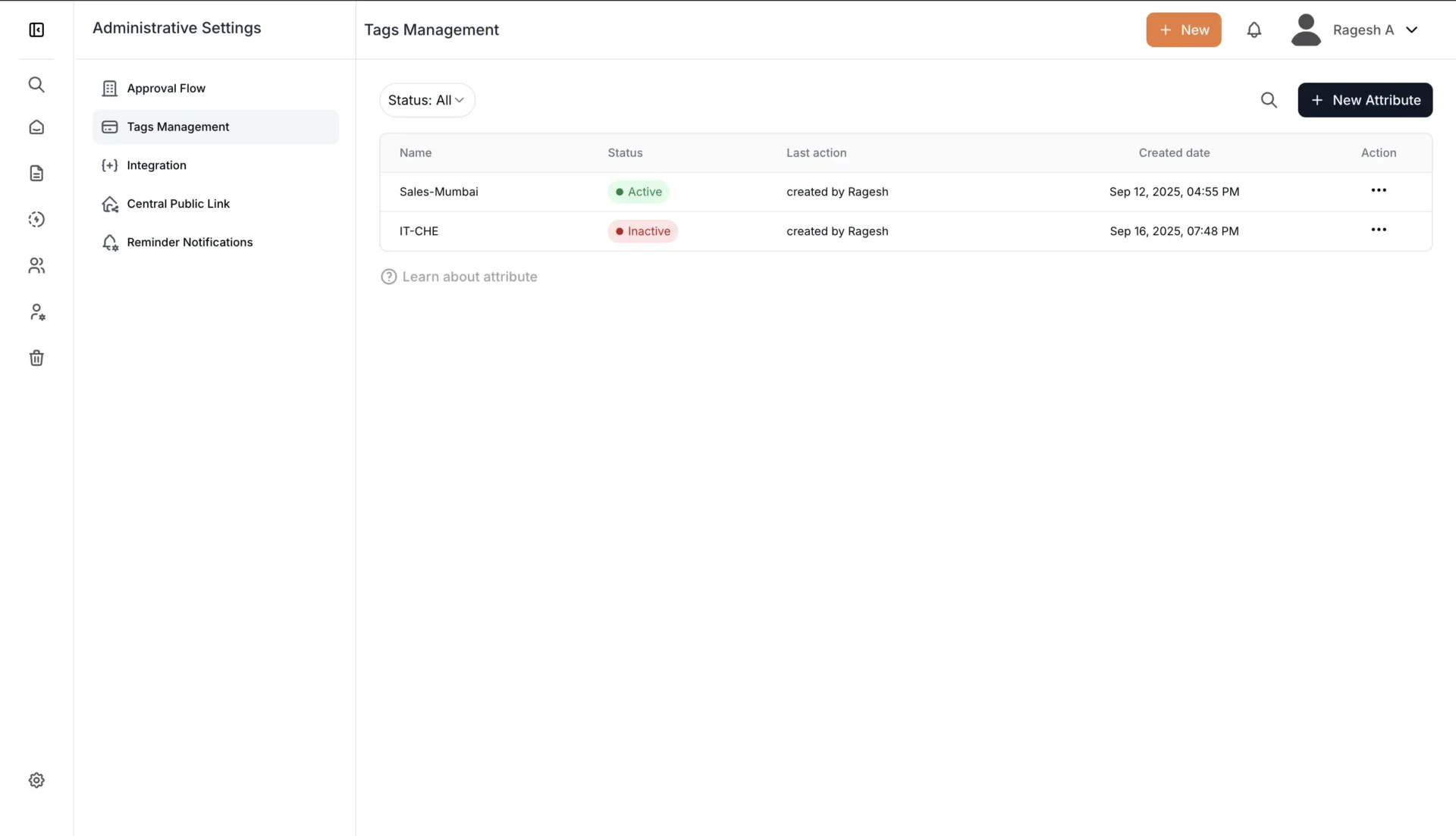
Both approaches work. Confluence offers more granular control. AllyMatter offers simpler permissions that work well enough for most companies in growth mode.
How analytics reveal adoption
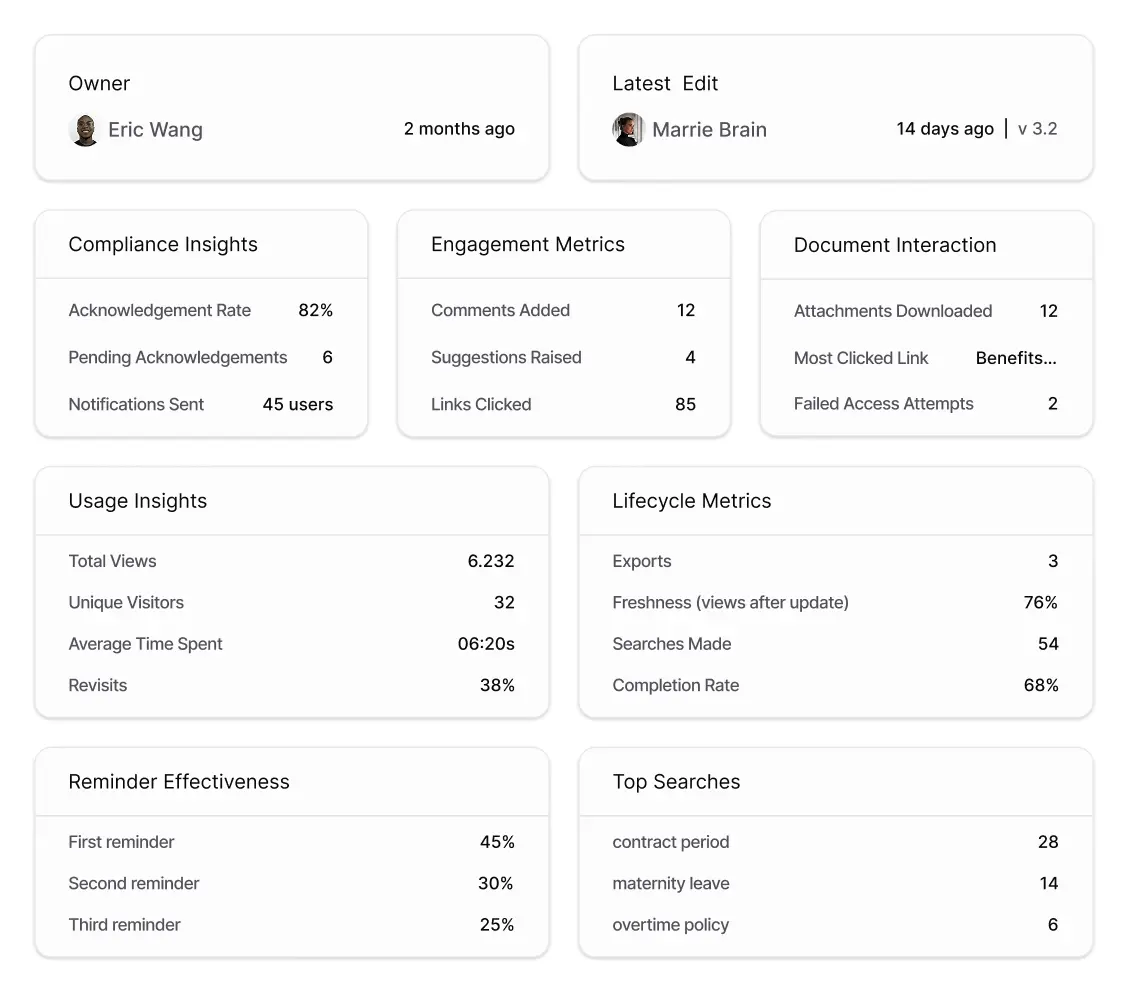
AllyMatter shows which documents are being read, where people are getting stuck (high search volume but low completion rates), and which policies need refresh. You can see acknowledgment rates, most-searched terms, and document freshness metrics.
Confluence has analytics but they require more interpretation. You’ll see page views and contributors, but connecting that to business outcomes like policy compliance or onboarding effectiveness takes more work.
A concrete scenario
Your company is preparing for SOC 2 compliance. Your auditor needs to see your data handling policies with approval records, who has access to sensitive systems (documented in your access control procedures), proof that all employees have read and acknowledged the security policies, change history for all security-related documents over the past year, and an export of everything for their review.
In Confluence, you compile pages from multiple spaces, dig through comments for approval records, check Jira for related tickets, pull acknowledgment data from wherever you stored it (probably a spreadsheet), manually create a change log, and export pages individually to PDF. You spend days gathering evidence.
In AllyMatter, you filter to “Security” documents and export the audit pack (complete with approvals, acknowledgments, version history, and access logs). You send it the same day.
This isn’t about which tool is better in abstract terms. It’s about which tool fits the actual work startups need to do with their knowledge base.
Making the decision
Both tools can work. Confluence gives you flexibility to create exactly the structure you want. AllyMatter gives you a structure that works out of the box.
If you’re a software team that lives in Atlassian tools and wants a collaborative wiki for project docs and specs, Confluence makes sense. You already understand the paradigm and value the flexibility.
If you’re a scaling company that needs to capture policies, procedures, and onboarding materials in a way that supports compliance and scales without dedicated staff, AllyMatter removes the setup and maintenance work.
Run the pilot I outlined above. Import your five most important documents. Execute one policy change end-to-end. Test retrieval with people who weren’t involved in setup. Measure the time and complexity.
Need help deciding what to document first? Start with understanding how to structure your knowledge base before choosing a platform.
The right choice becomes obvious when you’re doing the actual work instead of comparing feature lists.
Choosing based on your actual needs
Both Confluence and AllyMatter solve knowledge management problems. Confluence excels at flexible collaboration and project documentation. AllyMatter removes friction from policy management and compliance tracking.
Your decision comes down to three questions: Do you need flexibility or structure? Do you want to configure workflows or use pre-built ones? Do you have time to maintain the system or need it to maintain itself?
Run the pilot. Compare the actual work, not the feature lists. The right tool makes knowledge management feel effortless instead of adding to your workload.
For more guidance on building your startup’s knowledge foundation, see our complete guide to building your startup knowledge base. If you’re ready to move beyond scattered documentation, start with the right foundation to prevent costly migrations later.
See the difference yourself
The fastest way to compare AllyMatter and Confluence is to run the pilot we outlined above with your own documents. Join our waitlist to get early access and start testing with your team’s actual policies and procedures.
Frequently asked questions
Can I migrate from Confluence to AllyMatter later if I start with Confluence?
Yes, but it requires work. You’ll need to export content (Confluence makes this relatively straightforward) and restructure it to fit AllyMatter’s organizational model. The harder part is rebuilding approval workflows, acknowledgment tracking, and metadata. Better to pick the right tool from the start based on your primary use case.
If we’re already using Confluence for engineering, can we add AllyMatter just for HR policies without creating confusion?
Absolutely. Many companies use both. Confluence handles collaborative project documentation and technical specs. AllyMatter manages policies, SOPs, and compliance documentation. Clear communication about which tool serves which purpose prevents confusion. Engineering keeps their workflow, operations gets structure for policies.
How long does setup actually take for each platform?
AllyMatter takes 2-3 hours to configure basic settings, import initial documents, and train your team on where things go. Confluence takes several days to decide on space structure, set up permissions, configure necessary plugins, create templates, and train team members on the organizational system you’ve designed. The difference matters when you’re running lean.
Do companies typically use both Confluence and AllyMatter, or is it one or the other?
Both patterns work. Some companies use only Confluence or only AllyMatter. Others use Confluence for engineering and project docs while using AllyMatter for company policies and onboarding. Pick based on your team composition. If most of your documentation is engineering-focused, Confluence alone might work. If you have significant HR, operations, and compliance needs, you’ll likely need something purpose-built for policies.
We already pay for Confluence. Does it make sense to pay for another tool?
Consider what Confluence costs beyond licensing. Operations teams spending hours weekly managing policies in Confluence, buying plugins for compliance features, and manually tracking who’s read what. These hidden costs add up. Calculate the actual time your team spends working around Confluence’s limitations. The right tool for policies might save more in operational efficiency than it costs in licensing.