Most teams outgrow Google Drive for internal documentation before they realize it. Here’s where the gaps actually show up.
Your head of HR updates the data handling policy, uploads it to Drive, pastes the link in a Slack channel, and considers it done. Six weeks later a vendor audit asks for documented proof that the relevant employees received, read, and acknowledged the updated policy. The document is there. The record of who engaged with it is not.
This comes up more than people expect, and it rarely gets flagged until the moment it causes a problem. Drive did not fail here. It just was not built for this. Drive is a file storage and collaboration tool, and it does that well. An internal knowledge management system is something different: structured access, formal approval chains, acknowledgment records, audit trails. The two overlap just enough to create confusion about which one you actually need. Here is the plain comparison so you can make that call.
Where Google Drive genuinely wins
Drive earns its place in most companies’ stacks, and that is worth saying before getting into where it falls short. For teams already on Google Workspace, Drive is embedded in how work happens. Docs, Sheets, and Slides all live there, and the co-editing experience in Google Docs is genuinely good. For working files, project briefs, marketing assets, and shared reference documents, it is a practical, low-friction choice, and the cost is already bundled into Workspace. Familiarity carries real weight too: a tool people actually open beats a better tool that does not get adopted.
The problem develops when the team starts using Drive as a policy management system, an onboarding hub, or a compliance record. Google designed it for none of those.
Where AllyMatter wins
The differences are not about interface or search speed. They are structural. AllyMatter supports workflows Drive simply does not.
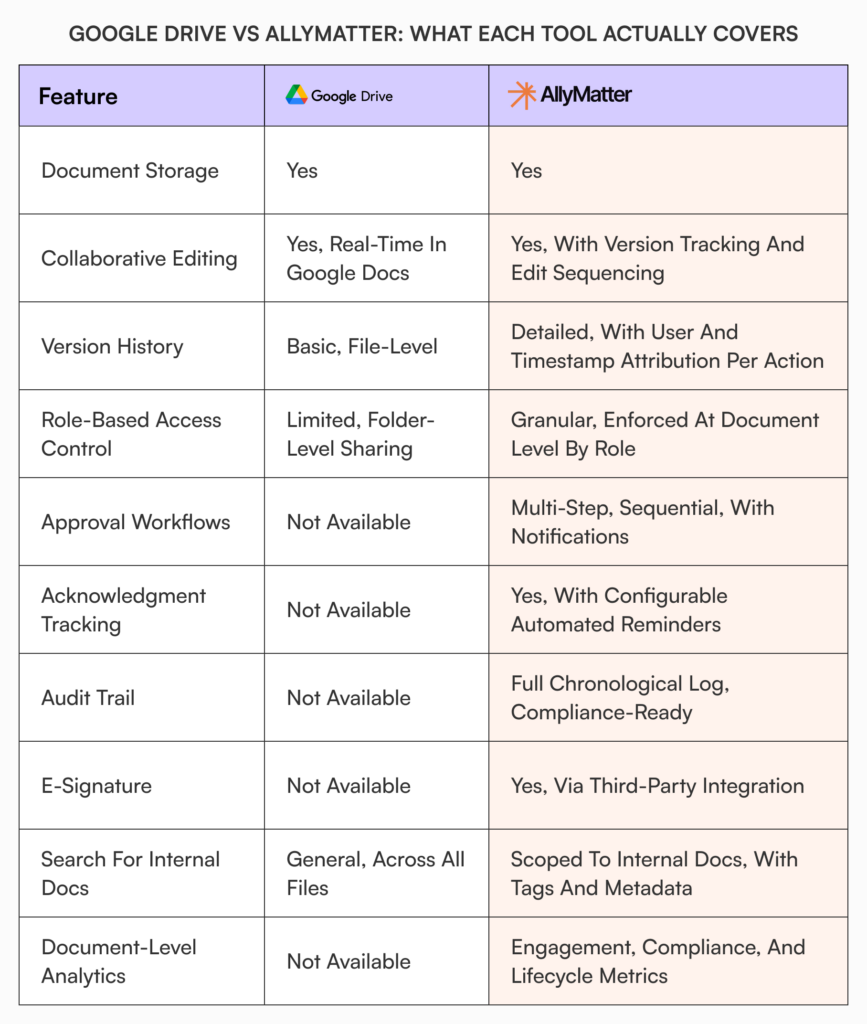
Approval workflows. Drive and Docs include a basic approve-or-reject step on higher Workspace tiers, but not a configurable multi-stage chain. In AllyMatter, a document moves through defined stages with assigned approvers, you set whether all approvers or any one clears each stage, any approver can reject with comments and send it back, and the full chain across legal, HR, and finance is visible and timestamped inside the platform rather than scattered across inboxes.
Acknowledgment tracking. Sharing a document and confirming the right people read it are two different problems. Drive handles the first and has no mechanism for the second. AllyMatter records acknowledgment at the individual level, shows exactly who has and has not completed it, sends automatic reminders to the stragglers, and even captures how long each person spent on the document.
Audit trails. Version history records what changed in a file. An audit trail answers a different question: who took each action, when, and in what order, across creation, edits, visibility changes, approvals, and acknowledgments. AllyMatter keeps that chronological record as a matter of course and exports it per document, per folder, or per user.
Access control. Drive’s sharing model prioritizes flexibility, which is great for collaboration and hard to govern at scale. AllyMatter uses four roles, editors, viewers, approvers, and admins, with approvers able to be external where outside review is needed. Documents default to internal-only and can be opened deliberately to the whole organization, named external people, or fully public, and any change to those settings lands in the audit trail.
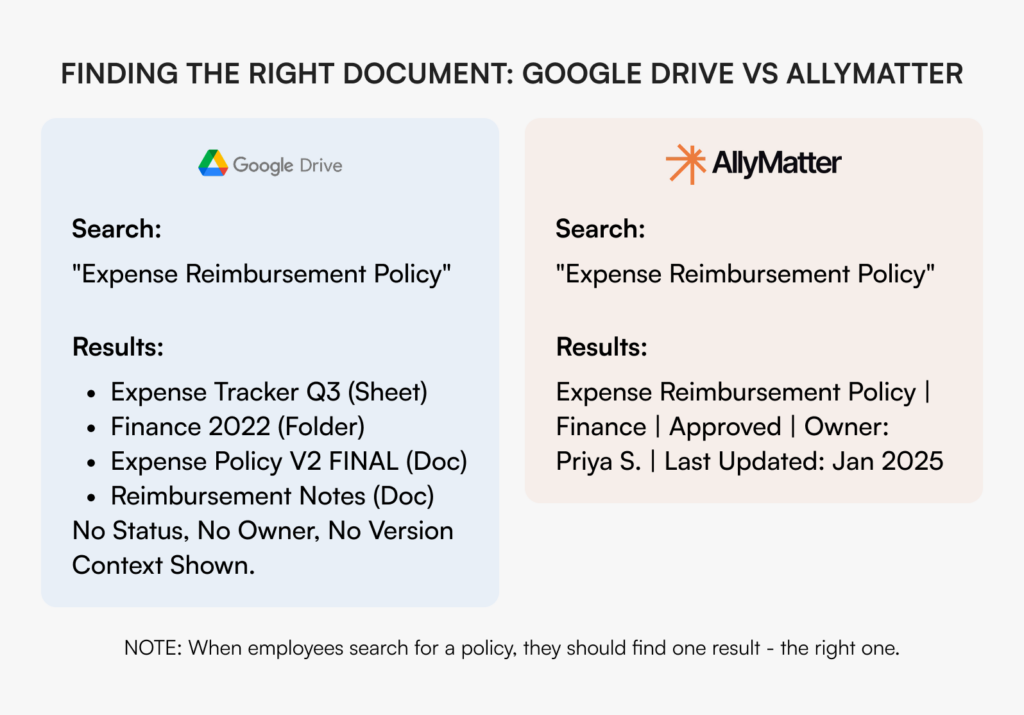
Search. Drive searches everything in your account, including drafts, old versions, and files shared from other teams, which is noise when someone just needs the current approved SOP. AllyMatter search runs only across your internal documentation, is permission-aware so people see only what their tags allow, and uses department, geography, and custom tags to return the one approved, current version.
What it takes to make Drive do this
You cannot flip a setting to turn Drive into a governance system. You assemble a stack, and every piece adds cost, setup, and another seam where things break.
- Approval workflows: the native approve-or-reject step is a single stage, so real multi-stage review chains mean an Apps Script build or a third-party approval add-on that someone has to maintain.
- Acknowledgment tracking: there is no native way to require and record that each person read a policy, so teams stitch it together with a Google Form plus a spreadsheet, or buy a policy-acknowledgment add-on, then chase responses by hand.
- Audit trail: Drive activity and Docs version history show edits, but a defensible per-document trail of approvals, acknowledgments, and access changes usually means Google Vault (a higher Workspace tier or add-on built for retention and eDiscovery, not policy sign-off) plus manual assembly at audit time.
- E-signature: for signed attestations you add a tool like DocuSign or PandaDoc, or Google’s own eSignature on eligible tiers.
- Governed search and structure: to stop search returning every draft and shared file, teams bolt a separate wiki or knowledge-base layer on top of Drive, which becomes one more place documents live.
Run that stack for a year and you are paying for several tools, maintaining the integrations between them, and pulling someone technical in to keep it working. AllyMatter covers approvals, acknowledgment, audit, permission-aware search, and version compare in one system, so there is nothing to stitch together. E-signature is coming soon; until then it plugs in.
When Google Drive is enough
Drive is the right tool when documentation needs are genuinely simple and the risk is low. A 30-person team sharing project files and reference materials with no compliance requirements does not need to replace it. The same goes for early-stage companies where everyone has context through proximity, or a marketing team managing campaign assets. The deciding question is whether any of your documents carry accountability requirements. If no one will ever need to prove who approved a document, who read a policy, or what state a procedure was in on a given date, Drive is sufficient.
When you need AllyMatter
The trigger is usually a specific event, not a general sense of disorganization.
Priya is head of HR at a 200-person healthtech company. Her team updated the data handling policy after a vendor audit flagged gaps. She uploaded the revised document to Drive, emailed the team, and moved on. At the follow-up audit six weeks later, the auditor asked for evidence that employees with access to patient data had specifically received and acknowledged the updated policy. Priya had the document and the email. What she could not show was who, individually, had seen it and confirmed they understood it. The finding went against her team. Better folder organization in Drive does not solve that.
Beyond compliance, AllyMatter is the right choice when policy updates circulate with no formal approval chain or record of who reviewed them, acknowledgment is tracked by hand in spreadsheets, multiple versions of a policy are in circulation with no clear current one, audit prep means reconstructing history from email and Slack, or you operate in healthcare, financial services, legal, pharma, or manufacturing where documentation carries regulatory weight. If any of those describe you, the risk of staying on Drive for formal documentation is already present. Why general-purpose tools fall short for internal documentation explains why the problem persists even with better naming conventions.
Start your 30-day free trial. No credit card to start, and a 30-day money-back guarantee if you convert and change your mind. Start free or try the sandbox demo.
Which tool fits your situation
Work through it in sequence. If your team is under 50 people with no regulatory obligations and no need to prove that specific individuals received and acknowledged specific documents, Drive is sufficient for now. If you are between 50 and 200 and have had even one moment where you could not confirm who approved a document or whether a policy update reached the right people, you have already hit the gap this article describes. If you are over 200 or in a regulated industry, a full audit trail and individual acknowledgment tracking are not optional, and the only question is how soon their absence becomes a documented problem. And if you are preparing for an external audit in the next 12 months, remember the question auditors ask is not whether a document exists, but whether you can prove it was reviewed, approved, and acknowledged by the right people on a specific timeline.
What moving looks like
The worry about switching is usually disruption, so here it is plainly. AllyMatter does not need IT to configure. HR managers and operations leads set up users, roles, folders, and approval flows directly through an admin interface, with the core workspace ready in about five minutes. The more substantive work before any move is a documentation audit: deciding what is current, what is superseded, and what is genuinely policy-relevant. That work is worth doing regardless of platform, and our internal knowledge base best practices guide covers how.
Most teams do not replace Drive entirely. They keep it for working files and active collaboration and move formal documentation, policies, SOPs, and compliance content to AllyMatter, which for most organizations is the right architecture. And migration is on us: we bring your existing documentation across, structure and permissions included, so the switch is not a project you run alone. The migrations page covers how it works.
Getting this decision right
The companies that handle this well act when the risk becomes visible, not after it becomes costly. A missed acknowledgment in an audit, a compliance finding that traces back to an undocumented approval, a policy dispute with no record of who signed off: all avoidable, but only if the infrastructure is in place before the moment of scrutiny. Drive is not the wrong tool. It is a tool being asked to do something it was not designed for, and recognizing that is what makes the decision straightforward.
Start your 30-day free trial. No credit card to start, and a 30-day money-back guarantee if you convert and change your mind. Start free or explore the sandbox to see approval flows, acknowledgment tracking, and audit trails in your own environment first.
Frequently asked questions
Can I use Google Drive and AllyMatter together?
Yes, and most teams do. Drive stays the workspace for active collaboration, drafts, and working files. AllyMatter handles the formal layer: policies, SOPs, and compliance content that need an approval chain, acknowledgment tracking, or a defensible audit trail. The overlap is minimal because they solve different problems.
Does AllyMatter require IT to set up?
No. HR managers, operations leads, and admins configure it directly. Adding users, assigning roles, building folders, and creating approval flows are all handled through an admin interface that does not need engineering support, usually in about five minutes.
What makes AllyMatter’s search different from Google Drive’s?
Scope and precision. Drive searches everything tied to your account. AllyMatter searches only your internal documentation and is permission-aware, filtering by tags you define such as department, geography, and approval status, so an employee sees the one document that is current and approved rather than ten similarly named files.
Is AllyMatter suitable for regulated industries?
It is where the fit is clearest. The audit trail, individual acknowledgment tracking, and configurable approval workflows are exactly what compliance audits expect from a documentation system. Healthcare, financial services, legal, pharma, and manufacturing each carry obligations that a basic version history in Drive does not satisfy, and AllyMatter treats those as a baseline rather than an add-on.
What would it cost to make Google Drive do all this?
More than it looks. You would add a workflow tool for multi-stage approvals, a form-and-spreadsheet or add-on for acknowledgment, Google Vault or similar for retention and audit, and an e-sign tool for signed attestations, then maintain the integrations between them. AllyMatter covers those in one system.

Founder of AllyMatter I’m Sid Varma, founder of AllyMatter, an operations-first knowledge base for growing companies. Before AllyMatter, I co-founded Syren Cloud and helped scale it into a 300-person organization across two countries, leading marketing, operations, and HR. We moved fast, served demanding customers, and learned the hard way that internal knowledge systems built for help docs or IT don’t solve day-to-day operations. AllyMatter is my answer—tools that turn tribal knowledge into trusted, searchable processes. This blog shares the playbooks, checklists, and lessons I wish I’d had while scaling.