You hired someone brilliant. Three days in, they’re still hunting for the expense policy. Five people send different documents. Two are from 2022. Nobody knows which is current. This scenario repeats itself weekly in growing companies. An internal wiki solves this problem, but only when built correctly.
An internal wiki gives your team one place where they can create, organize and access company knowledge. It helps reduce repetitive questions, shortens onboarding time and supports transparency within the organization.
This article explores what an internal wiki is, the types that exist, the benefits it provides, the tools available and a step by step guide on how to create one.
What is an internal wiki
An internal wiki is a private knowledge repository used by employees within a company. Team members write and edit content together, keeping information current as work evolves, document internal processes, and organize company information for easy access.
Unlike traditional documentation systems, an internal wiki is not static. It is built for collaboration. Pages can be linked together, edited in real time and continually updated as the company evolves.
Some common uses of internal wikis include:
- Employee onboarding materials
- Team processes and workflows
- Product or engineering documentation
- Meeting notes and project plans
- Company policies and HR guidelines
A good internal wiki makes information easy to find, easy to update and easy to share.
Growing companies often start with basic tools before recognizing they need dedicated wiki systems. A Short Guide to Internal Wiki for Startups walks through this transition.
Types of internal wikis
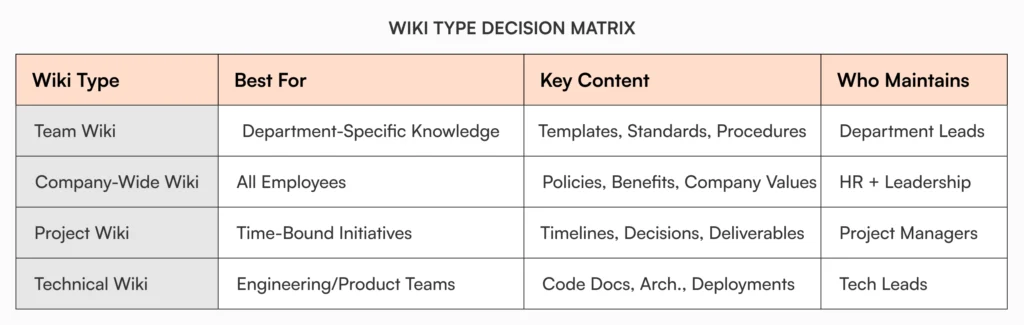
Different wiki types serve different purposes:
Team wiki
A team wiki focuses on department-specific knowledge. Marketing might document campaign templates and brand guidelines. Engineering stores technical standards and deployment procedures. Keep team wikis focused on what that specific group needs rather than trying to serve everyone.
Company-wide wiki
Company-wide wikis hold information relevant to all employees: HR policies, benefits guides, company values, and general operating procedures. These work best when organized by function rather than department so anyone can find what they need.
Project wiki
Project wikis document specific initiatives or cross-functional work. They include timelines, meeting notes, deliverables, and project-specific decisions. Archive these wikis when projects complete rather than letting them clutter your main wiki.
Technical wiki
Technical wikis serve engineering and product teams. They contain code documentation, system architecture, deployment procedures, and troubleshooting guides. These require different organization than business documentation because developers search differently than other roles.
Each type of wiki can serve a different purpose and in many cases, companies maintain more than one type depending on the complexity of their operations.
Benefits of an internal wiki
Internal wikis solve specific problems that become expensive as companies grow.
Centralized information
Internal wikis create a single source of truth for company knowledge. Instead of digging through folders, Slack messages or emails, employees can find what they need in one place.
Faster onboarding
New hires struggle to understand processes without clear documentation. Marcus joined as a finance manager and needed the vendor payment process. He asked five people and got five different answers because the actual process lived in a two-year-old email thread. With a well-organized wiki, he would have found the current, approved process immediately and started contributing on day two instead of day eight.
Reduced repetition
HR and team leads often receive the same questions repeatedly. A wiki reduces this by giving employees access to self-service answers.
Improved collaboration
Because anyone can contribute, internal wikis encourage team members to share what they know. This leads to collective ownership of information and better decision making.
Real-time updates
When procedures change, updates can be made instantly. Everyone sees the latest version, reducing the risk of outdated or incorrect guidance.
Knowledge retention
As employees leave or shift roles, their knowledge does not disappear with them. It remains accessible in the wiki for others to use and learn from.
Preserving institutional knowledge becomes critical during growth phases. How Fast-Scaling Teams Handle Employee Transitions: A Guide explores this challenge in depth.
How to create an internal wiki
Building an effective wiki requires planning. It involves planning, selecting the right platform, creating content and maintaining it over time.
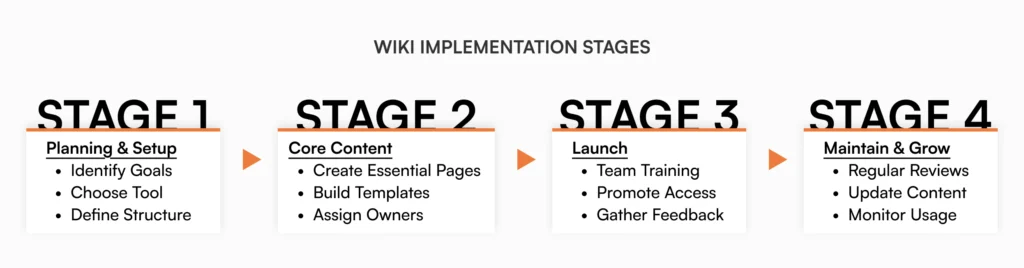
Step 1: Identify your goals
Before building your wiki, identify what you’re solving:
- Repeated questions? Prioritize FAQ-style content and self-service documentation
- Slow onboarding? Focus on role-specific guides and process walkthroughs
- Department silos? Structure around cross-functional visibility and search
- Upcoming audits? Build approval workflows and version tracking into your foundation
- Remote work gaps? Emphasize asynchronous documentation and clear ownership
Your goals will guide your content structure and tool selection.
Step 2: Choose the right tool
There are many tools that support internal wikis. Some are designed for technical teams while others focus on ease of use for general business operations. Common options include:
- AllyMatter (centralized documentation, built-in approvals)
- Notion (versatile, project management integration)
- Confluence (Atlassian ecosystem, technical teams)
- Slab (simple interface, modern search)
- Guru (browser extension, workflow integration)
- Tettra (Slack-focused, quick adoption)
- Slite (remote teams, collaborative editing)
- MediaWiki (open-source, technical setups)
Look for tools that offer permissions control, version history, easy editing, search functionality and integrations with your existing tech stack.
Step 3: Structure your wiki
A wiki without structure quickly becomes a mess. Start with high level categories based on departments or workflows. Examples include:
- Human Resources
- IT and Security
- Sales and Marketing
- Product Documentation
- Onboarding
- Company Policies
Create a homepage or landing page that acts as a table of contents. Use internal links to connect pages and guide users through related information.
How to Structure an Internal Knowledge Base explores organizational frameworks that work for growing teams.
Step 4: Start with core content
Begin with the most important and most requested information. This could be how to request time off, how to access internal tools, or how your product is built. Prioritize pages if:
- Teams ask about the topic multiple times per week
- It’s required for role transitions or onboarding
- Outdated versions currently create confusion or errors
- It supports time-sensitive or critical business processes
Use templates to ensure consistency. For example, every policy page might have a summary, purpose, steps and contact person.
Step 5: Involve the team
Wikis work best when they are collaborative. Encourage team leads and subject matter experts to contribute. Assign content owners to maintain specific areas and keep them updated.
Set clear expectations. For example, every department reviews their pages quarterly, subject matter experts verify technical accuracy, and anyone can flag outdated content. Define what ‘ownership’ means: is it creating content, updating it, or both?
Step 6: Launch and promote
Once the core content is ready, share the wiki with your team. Provide a short guide or walkthrough. Embed links to the wiki in tools like Slack or your company intranet. Make it easy to access and encourage feedback.
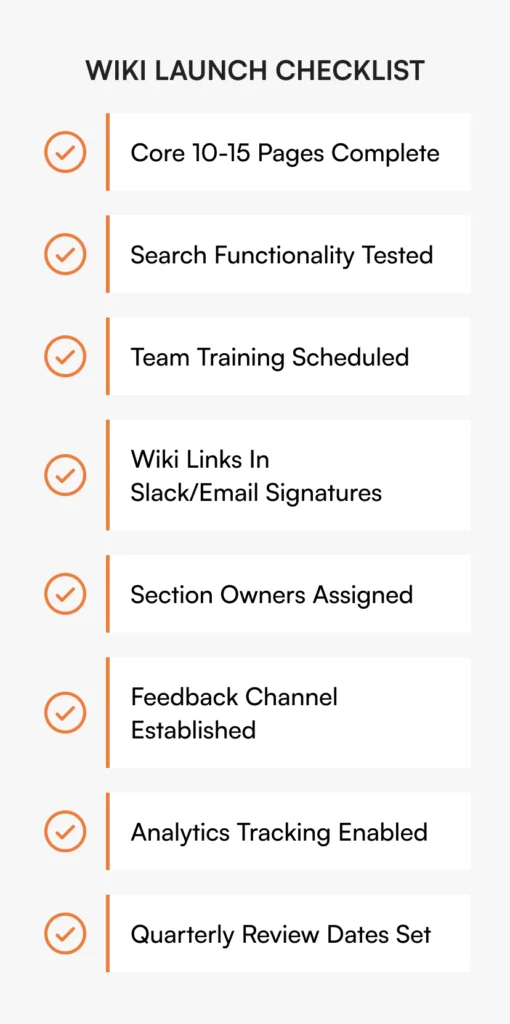
Step 7: Maintain and improve
A wiki is never finished. As your company changes, so will your processes and information. Schedule regular reviews. Use analytics to see what content is popular or hard to find. Remove outdated pages and keep improving based on employee input.
Deciding what content to keep versus archive requires clear criteria. When to Archive a Knowledge Base Page offers practical decision frameworks.
How AllyMatter supports wiki success at scale
Growing companies need organized documentation without complex enterprise systems. Most teams sit between scattered Google Docs and enterprise tools requiring dedicated administrators.
AllyMatter focuses on three things that matter during growth:
- Smart organization. Custom categories and metadata let you structure content around how your company actually works. Search by owner, department, date, or document status without rigid folder hierarchies.
- Scalable access control. Set permissions by role or department. When someone changes roles, their access adjusts automatically. You’re not manually updating permission lists every time your org chart shifts.
- Built-in compliance support. Automatic version tracking and audit trails document every change. Built-in signatures handle policy acknowledgments without needing separate tools.
The platform keeps everything in one system rather than requiring multiple tools for documentation, approvals, and signatures.
Tips for a successful internal wiki
Use clear, simple language that anyone can understand. Avoid jargon unless writing for technical audiences. If HR policies require a dictionary, people won’t read them.
Break long content into smaller, readable sections. Most wiki users scan first, read second. Descriptive subheadings help people find specific information quickly.
Add visuals like diagrams, screenshots or videos when helpful. Show don’t just tell. A screenshot of where to click beats three paragraphs of written instructions.
Include search keywords and tags for better discoverability. Think about how people will search. If someone types “submit expenses,” does your page include those exact words?
Assign owners for each section to ensure accountability. When Finance owns expense documentation, they keep it current because they answer questions when it’s wrong.
Encourage a culture where documentation is valued and rewarded. If contributing to the wiki isn’t recognized, it won’t happen. Make updates part of project completion, not optional extra work.
Common mistakes to avoid
Creating too much content without structure. Start with clear categories and navigation before building comprehensive documentation. Ten well-organized pages beat a hundred scattered ones.
Letting outdated content accumulate. Schedule quarterly reviews for critical sections. When teams find three versions of the same policy, they stop trusting the wiki entirely.
Limiting access and discouraging contributions. If updating a page requires IT approval, nobody will fix obvious errors. Use permissions for sensitive content, but let teams maintain their own sections.
Using a tool that doesn’t scale with your team. Choose based on where you’ll be in 18 months, not just current size. Migration later wastes more time than choosing right initially.
Ignoring feedback or usage data. Track which pages get viewed most and where people abandon searches. Analytics reveal what’s working and what needs improvement.
Getting your wiki right
Internal wikis fail when they become documentation graveyards. They succeed when teams find information faster than asking colleagues, when updates happen without friction, and when contributing feels natural.
Start with questions your team asks most. Structure content around how you work, not how templates suggest you should organize. Pick tools that remove barriers instead of adding steps. Treat your wiki as infrastructure that evolves with your company.
The best wikis aren’t comprehensive. They’re accurate, accessible, and actively maintained. Build for utility, not perfection.
See how AllyMatter can help your team. Join our waitlist for updates.
Frequently asked questions
How long does it take to build a functional internal wiki?
Most growing companies can launch a working wiki in two to three weeks by focusing on immediate needs rather than comprehensive coverage. Start with the documentation your team requests most: onboarding materials, core policies, and process guides for frequently asked questions. Your wiki should grow organically as needs emerge, not launch as a complete system on day one.
Should we migrate all existing documentation at once?
No. Migrating everything creates overwhelming work and often transfers outdated content into your new system. Instead, move high-priority documentation first: active policies, current processes, and information people request regularly. Migrate additional content gradually, reviewing and updating it as you go. This approach ensures quality over quantity.
How do we prevent our wiki from becoming outdated?
Assign clear ownership for each major section. HR manages policy pages, Engineering maintains technical docs, Operations owns process guides. Set quarterly review schedules for critical content and remove the ‘last updated’ date for pages that are actively maintained. When someone finds outdated information, make updating it their responsibility rather than creating a bottleneck through one wiki administrator.
How do we get team members to actually use the wiki?
Make the wiki more convenient than alternatives. When someone asks a documented question via Slack or email, respond with the wiki link. Put wiki links in email signatures, onboarding checklists, and channel descriptions. Most importantly, ensure the wiki actually contains useful, current information. People won’t use a wiki that wastes their time with outdated or incomplete content.
Do we need a dedicated person to manage our wiki?
Not necessarily. Distributed ownership works better than centralized control for most growing companies. Assign section ownership to department leads: HR manages policy pages, Engineering owns technical documentation, Operations maintains process guides. This prevents bottlenecks and ensures people closest to the work keep content current. You may want one person monitoring overall wiki health and flagging outdated content, but this shouldn’t be a full-time role unless you’re managing thousands of pages.