

Product Updates · 8 min read
10 Ways AllyMatter Transforms Operations With Knowledge Base
Operations consistency rarely breaks down all at once.
A supervisor trains new hires from memory. An auditor asks for the current SOP and three different versions appear. One location follows a process the other abandoned six months ago.
Growing companies tend to hold operational consistency together reasonably well up to a point. Around 50 employees, informal knowledge sharing stops being reliable. Teams create local workarounds. Departments drift into their own processes. New locations inherit outdated documentation because nobody is sure which version is current.
Most operations leaders already have processes documented somewhere. The harder problem is making sure employees can actually find, trust, and follow the right version consistently across teams.
That’s the problem a centralized internal knowledge base solves.
How AllyMatter helps operations teams standardize and scale
These are the areas where operations teams typically see the most impact:
Create standardized processes that scale across locations
When operations expand across multiple locations, maintaining consistency becomes challenging. Without standardized documentation, each site develops its own interpretation of processes, creating quality variations and efficiency problems.
Somewhere in your organization right now, two teams are following different versions of the same process. One updated the shared drive. The other never got the memo, so they’re still working from a PDF someone downloaded six months ago.
AllyMatter gives operations teams one controlled location for approved SOPs, so employees across facilities, shifts, or departments work from the same guidance instead of local interpretations.
Preserve tribal knowledge before it walks out the door
Experienced employees handle exceptions automatically, and most of it never gets documented because it doesn’t feel like knowledge. It just feels like doing the job. The operations coordinator escalates the right vendor without thinking twice, the warehouse lead catches a quality issue before it reaches the customer, and none of that survives a resignation unless someone wrote it down first.
AllyMatter helps teams capture that institutional knowledge before it disappears, turning what individuals know into something the whole team can access.
Streamline onboarding and operational training
Without structured documentation, training new operations team members becomes inconsistent and inefficient. Trainers may emphasize different aspects of processes, creating knowledge gaps that lead to performance variations.
AllyMatter gives operations teams a central place to organize onboarding documentation so new employees learn from approved processes instead of informal team habits or outdated files. New team members can access standardized process documentation, complete with visual aids and clear step-by-step instructions. Operational gaps often come from small differences in how employees were trained across locations, managers, or shifts. Consistency in onboarding documentation is what prevents that drift before it starts.
For example, you can create dedicated onboarding sections within your knowledge base that walk new hires through department-specific procedures with visual guides, images, and videos that standardize the learning process.
Break down silos between departments
When departments operate in isolation, inefficiencies multiply. Finance implements payment procedures without understanding procurement workflows, while operations teams lack visibility into IT’s system maintenance schedules.
AllyMatter connects interdependent documentation across departments, showing operations teams how their processes interact with other functions. Tag-based access control lets you give the right teams visibility into the procedures they need, without exposing everything to everyone. Operations sees ops + the pieces of finance, IT, and procurement they touch, and nothing else. That’s usually enough visibility to reduce constant back-and-forth between departments without exposing sensitive documentation company-wide.
Tagging documents by department and process type creates connections between related procedures. Link vendor management documentation to payment procedures and quality control checks, so operations teams can see the full process landscape rather than their slice of it.
Simplify compliance and streamline audits
Operations teams often scramble to prepare for audits, pulling documentation from various sources and struggling to demonstrate process consistency.
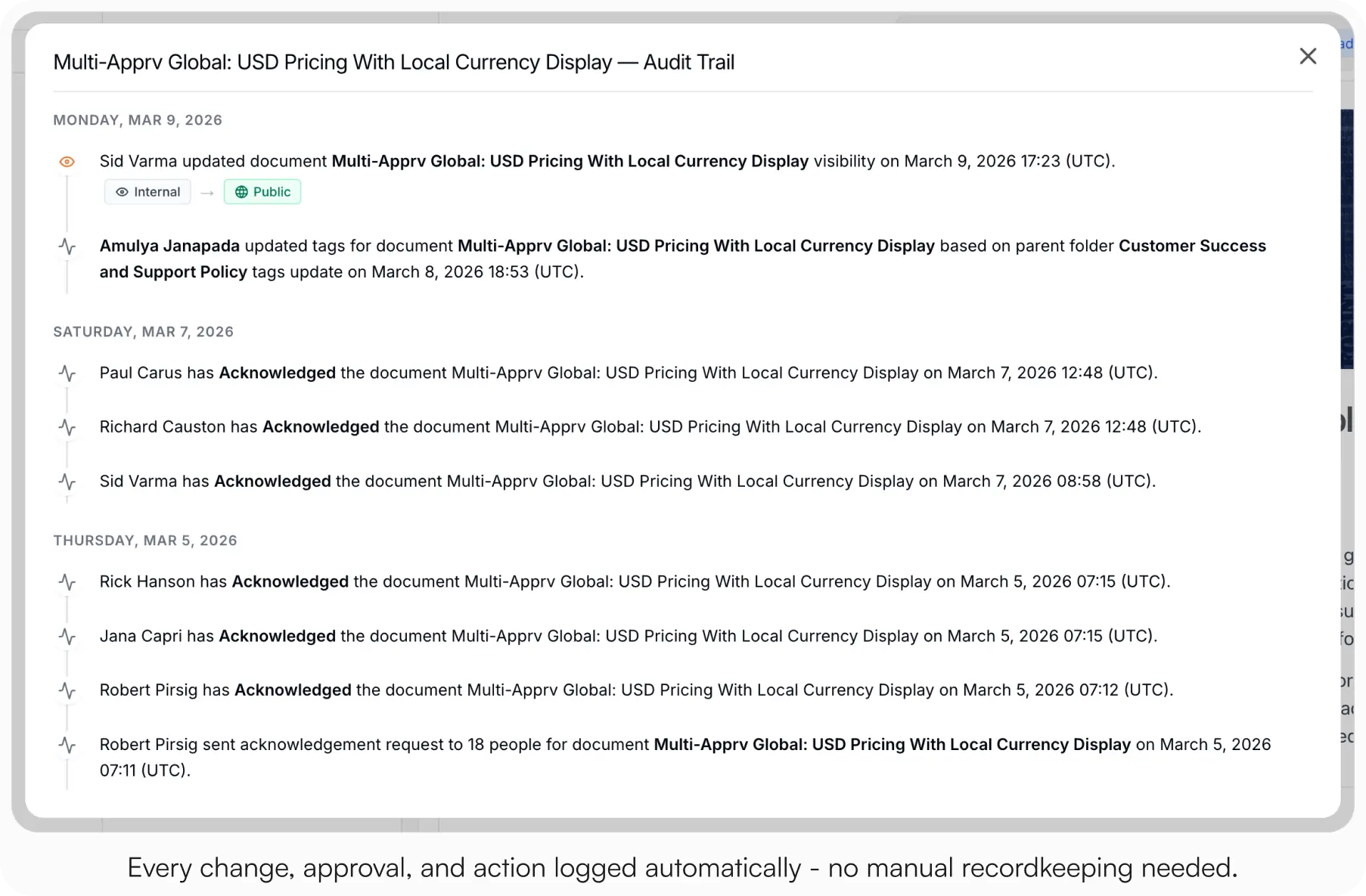
AllyMatter’s audit trail and version tracking makes audit preparation significantly easier to manage. The platform maintains detailed records of document changes, approvals, and acknowledgments, giving auditors exactly what they need without the last-minute scramble. Audit preparation becomes painful when teams spend more time validating documentation than reviewing the actual process itself, which is usually a sign the organization has lost trust in its own operational records.
For instance, when preparing for ISO 9001 certification, operations teams can produce consistent process documentation with complete revision histories, reducing audit preparation time while demonstrating consistent quality management practices.
Audit prep shouldn’t be a scramble. Start your 30-day free trial. No credit card to start, and a 30-day money-back guarantee if you convert and change your mind.
Centralize vendor management documentation
Growing companies often struggle with fragmented vendor information. Contract details live in legal files, payment terms in finance’s systems, and performance metrics in operations’ spreadsheets.
Vendor management problems often turn into documentation problems first. Teams waste time searching for the latest contract terms, escalation contacts, or approval procedures, and the same questions get asked again because nobody knows where the final version actually lives.
AllyMatter creates a central repository for all vendor documentation, accessible to everyone who works with external partners. Operations teams can find vendor contacts, service agreements, quality requirements, and issue escalation procedures in one location, ensuring consistent supplier management.
Document equipment and maintenance procedures
Equipment documentation usually gets attention only after downtime exposes a gap. Someone follows an outdated maintenance checklist, a troubleshooting step exists only in one experienced operator’s head, or a replacement part gets delayed because the specification was never written down. In operational environments, that kind of undocumented dependency tends to stay invisible until something breaks.
AllyMatter simplifies the creation and distribution of equipment documentation, maintenance schedules, and troubleshooting guides. Operations teams can document proper equipment usage with images and videos, create maintenance checklists, and develop troubleshooting decision trees that help operators resolve issues quickly.
A straightforward application: document each piece of equipment with visual operating procedures, maintenance checklists, and troubleshooting guides. You can use AllyMatter’s approval workflows to ensure documentation stays accurate and gets updated when procedures change.
Establish clear approval workflows for critical processes
Inconsistent approval processes create bottlenecks and confusion. When approval requirements aren’t clearly documented, team members either skip essential validations or waste time seeking unnecessary approvals.
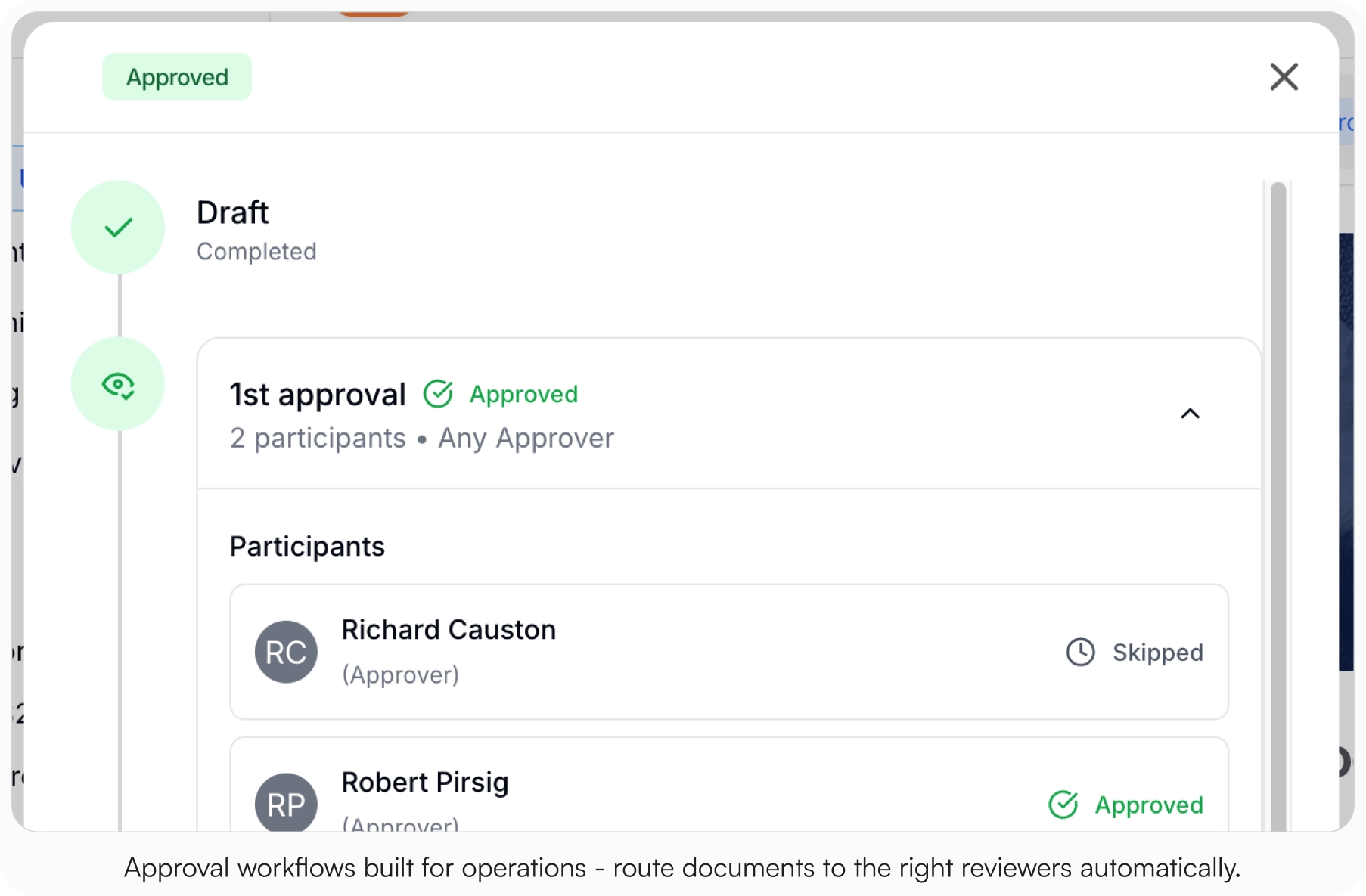
AllyMatter’s smart approval flows create structured, transparent approval processes for critical operational documents and procedures. Most growing companies need clarity around which operational changes require review and which don’t. Approval workflows help prevent two common problems: important process updates going live without oversight, and employees wasting time chasing approvals that were never necessary in the first place.
You can create tiered approval workflows where routine documents require minimal validation while high-risk procedures receive multiple reviews. The platform helps operations teams manage document approvals and track completion without relying on manual follow-up across email or chat threads.
Track and implement process improvements consistently
Process improvements create confusion surprisingly fast when documentation isn’t maintained properly. Teams start referencing older procedure screenshots, managers disagree about which version is current, and temporary workarounds quietly become permanent operating procedures.
Teams often need to understand not just what changed but why it changed and who approved the update. AllyMatter keeps revision history visible and searchable, helping operations teams maintain consistency while still improving processes over time.
Build scalable quality control processes
Quality issues often trace back to inconsistent documentation long before they trace back to employee performance. If inspection standards vary between teams or facilities, operational consistency becomes very hard to maintain.
AllyMatter gives operations teams the structure to build quality management systems that hold up as the company grows. The platform supports detailed inspection checklists, quality standards, and non-conformance management procedures, ensuring consistent quality regardless of who performs the inspections or where they occur.
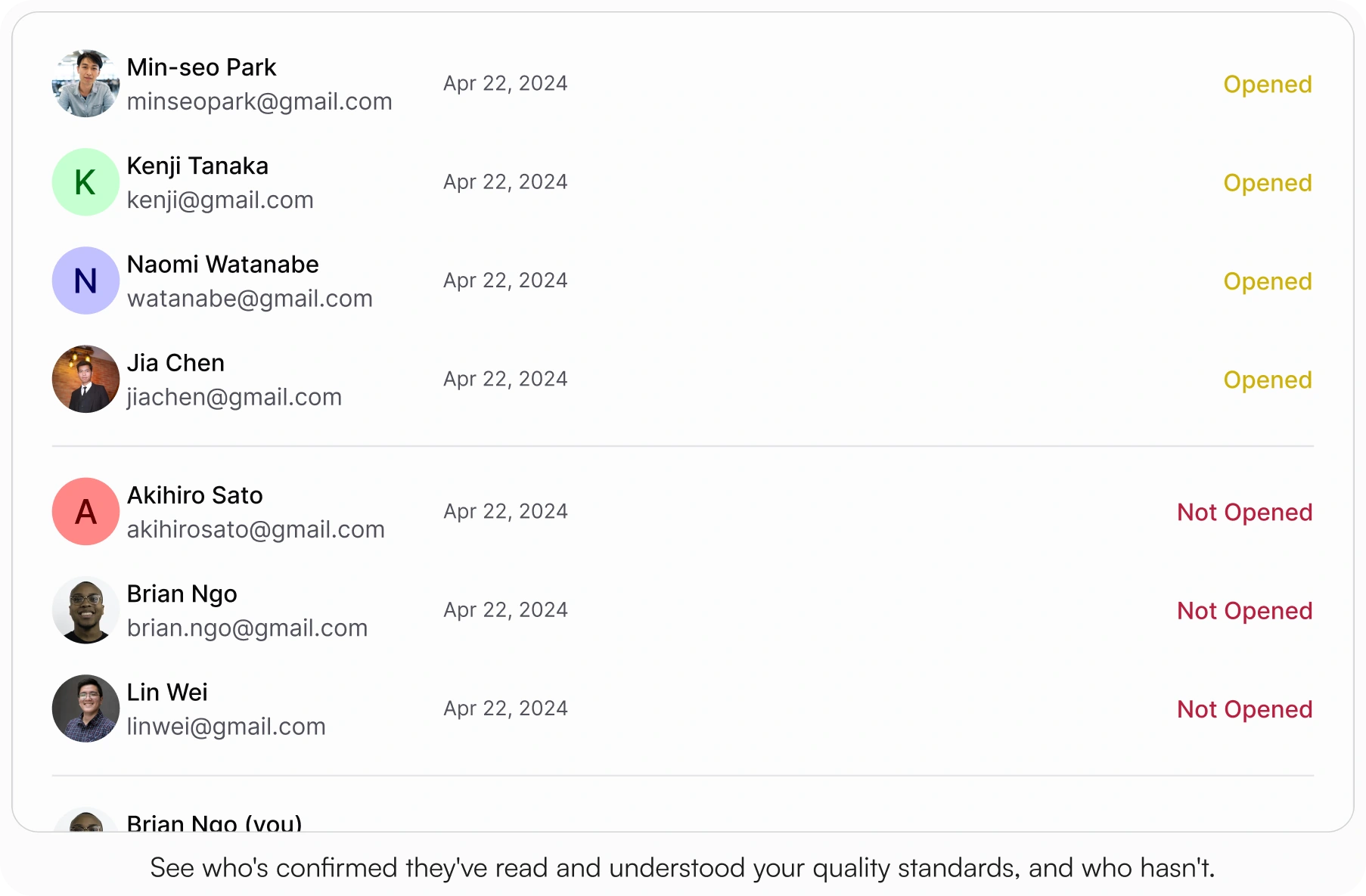
It helps you create visual quality control checklists with clear acceptance criteria, examples of conforming and non-conforming products, and standardized correction procedures. You can use AllyMatter’s acknowledgment features to verify that quality inspectors understand and apply the standards consistently.
Building operational consistency before growth exposes the gaps
Most operations teams eventually hit the same breaking point. Informal knowledge sharing works for a while, right up until growth exposes how inconsistent undocumented processes really are. Employees can’t reliably find, trust, or follow the current version of those processes across teams and locations.
The operations teams that scale well tend to treat documentation as part of the operational workflow itself, not as cleanup work someone updates when they have time.
If your team spends too much time answering repeat operational questions, correcting inconsistent execution, or searching for the latest approved procedure, the problem is usually documentation structure and governance, not effort.
Start your 30-day free trial. No credit card to start, and a 30-day money-back guarantee if you convert and change your mind.
Not ready for a trial? On yearly plans, migration from Confluence or Notion is on us when you decide. On yearly plans, we’ll move your existing docs over, usually within a week and often sooner.
Frequently asked questions
How do you build an internal knowledge base for operations teams?
Start by identifying your most critical processes and tribal knowledge. Document standard operating procedures, equipment manuals, and quality control processes. Use approval workflows to ensure accuracy and assign ownership to subject matter experts for ongoing maintenance.
What should be included in an operations knowledge base?
Include SOPs, equipment documentation, vendor information, compliance procedures, troubleshooting guides, quality control checklists, and safety protocols. Focus on information that operations teams access regularly or need during critical situations.
How do you ensure operations team members actually use the knowledge base?
Adoption problems usually come from two issues: employees can’t find information quickly enough, or they stop trusting whether the documentation is current. Search quality, version control, and clear ownership do more for adoption than creating more documents. Both improve when documentation becomes part of onboarding and daily workflows instead of a separate system employees have to remember to check.
What’s the difference between an operations manual and a knowledge base?
A traditional operations manual is static documentation, while a knowledge base is dynamic and searchable. Knowledge bases support multimedia content, version control, and collaborative updates. They also provide better search functionality and can integrate with other business systems.
How often should operations documentation be updated?
Review critical documents quarterly and update immediately when processes change. Use automated workflows to trigger reviews when equipment is modified or new regulations are implemented. Track document usage to prioritize updates for frequently accessed content.