Set Up a Self-Serve Onboarding Kit in Your Knowledge Base

Build role-based onboarding kits with required reads, acknowledgments, and manager visibility to enable faster employee contributions.

Managers shouldn’t answer the same “Where’s X?” question for every new hire. New teammates shouldn’t wait for links to HRIS, security, or playbooks. The fastest way out of this loop is a self-serve onboarding knowledge base: role-based checklists that point to living docs, day-one required reads with acknowledgements, and a simple manager view that shows who’s stuck.

This guide gives you a step-by-step plan for building a self-serve onboarding knowledge base and shows exactly where AllyMatter removes friction (targeted content, acknowledgments, approvals, version history, and audit-ready exports). CTAs below take you straight to the product.

For broader context on onboarding systems, see our guide on reducing employee onboarding time, and for HR-specific knowledge base strategy, review our comprehensive HR knowledge base guide.

The problem scene

Your new SDR asks where to set up direct deposit. Your engineer needs VPN steps. A manager can’t locate the latest PTO policy. Links live in email, exception notes live in Slack, and the handbook PDF is already stale. You spend your afternoon pasting paths instead of enabling actual work.

According to a Gartner survey, 47% of digital workers struggle to find the information needed to effectively perform their jobs. For new hires navigating unfamiliar systems, that friction multiplies.

Fix: Make the correct answer faster than asking a human. A Welcome Kit that new hires can follow immediately; the policy that surfaces with your phrasing in search; day-one “read & acknowledge” to prove comprehension; and a manager view that highlights roadblocks.

The step-by-step setup plan

Step 1 — Inventory the first-week questions

  • Pull last month’s Slack/Teams #ask-hr, #ask-it, and onboarding email threads.
  • List the top 25 repeat questions per role: Sales, Success, Engineering, Ops, Design, plus an “All employees” set.
  • Flag anything that must be read & acknowledged on start (Code of Conduct, Anti-Harassment, Security 101).

These questions will form the foundation of your onboarding knowledge base.

Example spreadsheet showing onboarding question inventory with columns for Question, Role, Link Needed, Owner, Priority, and Must Acknowledge, featuring three sample rows for direct deposit, VPN access, and PTO policy questions

Step 2 — Draft role-based checklists (link out; keep steps short)

Create one Welcome Kit checklist per role + one “All employees” checklist. Use short, imperative steps that link to living docs and tools, not walls of text. Add “Owner” and “Last updated” to every linked page.

Example: All Employees — Start

  1. Complete I-9 in HRIS (5–10 min)
  2. Set up Direct Deposit (HRIS → Payroll → Bank)
  3. Read & Acknowledge: Code of Conduct, Anti-Harassment, Security 101
  4. Join Slack + email groups (auto)
  5. Book your IT setup slot (15 min)

Example: Sales (AE) — Start

  1. CRM access + pipeline view
  2. Sales enablement hub → Top 5 playbooks
  3. Tools: dialer, call recorder, calendaring
  4. “First 5 calls” checklist
  5. Read & Acknowledge: Pricing & Discount Policy

Step 3 — Convert PDFs and emails into living, linkable pages

Turn policy PDFs and long emails into structured articles (Policy, Procedure, FAQ). Split multi-purpose docs so each page answers one intent and is easy to scan.

Where AllyMatter helps: Author in the editor, route approvals (HRBP → Legal → CHRO), publish, and keep visible approver lineage and version diffs. No one wonders which version is current.

Step 4 — Wire targeting, tags, and synonyms (make it findable)

  • Tag content by role, location/state, employment type.
  • Add synonyms so search speaks human: “vacation” → PTO, “maternity leave” → Parental Leave + FMLA, “401k” → 401(k).
  • Set targeted delivery so Sales see sales tools; Engineering see repos/IDEs; California employees see CA addenda.

Tag your content this way:

  • If applies to all employees → tag ‘All’
  • If role-specific → tag role name (Sales, Engineering, Success)
  • If location-dependent → add state/country tag
  • If employment-type specific → tag FT/PT/Contractor

Where AllyMatter helps: Target articles and checklists by role/org/state and pin a Welcome Kit so it’s the first thing a new hire sees.

AllyMatter user management dashboard showing employee list with assigned roles, locations, and account status

Step 5 — Turn on required reads and acknowledgments

Mark must-reads: Code of Conduct, Anti-Harassment/EEO, Security 101, Timekeeping (non-exempt), Health & Safety, and Remote/Hybrid Work (if relevant). Set acknowledgment windows with automatic reminders. Add a “What changed” note to policies updated recently.

Where AllyMatter helps: Acknowledgments track who read what, by when, exportable to CSV/PDF. No more “Did they actually see it?” during audits.

Dashboard showing 12 unsigned documents and 3 unapproved documents with document list and status tracking

Step 6 — Give managers a simple progress view

Roll up a Manager Dashboard: new hires, links to their Welcome Kits, acknowledgment status, and the top searches with zero results (to close gaps). Include quick actions: reshare a link, nudge a teammate, request an IT provision.

Where AllyMatter helps: Managers can see who’s read required policies and which onboarding docs get the most searches, enabling them to remove blockers without pinging HR.

Step 7 — Announce, measure, and tune weekly

Share the Welcome Kits in #all-company and each role channel; pin to team wikis and welcome emails. Ask managers to use the links, not paste instructions. Review metrics weekly (below) and add two improvements from zero-result searches.

Launch note you can paste:

“Your role-based Welcome Kit is live. It has everything you need to get productive – tools access, top docs, and required reads. Please complete today’s steps and acknowledge the day-one policies.

A pattern I’ve seen: teams launch Welcome Kits but don’t monitor zero-result searches for the first month. That’s where the real gaps show up. Set a 15-minute weekly review in your calendar for the first 90 days.

Role-based views and checklists people actually use

A Welcome Kit works when it’s short, obvious, and relevant. Build one All-Employees kit plus one per role and link to living docs rather than duplicating content.

Structure to copy (per kit):

  • Start (IT, HRIS, security, must-read policies with acknowledgments)
  • Tools & Access (role-specific)
  • Top 5 Docs (role playbooks/processes)
  • People & Rituals (team channels, recurring meetings, glossary)
  • First Win (one tangible task to complete now)

Example: Engineering — Top 5

  1. Dev environment setup
  2. PR & code review guidelines
  3. Incident response overview
  4. Sprint rituals (prep, stand-up, retro)
  5. Security 101 (acknowledge)

Example: Customer Success — Top 5

  1. Playbook: First 5 customer calls
  2. Ticket routing & escalation
  3. Product FAQ (link to dynamic KB)
  4. Renewal timeline
  5. Refund policy (acknowledge)

With AllyMatter, a checklist is a clean article with steps, links, owners, and “last updated.” Because it’s a living page, you avoid the “where’s the latest PDF?” problem forever.

Day-one required reads with acknowledgments (no excuses)

Did the new hire actually read the anti-harassment policy?’ That’s the question every CHRO dreads during an audit. With acknowledgment tracking, you’ll have timestamped proof, not a defensive ‘I think so.’

Day-one reading isn’t “nice to have.” It’s risk mitigation, cultural clarity, and smoother ops. Mark these must-read with acknowledgment:

  • Code of Conduct
  • Anti-Harassment & EEO
  • Security 101 / Acceptable Use
  • Timekeeping & Overtime (non-exempt)
  • Health & Safety (as applicable)
  • Remote/Hybrid Work (if applicable)

Keep each policy page short, include state addenda where needed, a two-line summary, and the Acknowledge button in view. This approach to HR policy management ensures clarity and compliance from day one.

Where AllyMatter helps: Logs who, what, and when. That makes audits and leadership updates painless.

How to track onboarding progress (without spreadsheets)

Effective onboarding measurement isn’t about spreadsheets. It’s about reducing time to productivity. You don’t need another tracker. You need proof of motion and a simple view of where to help.

Signals to watch (in AllyMatter):

  • Acknowledgment completion (policies read on time)
  • Welcome kit engagement (views per section, top outbound links clicked)
  • Top searches & zero-result searches (what new hires fail to find)
  • Most-viewed docs (are people using the right starters?)
  • Owner reminders (which pages are due for review)

Manager moves:

  • Nudge overdue policy reads (one click)
  • DM a link to the stuck step (“Here’s the VPN setup”)
  • Use Request Update on any doc to route changes to the owner

Metrics that matter (and how to show them)

Your north star is time to first contribution, the first task a new hire completes that moves the business. Secondary metric: drop in onboarding questions.

Define “first contribution” by role:

  • AE: first meeting booked
  • Engineer: first PR merged
  • CSM: first customer call completed
  • Designer: first file delivered
  • Ops: first workflow run

Effective knowledge base analytics focus on behavior, not just page views. Track continuously:

  1. Median time to first contribution (per role)
  2. Onboarding questions (Slack/help desk) vs Welcome Kit views
  3. Day-one acknowledgment rate (aim for ≥ 95% on time)
  4. Top zero-result searches (fuel your next two fixes

One-slide update pattern:

  • “Time to first PR fell from 9 → 6 days after adding Dev Env + Security 101.”
  • “Onboarding questions on expenses down 42% after adding screenshots.”
  • “Day-one acknowledgment completion at 97% (3% overdue; nudges sent).”

Before: New AE asks in Slack where to find discount policy. You paste link. Next AE asks same question three days later.

After: Discount policy tagged ‘Sales,’ pinned in Sales Welcome Kit, marked required-read. New AEs acknowledge on day one. Zero Slack questions.

Why AllyMatter fits this job (and generic wikis don’t)

You can duct-tape this in a wiki, but you’ll hit hard limits: no approver lineage, no acknowledgments, no audience targeting, no audit-ready exports. AllyMatter is built for the policy + process lifecycle HR and managers actually run:

  • Write once, approve properly (see who approved what, when)
  • Target delivery by role/state and pin the Welcome Kit up front
  • Acknowledge must-reads and prove they happened
  • Search that speaks human (“vacation” finds PTO) with synonyms and featured answers
  • Analytics that matter (number of views, who viewed what and when, total acknowledgement and total acknowledgements missing)

See AllyMatter do this live: Build your Welcome Kit – See a 10-min demo.

Copy-and-ship: The step-based onboarding kit (ready-to-use)

Use this to brief your team or paste straight into AllyMatter.

All Employees — Start

  • HRIS: I-9 → Direct Deposit → W-4
  • Read & Acknowledge: Code of Conduct, Anti-Harassment, Security 101
  • Accounts: email, Slack, calendars
  • IT: laptop, VPN, password manager
  • Meet: manager, buddy, HR Onboarding

Sales (AE)

  • CRM + sequences + calendaring
  • Enablement Hub → Top 5 plays
  • “First 5 calls” checklist
  • Read & Acknowledge: Pricing/Discount Policy

Engineering

  • Dev environment setup → repos
  • PR & code review guidelines
  • Incident response overview
  • Read & Acknowledge: Security 101

Customer Success

  • Ticketing + routing + escalation
  • Product FAQ + current release notes
  • Renewal timeline quick guide
  • Read & Acknowledge: Refund policy

Operations

  • Workflow tools access
  • SOPs: reporting cadence, month-end checklist
  • Vendor requests & approvals
  • Read & Acknowledge: Data handling & privacy

For startup-specific onboarding needs, see our zero to onboarded guide.

Common pitfalls (and quick fixes)

  • Wall-of-text checklists. Fix: keep steps short; link to living docs.
  • No targeting. Fix: tag/target by role/state so every kit feels tailored.
  • Required reads buried. Fix: put Acknowledge beside the policy summary.
  • Outdated screenshots. Fix: prefer short clips; add “Last updated” + owner.
  • No measurement. Fix: one dashboard, four KPIs (first contribution, questions, day-one reads, zero-results).

Outbound resource (for HR Policy context)

For statutory definitions and state nuances, reference SHRM. Use it for correctness; keep internal pages short and action-first.

Moving from scattered to self-serve

Self-serve onboarding isn’t about eliminating human interaction. It’s about eliminating repetitive questions that slow both managers and new hires. When your AE can find the discount policy without pinging you, when your engineer can set up VPN access from a clear checklist, when your finance hire acknowledges the expense policy on day one – that’s time redirected toward actual work.

The mechanics are straightforward: role-based kits, required reads with acknowledgments, targeted delivery, and manager visibility. The outcome is faster time to first contribution and fewer onboarding questions cluttering your channels.

Start with one role-based kit and three required-read policies. Ship it, measure it, and add two improvements weekly based on search analytics. Within a month, you’ll have onboarding infrastructure that scales with every new hire.

Ready to stop answering the same onboarding questions every week?

Build your Welcome Kit in AllyMatter and ship your first role-based checklists today. 

See a 10-min demo of AllyMatter acknowledgments and targeting. 

Frequently asked questions

How do I track whether new hires actually read required policies? 

AllyMatter’s acknowledgment feature logs exactly who read which policy and when. You’ll see completion status by individual and role, with automatic reminders for anyone overdue. During audits, export the complete record as CSV or PDF, no spreadsheet archaeology required.

Can I create different onboarding kits for different roles? 

Yes. AllyMatter’s granular access control lets you assign document access based on roles and departments. Your Sales team sees CRM playbooks and pricing policies, while Engineering sees development environment setup and security protocols. One knowledge base, targeted delivery based on who needs what.

What if a policy changes after someone’s already been onboarded? 

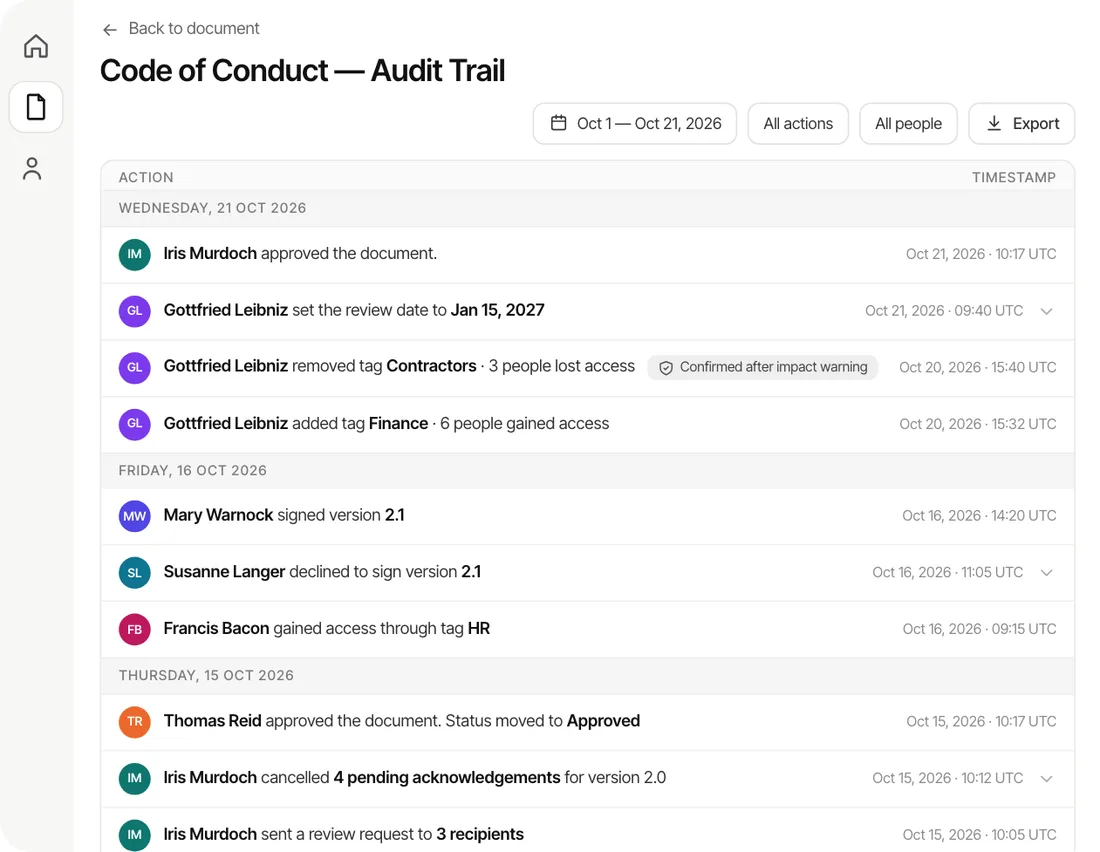
AllyMatter’s complete audit trail tracks every edit with timestamps and approver lineage. When you update a policy, the version history shows exactly what changed and when. New hires always access the current version, and you maintain records of who viewed which version during audits.

How long does it take to set up a complete onboarding knowledge base? 

Start with the all-employees checklist and one role-specific kit. That’s achievable in a week. Add required-read policies with acknowledgments in week two. Most teams have a functional system live within 30 days, then refine based on analytics.

How do managers track onboarding progress? 

AllyMatter’s analytics show which documents get viewed most, completion rates for required reads, and search patterns that reveal gaps. Managers can see acknowledgment status without digging through emails and can reshare links to specific documents when team members need guidance.

Scroll to Top