How site-based versus database-first architecture determines whether your documentation scales with your company or breaks under its weight.
Most companies do not realize they have a documentation architecture problem until someone asks for a specific policy and gets four different answers. Not four opinions. Four versions of the actual document, all technically current, all in valid locations. Nobody did anything wrong. The system just grew faster than anyone could keep it organized.
That moment, when confidence in your documentation quietly breaks, is where the SharePoint versus dedicated knowledge base conversation starts. Not with feature comparisons, but with the realization that something fundamental is not working. The cause is usually architecture.
The hidden cost of site-based architecture
SharePoint wins early for obvious reasons. It is already there, Microsoft licensing covers it, and IT knows how to set it up. And it works, for a while. The breakdown starts small. Someone updates a policy in one site. Another team does not see it because they bookmarked a different location. A third maintains its own copy because it could not find the official one. Six months later there are three versions and nobody is sure which is authoritative.
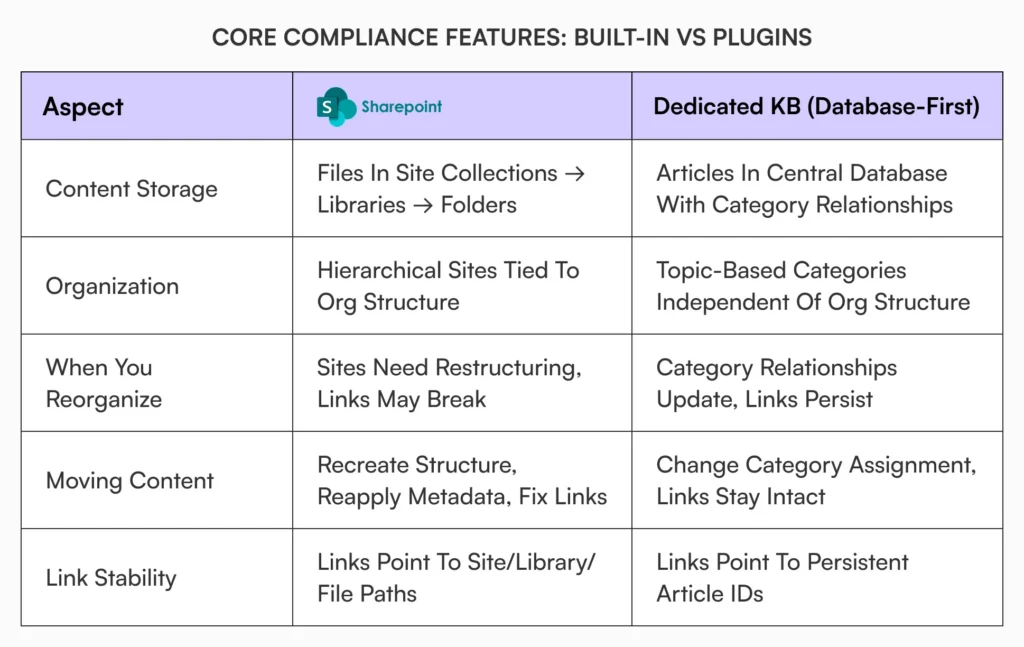
This is not a training or discipline problem. SharePoint organizes content around sites and subsites, each with its own libraries, metadata scheme, and navigation. Hub sites can connect them, but that is manual association someone has to maintain. The deeper issue is that SharePoint treats knowledge as files inside organizational containers, so when your org structure changes, and it will, the container structure does not adapt on its own. Someone redesigns it, or nobody does and the confusion compounds.
Database-first changes what’s possible
Dedicated knowledge base platforms like Document360 start from a different assumption. Content lives in a database, organized by topic relationships rather than org structure. That sounds abstract until you reorganize. Sales and marketing merge, product splits, departments get renamed. In SharePoint that often means rebuilding site architecture, remapping permissions, and fixing broken links. In a database-first system the content structure does not care: articles stay put, category relationships might shift, but you are not rebuilding scaffolding.
The same shows up when you move content. In SharePoint, moving a document between sites can mean reapplying metadata, recreating folders, fixing permission inheritance, and updating links. In a database system you are changing a category assignment while the article keeps its persistent identifier, so links do not break. Cross-linking works for the same reason: you link to a record, not a file path inside a site collection.
Search quality depends on metadata consistency
SharePoint search leans heavily on metadata. When content types and taxonomy terms are applied consistently across all sites, it works reasonably well. Once multiple teams manage their own sites, consistency slips and search gets noisy. Search “expense policy” and get 40 results because sites tagged things differently, or get nothing because nobody applied the right metadata. The person searching does not know which site owns which content, so they scroll, retry, or give up and ask someone.
A dedicated platform keeps documentation centralized rather than scattered across independently tagged sites, so search behaves consistently regardless of which team authored the content. New employees do not know your taxonomy and contractors do not understand your site structure, so a single, consistent, permission-aware search beats one that depends on every team maintaining identical tagging discipline.
Permissions: inheritance vs roles
SharePoint’s permission model is powerful and complex in equal measure. Permissions inherit from site to library to folder to file, and you can break inheritance anywhere to make exceptions. Over a year you accumulate permission islands scattered through the structure. When someone leaves and you need to audit their access, or an auditor asks who can see sensitive documents, the honest answer becomes “we would need to check each location individually.”
A dedicated knowledge base simplifies this with role-based access. AllyMatter, for example, uses four roles, editors, viewers, approvers, and admins, assigned through tags rather than traced through inheritance chains. You look at a tag and immediately see who has access. The trade-off is granularity: SharePoint lets you build very specific patterns, while a role-and-tag model pushes you toward clearer, more standardized structures. For governance, the standardization usually wins.
Maintenance scales differently
Ask a new team member to update an SOP in SharePoint and they have to work out which site holds SOPs, whether this is the current version, who owns the site, whether they have edit rights, and whether there are other copies elsewhere. That is cognitive overhead created by architecture, not user error. A dedicated knowledge base assumes content owners maintain their own areas without specialized technical knowledge: version control is visible and automatic, rolling back is straightforward, and approval workflows are part of the editing experience rather than separate automation you have to understand. There is also the technical maintenance SharePoint exposes, like the 5,000-item list view threshold, that most people do not know about until they hit it.
Site sprawl versus category sprawl
SharePoint environments develop site sprawl. Teams create sites freely, each with its own structure and governance, and over time you have dozens of semi-connected sites nobody fully understands. Consolidating means migrations, permission remapping, and careful attention to not breaking links. A dedicated knowledge base is not immune to chaos, you can still create category or tag sprawl, but cleaning it up is a content task, not an IT project. You merge categories and restructure hierarchies without migrations or broken links.
When architecture becomes strategic
Most leadership teams evaluate tools on features, cost, and adoption. The reframe is to ask what role the system plays in how the company operates. If it is mostly collaboration and file sharing, SharePoint makes sense. If it shifts toward policy governance, compliance documentation, and institutional knowledge that has to outlive reorganizations, architecture starts to matter. Can someone update a policy without IT help? Does search work for people who do not know your internal structure? Can you reorganize when the company restructures without breaking things? Do permissions make sense to department heads who are not SharePoint experts? Those are architectural questions, not feature ones.
Separating collaboration from governance
For many organizations the answer is not replacing SharePoint. It is understanding what each tool does well. SharePoint excels at collaboration, project workspaces, and file sharing, which benefit from its flexibility and Microsoft integration. A dedicated knowledge base excels at governed documentation, authoritative policies, and standardized processes, which benefit from simpler governance and content-first architecture. Running both is not duplication. It is using each platform for what it was designed to handle. The question is not “SharePoint or knowledge base,” it is “what needs collaboration flexibility and what needs governance clarity.”
How AllyMatter addresses governance architecture
AllyMatter exists for the governance use case that SharePoint’s collaboration-first architecture does not naturally support. It is built around governed documentation: version control is automatic and visible, version compare shows any two versions side by side with the changes highlighted, approval workflows are native rather than configured, and role-and-tag permissions are explicit and straightforward. Content structure is independent of org structure, so a reorganization does not force a documentation rebuild. You do not have to abandon your Microsoft collaboration tools to use it, because they serve different purposes.
Start your 30-day free trial. No credit card to start, and a 30-day money-back guarantee if you convert and change your mind. Start free or try the sandbox demo. If you decide to move, migration is on us: we bring your existing documentation across, structure and permissions included. The migrations page covers how it works.
What architecture determines
Companies pick tools based on what they do today, but architecture determines what becomes possible as they grow. SharePoint’s site-based model fits when flexibility matters more than consistency. A database-first platform fits when governance matters more than flexibility. The shift usually happens quietly: documentation becomes operational infrastructure, the person who understood the whole SharePoint structure leaves, auditors start asking about version control, and new hires cannot find basic policies without asking three people. Ignoring architecture as a decision factor just means discovering its limits later, usually at the worst possible time.
Frequently asked questions
Is SharePoint viable long-term as an internal knowledge base?
It can be, if you have dedicated administrators actively maintaining governance, information architecture, and permissions. Without that ongoing oversight, quality degrades as site sprawl grows and governance gets inconsistent across independently managed sites. The trade-off is flexibility versus governability.
What architectural limitations should teams understand first?
Site-based content organization, metadata-dependent search quality, cascading permission inheritance, and technical thresholds like the 5,000-item list view limit. These are not flaws, they are decisions that favor collaboration flexibility over knowledge governance.
How does database-first architecture improve maintenance?
It separates content from organizational structure. Articles exist as records with persistent identifiers rather than files inside site hierarchies, so you can reorganize categories and adapt to company changes without rebuilding architecture or breaking links. Maintenance becomes content work, not technical work.
When should companies add a dedicated knowledge base alongside SharePoint?
When documentation becomes central to operations or compliance and maintaining governance in SharePoint needs expertise most employees lack. If search quality impedes productivity or permission complexity creates audit concerns, the architecture is constraining you.
Can SharePoint and a dedicated knowledge base coexist?
They do in many organizations. SharePoint handles collaboration, project workspaces, and file sharing. The knowledge base handles governed documentation, authoritative policies, and standardized processes. The key is clearly defining which content belongs where.

Founder of AllyMatter I’m Sid Varma, founder of AllyMatter, an operations-first knowledge base for growing companies. Before AllyMatter, I co-founded Syren Cloud and helped scale it into a 300-person organization across two countries, leading marketing, operations, and HR. We moved fast, served demanding customers, and learned the hard way that internal knowledge systems built for help docs or IT don’t solve day-to-day operations. AllyMatter is my answer—tools that turn tribal knowledge into trusted, searchable processes. This blog shares the playbooks, checklists, and lessons I wish I’d had while scaling.