The CFO pinged you at 9 PM asking if she could approve a $12K software purchase. You’re the third person she asked today because no one knows where the spending authority threshold lives. It exists in your head, along with the client discount policy, the security exceptions process, and forty other decisions you make weekly.
You’ve become the knowledge bottleneck. Every exception flows through you. Every edge case waits for your input. Your team moves fast until they need context you haven’t documented. Then everything stops.
That knowledge sits in your head, not in a system your team can search. Converting that knowledge into searchable policies, decision logs, and workflows lets you step back without things breaking.
Identify what only founders know right now
List the decisions only you can make today. Not because they require your judgment, but because the criteria haven’t been written down anywhere.
Common founder-only knowledge includes spending thresholds, discount approval limits, security exception protocols, vendor onboarding steps, client escalation paths, and pricing edge cases. Your team asks about these weekly because the answers change based on context only you remember.
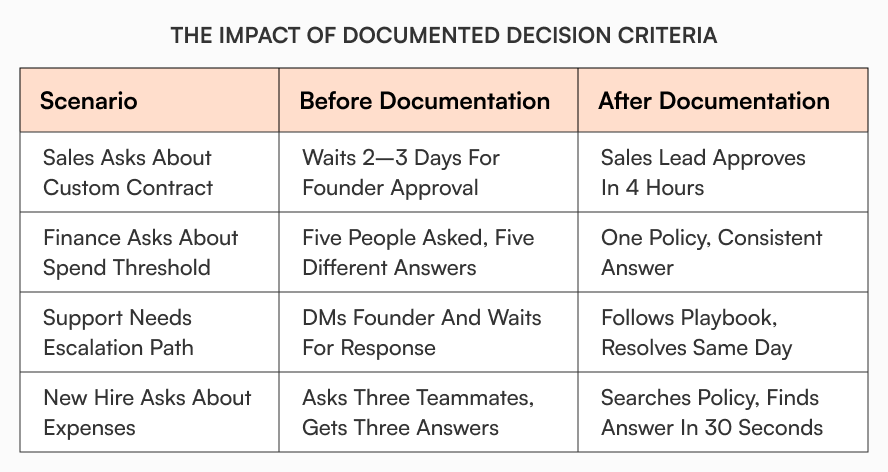
Rachel ran a 40-person SaaS company. Every contract exception came to her. Custom payment terms? Ask Rachel. Non-standard SLA? Rachel decides. Her sales team waited days for approvals because she traveled frequently.
She finally documented three tiers of contract modifications with clear authority levels. Standard modifications got approved by sales leads. Medium complexity went to the VP of Sales. Only structural changes required founder review. Her inbox dropped by 60% in the first month.
What to document first:
- Spending authority thresholds by department and amount
- Discount approval levels tied to deal size and margin impact
- Security exception criteria with risk assessment frameworks
- Vendor selection requirements including evaluation scorecards
- Client escalation decision trees with resolution authority
- Pricing edge cases with approved deviation boundaries
For teams building this complete system from scratch, building a startup knowledge base: the complete guide covers the architecture, migration, and governance framework.
Convert decisions into reusable artifacts
Founder knowledge becomes team knowledge when you capture the logic behind decisions, not just the outcomes.
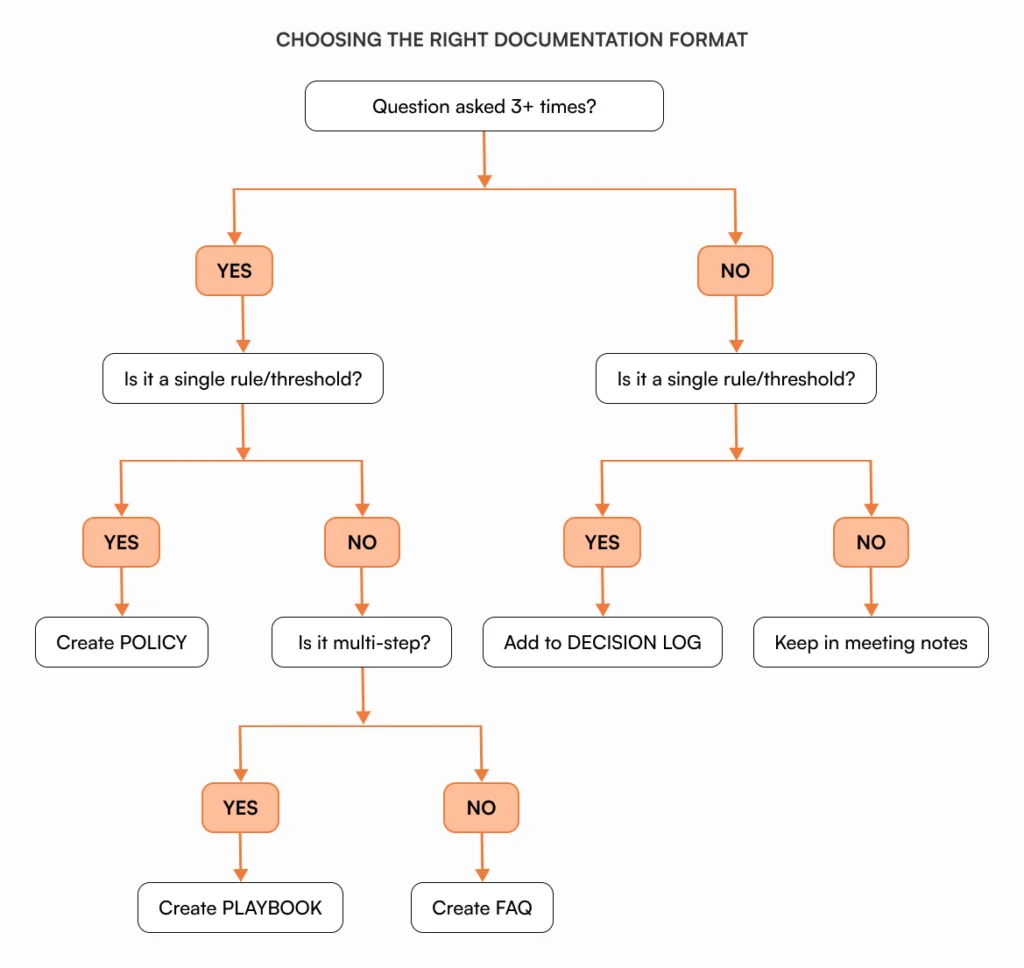
Decision logs record what you decided, why you decided it, and what constraints mattered. When your head of product asks why you picked vendor A over vendor B six months ago, the decision log shows the evaluation criteria, the trade-offs, and the context. Relitigating decisions or making contradictory choices becomes much harder.
Policies turn repeated decisions into consistent rules. If you’ve answered the same question three times, it belongs in a policy document. Expense limits, approval thresholds, security protocols, and exception handling all become searchable policies instead of tribal knowledge.
Playbooks document multi-step workflows that require judgment calls. Your customer escalation process might involve four decision points. A playbook captures the logic at each step so your support lead can handle 80% of escalations without asking you.
For structured approaches to documentation, see internal knowledge base best practices.
Delegate safely with approvals and version control
Founder knowledge delegation fails when teams don’t trust the information or can’t track changes. Approval workflows and version history solve both problems.
Route new policies through the right stakeholders before publication. Your security policy gets reviewed by your technical lead. HR policies go through your HRBP or legal counsel. Finance procedures get checked by your CFO. Publication happens only after review, which builds confidence that documents reflect current thinking rather than outdated drafts.
Version history shows what changed and why. When someone questions a policy update, you can show exactly what shifted, who approved it, and what drove the change. Change notes explain the reasoning so future readers understand the context behind decisions.
Structured approval flows route documents to specific reviewers based on content type. Version tracking captures additions, deletions, timestamps, and the approver behind each change automatically.

For teams implementing these systems, document workflows in AllyMatter explains the mechanics.
Set ownership and service level agreements
Every document needs a clear owner. Responsibility for keeping content current belongs to one person, not a committee.
Assign ownership by domain expertise, not seniority. Your head of finance owns expense policies. Deployment procedures belong to your VP of Engineering. Customer success leads maintain escalation playbooks. This clear accountability prevents documents from becoming orphaned when people leave or change roles.
Service level agreements define how fast owners respond to update requests. High-traffic documents like security policies might require monthly reviews. Lower-priority content gets reviewed quarterly. Making expectations explicit matters because teammates need to know when to expect updates.
Teammates can comment on documents to flag issues, and ownership assignment ensures someone responds. Maintenance work shifts from you to the people closest to each domain. This approach prevents issues covered in breaking down knowledge silos with AllyMatter.
Create “Start Here” pages for each role
New hires and cross-functional teammates need different information. Role-specific start pages surface the policies and procedures each person actually uses.
Your engineering start page links to deployment procedures, security protocols, and architecture decision logs. Sales connects to pricing guidelines, discount approval workflows, and contract templates. Support shows escalation paths, refund policies, and SLA commitments.
Information overload disappears when people see what applies to them, not everything in the knowledge base.
Wire up search synonyms based on how your team asks questions. If they search “can I expense this,” make sure the expense policy appears. If they search “client wants a refund,” surface the refund procedure. Knowledge bases should understand natural language, not force people to guess the right keywords.
Keep start pages current by assigning a curator for each role. Your engineering manager owns the engineering start page. Your sales enablement lead maintains the sales page. These curators update links quarterly and remove outdated procedures. New hires should be able to self-serve 80% of their first-week questions from their role’s start page.
According to a Gartner survey, 47% of digital workers struggle to find the information needed to effectively perform their jobs. Smart search and role-based filtering fix founder knowledge delegation problems at the discovery layer.
When to require electronic signatures
Some documents need more than acknowledgment. Security policies, acceptable use agreements, and codes of conduct often require legally binding signatures for compliance reasons.
Require e-signatures when:
- Legal or regulatory compliance depends on proof of acknowledgment
- The policy creates binding obligations like acceptable use or IP assignment
- You need audit-ready records showing who agreed to what and when
- Insurance requirements demand signed documentation
A fintech startup learned this the hard way. They distributed an updated acceptable use policy through Slack without signatures. Six months later during a security audit, they couldn’t prove employees had acknowledged the policy. The audit flagged it as a compliance gap, delaying their SOC 2 certification by three months.
Don’t require e-signatures for routine SOPs, FAQs, or informational content. Overusing signatures creates friction and trains people to click through without reading.
Simple acknowledgment buttons work for routine policies. Integrations with third-party e-signature providers handle documents requiring legal enforceability. Pre-revenue to Series A: capture your startup’s tribal knowledge explains what to document first when scaling quickly.
Weekly dashboard: Track what’s breaking down
You can’t manage what you don’t measure. A simple weekly dashboard shows where knowledge gaps exist and where founder knowledge delegation is failing.
Track acknowledgment rates. When 6 people haven’t acknowledged a required policy update, you have a compliance gap. The dashboard shows acknowledgment rates by document and pending acknowledgments by person so you can follow up before it becomes an audit issue.
Review what people search for. Top searches reveal what information matters most to your team. If “contract period,” “maternity leave,” and “overtime policy” dominate searches, those documents need to be accurate and easy to find.
Monitor document freshness. When a document owner last updated content two months ago but the document gets 6,232 views, freshness matters. The dashboard shows which high-traffic documents need review and which owners might need reminders.
Watch engagement patterns. Comments, suggestions, and link clicks tell you whether documents actually help people. Low engagement on high-view documents signals confusion. Check whether the content answers the questions people actually have.
Spot access problems. Failed access attempts indicate permission issues or broken links. Two failed attempts might mean someone’s role assignment needs updating or a linked document moved.
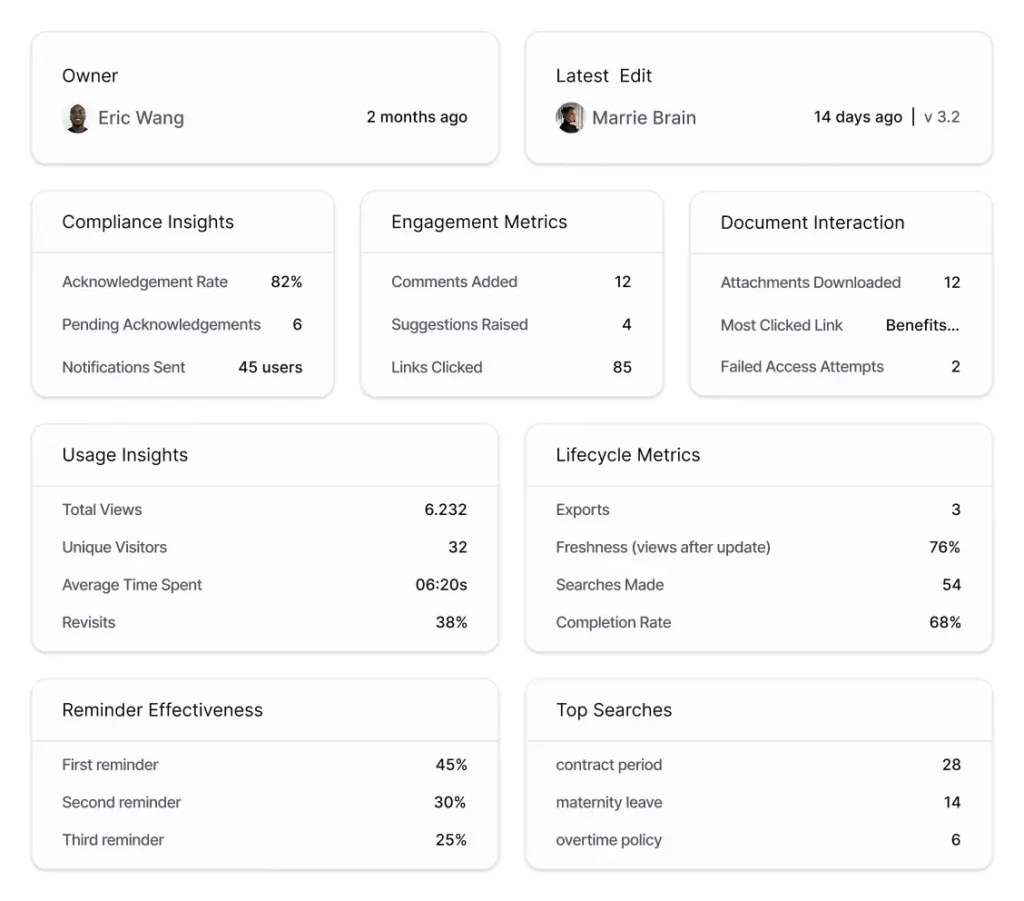
Analytics dashboards surface these metrics without manual tracking. You see compliance insights, usage patterns, engagement levels, and document health in one view. For measurement approaches, see internal documentation strategic metrics guide.
How AllyMatter supports founder knowledge delegation
Founder knowledge delegation requires both control and speed. Most knowledge bases force you to choose.
Approval workflows route content through reviewers before publication. Your team can draft and update procedures, but nothing publishes until the right person reviews it. Knowledge creation scales beyond what you can personally write while maintaining quality. The mechanics work through configurable approval flows that route by content type and department.
Version control with detailed change notes shows exactly what shifted and why. When teammates question a policy update, you can show the exact changes, the approver, and the reasoning without reconstructing from memory. Trust in the system builds when people can verify what changed.
Role-based access control means different teams see different information. Your finance team doesn’t need engineering deployment procedures cluttering their view. Your sales team doesn’t need internal IT security protocols. Targeted visibility keeps everyone focused on what matters to them without information overload.
Acknowledgment tracking handles compliance requirements without manual follow-up. You can prove who read what and when, essential for security policies, acceptable use agreements, and regulatory documentation. Optional e-signature support* through integrations covers documents requiring legal enforceability.
(*This feature is under development.)
Audit trails capture everything automatically. You’re always ready for compliance questions or investor due diligence without scrambling to reconstruct what happened. For version tracking specifics, see AllyMatter document audit and history.
Document owner assignment and request update features shift maintenance work to the people closest to each domain. You assign clear ownership, set review cycles, and teammates can flag outdated content directly to the owner. Governance happens without founder intervention in every update cycle.
From founder brain to team resource
Founder knowledge delegation doesn’t mean losing control. Making your knowledge reusable beats keeping it locked away.
Start small. Document the decisions teammates ask about most. Convert those answers into policies with clear approval criteria. Assign ownership to the people closest to each domain. Build the search and acknowledgment habits your team needs to rely on documentation instead of interrupting you.
Teams that scale smoothly make knowledge sharing a system, not a favor. Context gets captured when decisions happen. Procedures stay current as processes evolve. Everyone works from the same foundational information.
Perfect documentation or a dedicated team aren’t requirements. You need consistency and clear ownership. A simple knowledge base maintained quarterly beats a complex one that gets ignored.
Every decision you make adds to your team’s collective knowledge. The difference between companies that scale smoothly and those that struggle isn’t the decisions themselves. It’s whether those decisions stay with you alone or become accessible to everyone.
The best time to delegate your knowledge is before you desperately need to. Start your 30-day trial and see how AllyMatter helps founders build a knowledge base that works without them.
Frequently asked questions
What founder knowledge should I document first?
Start with decisions teammates ask about most frequently. This typically includes spending approval thresholds, discount authorization limits, vendor selection criteria, security exception protocols, and contract modification guidelines. Document the logic behind these decisions, not just the outcomes. If you’ve answered the same question three times, it belongs in a policy document.
How do I delegate documentation without losing quality control?
Use approval workflows that route documents through relevant stakeholders before publication. Security policies get reviewed by technical leads. HR policies go through legal or compliance. Finance procedures get checked by your CFO. Publication happens only after review. This distributes documentation work across subject matter experts while maintaining quality standards.
Should I require e-signatures for all policies?
No. Reserve e-signatures for documents that create legal obligations or compliance requirements. Security policies, acceptable use agreements, codes of conduct, and IP assignment documents typically need signatures. Routine SOPs, FAQs, and informational content should use simple acknowledgment buttons. Overusing signatures creates friction and reduces effectiveness.
How often should I review founder-created documentation?
High-traffic documents like security policies and approval workflows need quarterly reviews. Lower-priority content can be reviewed twice yearly. Assign clear ownership so each document has someone responsible for keeping it current. Use request update features to let teammates flag outdated content between scheduled reviews.
How do I track if my team actually uses the knowledge base for founder knowledge delegation?
Monitor zero-result searches to find gaps. Track acknowledgment rates on required policies to identify compliance risks. Review high-traffic pages and comment threads to see where people need clarification. Check how often teammates search before asking questions. A weekly dashboard showing these metrics helps you spot issues before they become problems.

Vikas is a B2B marketing professional with over 14 years of experience in content strategy, messaging, and demand generation. He specializes in turning complex business challenges into clear, actionable stories to connect meaningfully with audiences.